This guide explains how to build the two Barracuda App Server (BAS) reference hosts included in this repository: Mako Server for high-level operating systems (HLOS) and Xedge for real-time operating systems (RTOS) and embedded firmware. It covers the shared BAS source, porting layers, feature macros, generated resources, and cross-compilation details required by those hosts.
| Goal | Start here |
|---|---|
| Evaluate BAS or use a precompiled package | Select your platform on the BAS download page. |
| Build or customize Mako Server for an HLOS | See Mako Server (HLOS). |
| Integrate Xedge into an RTOS or firmware | See Xedge (RTOS), RTOS Build Examples, and Porting Layers. |
For native Barracuda Embedded Web Server (BWS), REST, WebSocket, and Modern C++ projects, use the example chooser in the repository README. The README also explains the available licenses.
Mako Server and Xedge both compile src/BAS.c, the amalgamated Barracuda App Server library. "Amalgamated" means that many separate C files have been combined into one primary source file, making compilation and integration easier.
- Mako Server adds HLOS startup, command-line/service behavior, disk resources, and optional native modules around BAS.
- Xedge adds the embedded application environment, resource package, target startup integration, and optional hardware/native bindings around BAS.
BAS includes the BWS C APIs and adds Lua, Lua Server Pages (LSP), and higher-level web and IoT APIs. Application logic can be written in Lua while performance-critical or hardware-specific modules remain in C or C++.
See Embedded Web Server vs. Embedded Application Server if you are new to application server technology.
If you already use a compatible Lua 5.5 build, you can exclude the bundled Lua source by compiling with -DUSE_BA_LUA=0. Link BAS with that Lua build and verify that its configuration and application binary interface (ABI) match the BAS headers.
Both hosts start with the following files:
src/BAS.c: amalgamated Barracuda App Server.src/arch/XXX/ThreadLib.c: kernel porting layer.src/arch/NET/XXX/SoDisp.c: TCP/IP porting layer, also called the socket dispatcher.src/DiskIo/XXX/BaFile.c: optional file system porting layer.
Add the Mako Server or Xedge host sources and generated resources described in their sections below. See the memory section in Porting Barracuda to an Embedded System for target-sizing guidance.
To compile either host, add the required porting layers to src/BAS.c:
- Add the required
ThreadLib.c. - Add the required
SoDisp.c. - Optionally add
BaFile.cwhen using file system support.
Replace XXX with the required porting layer.
The compiler include path must include:
incinc/arch/XXXinc/arch/NET/XXXinc/DiskIo/XXX, when using a file system porting layer
BAS can be used in several deployment models. This guide focuses on:
- Mako Server as a process on desktop/server or embedded HLOS targets.
- Xedge integrated into RTOS-powered or other embedded firmware.
The amalgamated source can be compiled from the command line or added to an IDE, Makefile, CMake project, or vendor build system.
The Mako Server example is the reference host for high-level operating systems such as Windows, embedded Linux, and QNX. Mako Server can also be adapted to environments such as VxWorks 7, but Xedge is the normal starting point for RTOS and firmware integration.
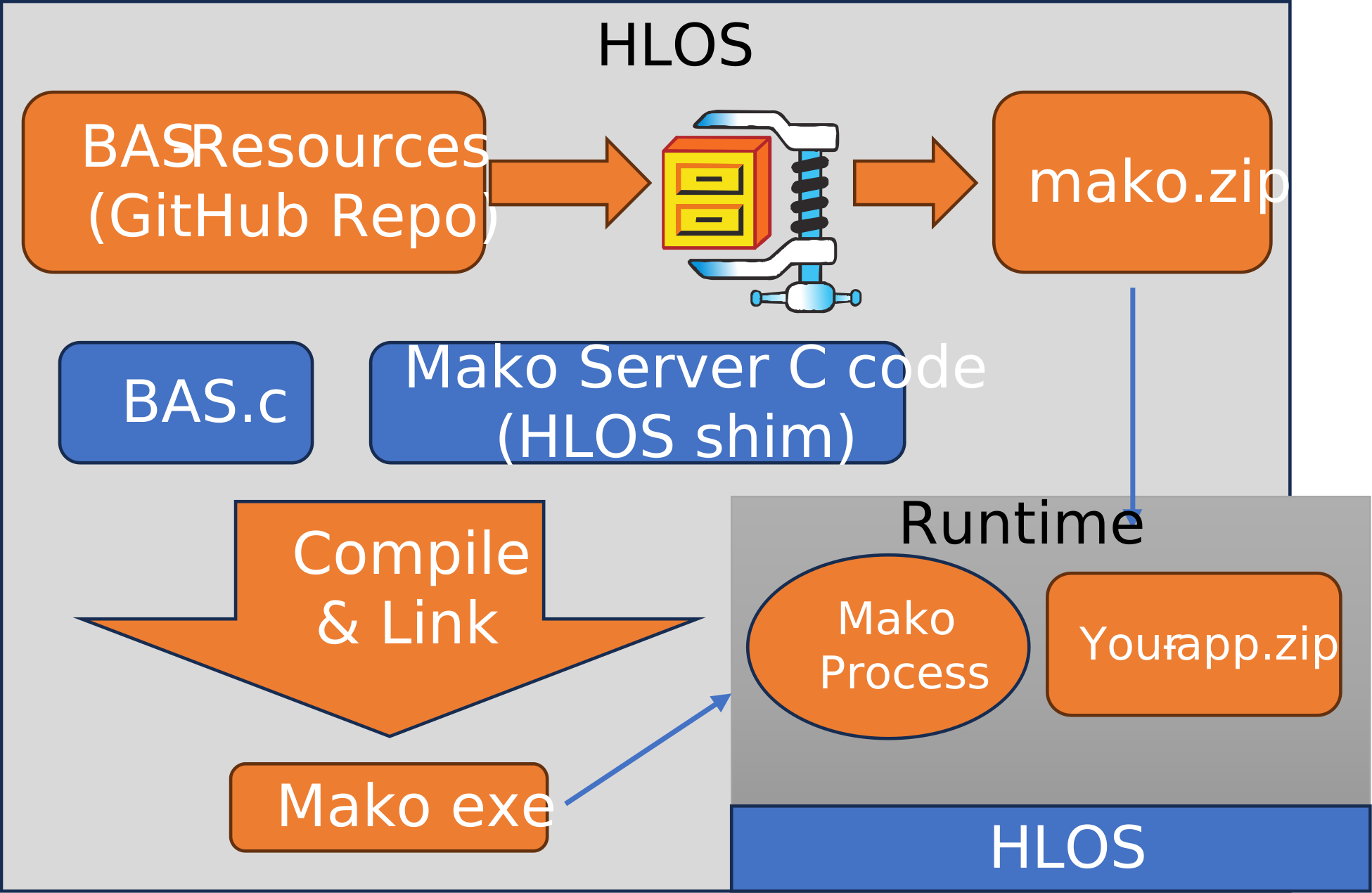
mako.mk automatically includes the packaged GCC/Clang assembly for supported
x86-64 and ARM64 compiler targets. It preprocesses SharkSslTarget.c and
compile-checks the backend sources with your selected compiler and flags.
These checks never execute target code, so they also work when cross-compiling.
Unsupported targets or failed automatic checks retain the C implementation.
At runtime, feature checks select the cipher paths supported by the CPU and OS.
From the repository root, inspect the selection before building:
# Display the selected backend, enabled hooks, and any failed compile checks.
make -f mako.mk sharkssl-info
make -f mako.mk
SHARKSSL_ASM is an optional string setting: auto (default), off,
X64_GCC, or ARM64_GCC. Explicit backend requests fail if the compiler target
does not match or required backend sources cannot compile. Automatic x64
selection omits VAES if the assembler cannot assemble that optional kernel.
Manually enabled assembly hooks must also be supported; failures are reported.
# Build entirely with C. Remove any manually enabled assembly macros as well.
make -f mako.mk SHARKSSL_ASM=off clean
make -f mako.mk SHARKSSL_ASM=off

# Cross-compile using the compiler target to select ARM64 assembly.
make -f mako.mk CC=aarch64-linux-gnu-gcc sharkssl-info
make -f mako.mk CC=aarch64-linux-gnu-gcc
Use a clean build after changing compiler or feature flags, or set the optional
directory path ODIR to a separate object directory for each configuration
(default: the repository root). The optional path BASRESDIR selects the
BAS-Resources checkout (default: ../BAS-Resources). If you set TARGET to an
executable path outside the repository root, copy mako.zip beside it before
running the server.
The shared build rules are in SharkSslAsm.mk and
SharkSslBackends.mk. See the
x64 and
ARM64 port guides for individual hooks and
CPU requirements. In an amalgamated build, retain src/BAS.c (or src/BWS.c
for BWS) where those guides refer to the SDK's SharkSslCrypto.c.
This automatic selection applies to mako.mk; IDE projects and other build
systems must add their backend files and definitions separately.
Open mako.sln and select Debug or Release,
with Win32 or x64. The project uses the installed Visual Studio C++ toolset and
Windows 10/11 SDK. All four configurations define BAS_LOADED and build SharkSSL
with C implementations only; no assembler setup is needed.
Executables are written to
examples/MakoServer/obj/VcMake/<platform>/<configuration>/, with separate
intermediate files for each configuration. Debug uses the debug C runtime and
retains assertions; Release enables optimization.
SQLite is optional. When src/sqlite3.c and src/sqlite3.h are absent,
all four configurations build without SQLite (USE_SQL=0). Mako can run in
this configuration, but applications that require its SQLite binding cannot
use that binding.
To enable SQLite, copy the SQLite amalgamation files sqlite3.c and sqlite3.h
into this repository's src directory, reload the solution, and rebuild. The
project detects the files and includes SQLite and its Lua binding automatically
(USE_SQL=1). No project-file edits are required.
The optional MSBuild boolean property UseSqlite overrides detection:
rem Run from the repository root in a Visual Studio Developer Command Prompt.
rem Build without SQLite even when its source files are present.
msbuild examples\MakoServer\VcMake\mako.sln /t:Rebuild /p:Configuration=Release /p:Platform=x64 /p:UseSqlite=false

rem Require SQLite; the build reports an error if either source file is missing.
msbuild examples\MakoServer\VcMake\mako.sln /t:Rebuild /p:Configuration=Release /p:Platform=x64 /p:UseSqlite=true
Place mako.zip beside the executable before running it. The project copies
the repository-root mako.zip if present. The optional MSBuild path property
MakoZip selects a resource archive elsewhere:
rem Run from the repository root in a Visual Studio Developer Command Prompt.
msbuild examples\MakoServer\VcMake\mako.sln /p:Configuration=Release /p:Platform=x64 /p:MakoZip=C:\resources\mako.zipFor Linux and embedded Linux, see Embedded Linux Web Interface Design. You can download and compile the server as follows:
bash <(wget -O - https://raw.githubusercontent.com/RealTimeLogic/BAS/main/LinuxBuild.sh)For a more robust compilation option, use the included Ansible script. You can also install the server as a systemd service using an Ansible script.
To cross-compile for embedded Linux, set CC to your cross-compiler:
export CC=/opt/gcc-linaro-7.1.1-2017.08-x86_64_arm-linux-gnueabihf/bin/arm-linux-gnueabihf-gcc
bash <(wget -O - https://raw.githubusercontent.com/RealTimeLogic/BAS/main/LinuxBuild.sh)
To cross-compile with Lua GPIO bindings, set CROSS_COMPILE to your toolchain prefix:
export CROSS_COMPILE=/opt/gcc-linaro-7.1.1-2017.08-x86_64_arm-linux-gnueabihf/bin/arm-linux-gnueabihf-
bash <(wget -O - https://raw.githubusercontent.com/RealTimeLogic/BAS/main/RaspberryPiBuild.sh)The following example builds Mako Server without SQLite for a high-level operating system. It works with GCC and compatible compilers, including cross-compilers for embedded Linux and QNX. Replace gcc with the compiler for your target. See VxWorks for the RTOS-specific example.
gcc -o examples/MakoServer/mako -fmerge-all-constants -Os\
    -DUSE_EMBEDDED_ZIP=0 -DBA_FILESIZE64 -DLUA_USE_LINUX -DMAKO -DUSE_SQL=0\
    -Iinc -Iinc/arch/Posix -Iinc/arch/NET/Posix\
    src/BAS.c\
    src/arch/Posix/ThreadLib.c src/arch/NET/generic/SoDisp.c src/DiskIo/posix/BaFile.c\
    examples/MakoServer/src/MakoMain.c\
    -lpthread -lm -ldl
See the Mako Server build documentation for details on macros and other build options. The amalgamated version in this repository differs from the standard SDK layout.
After running the compilation command, build mako.zip and place it beside the executable in examples/MakoServer. Start the server from that directory. A successful startup reports that mako.zip was mounted and that the configured HTTP and HTTPS listeners are active. Version numbers, addresses, and ports depend on the build and configuration.
The following example compiles and links Mako Server as a 64-bit Windows application using the Visual Studio command-line compiler. It includes two additional files that make it possible to run the server as a Windows service.
See the current Mako Server for Windows page for Microsoft Store, ZIP, and source-build alternatives.
cl /O2^
 /DUSE_EMBEDDED_ZIP=0 /DBA_FILESIZE64 /DMAKO /DUSE_SQL=0^
 /Iinc /Iinc/arch/Windows /Iinc/arch/NET/Windows^
 src/BAS.c^
 src/arch/Windows/ThreadLib.c src/arch/NET/generic/SoDisp.c src/DiskIo/windows/BaFile.c^
 examples/MakoServer/src/MakoMain.c^
 examples/MakoServer/src/Windows/MakoWinMain.c examples/MakoServer/src/Windows/servutil.c^
 ws2_32.lib kernel32.lib User32.lib Gdi32.lib advapi32.lib ole32.lib oleaut32.lib shell32.lib^
 /link /machine:X64 /OUT:examples/MakoServer/mako.exe
This command requires the 64-bit Visual C++ toolset command line.
Mako Server can optionally be linked with SQLite and the Lua SQLite bindings. Before running the command below, download SQLite and copy sqlite3.c and sqlite3.h to src.
gcc -o examples/MakoServer/mako -fmerge-all-constants -Os\
    -DUSE_EMBEDDED_ZIP=0 -DBA_FILESIZE64 -DLUA_USE_LINUX -DMAKO\
    -Iinc -Iinc/arch/Posix -Iinc/arch/NET/Posix\
    src/BAS.c\
    src/arch/Posix/ThreadLib.c src/arch/NET/generic/SoDisp.c src/DiskIo/posix/BaFile.c\
    examples/MakoServer/src/MakoMain.c\
    src/ls_sqlite3.c src/luasql.c src/sqlite3.c\
    -lpthread -lm -ldl
Xedge is the BAS-based host for developing and running Lua and LSP applications on RTOS and firmware targets. It includes a browser-based development environment and supports packaging applications for deployment. See the online Xedge documentation for application development and release options.
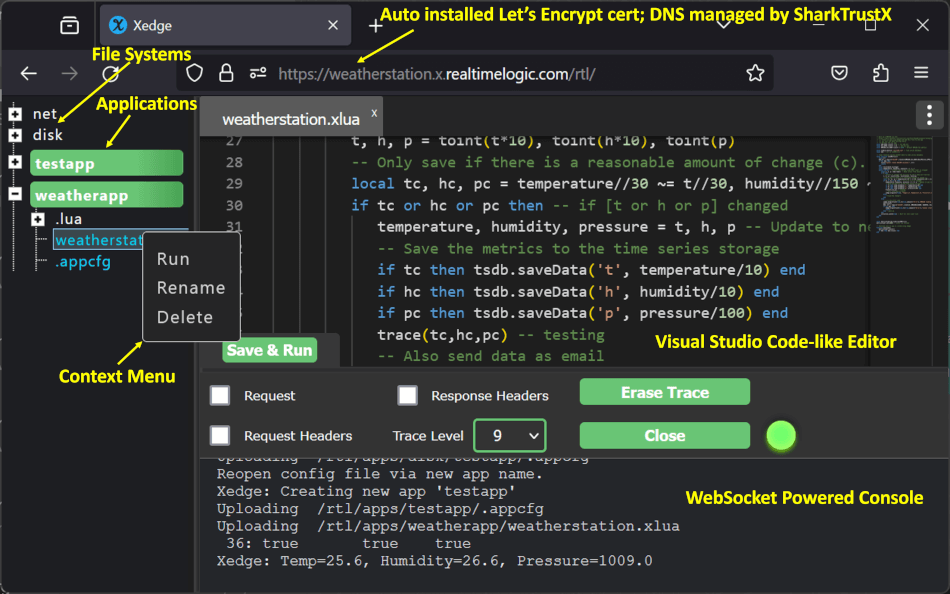
See the Xedge product page for details.
The Xedge IDE includes a single-page web application and supporting server-side code. These resources must be included in the build.
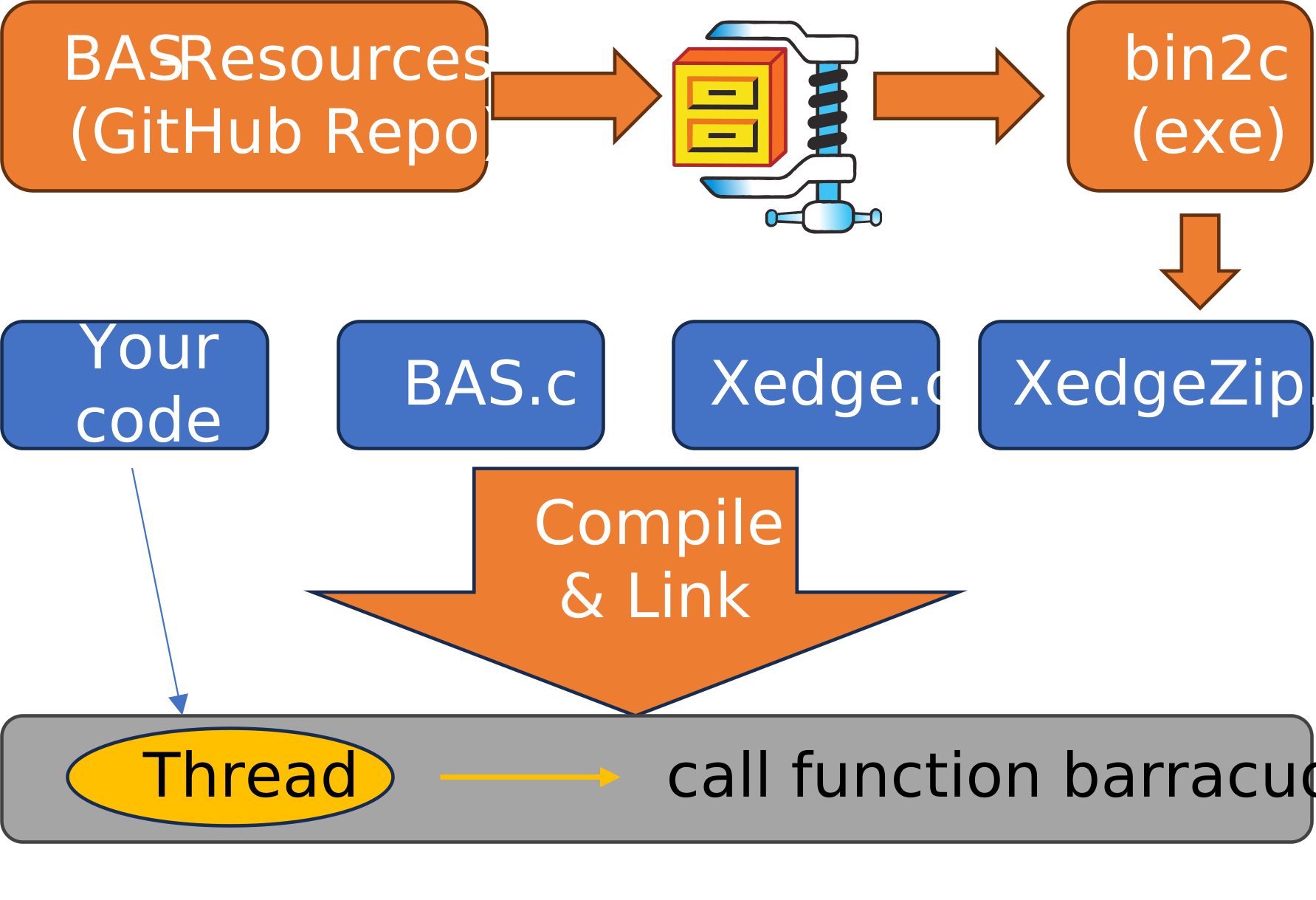
The compilation process below shows the general integration pattern. For an ESP32-based walkthrough, see Rapid Firmware Development with the Barracuda App Server. Other targets require their own startup code, porting layers, resource configuration, and build settings.
Fetch the repositories and build the resource ZIP file:
# Fetch the Barracuda App Server
git clone https://github.com/RealTimeLogic/BAS.git

# Fetch the Barracuda App Server resources
git clone https://github.com/RealTimeLogic/BAS-Resources.git

# Go to the build directory
cd BAS-Resources/build/

# Run the build script. If on Windows, use Xedge.cmd.
# When prompted, initially select n for OPC UA, s for small cacert.shark,
# and n for compressing the files.
. Xedge.sh

# The ZIP file is converted to a C array by the build script.
# Copy this file to the Xedge directory.
cp XedgeZip.c ../../BAS/examples/xedge/
cd ../../BAS
XedgeZip.c contains the Xedge resources converted to a C file. See the BAS-Resources repository for details.
To compile Xedge, include:
- Required for every target:
src/BAS.c,examples/xedge/src/xedge.c,examples/xedge/XedgeZip.c, the target'sThreadLib.c, and the matchingSoDisp.c. - Host test builds:
examples/HostInit/Main.candexamples/HostInit/HostInit.cprovide HLOS startup scaffolding. Replace them with target-specific startup code for RTOS and firmware builds. - Target-dependent: Add an allocator such as
src/dlmalloc.cif the target does not provide a suitable allocator. AddBaFile.cfor supported file systems andled.cfor the example Lua bindings.
The following example uses Linux to compile Xedge as a standalone application. For embedded devices, include the relevant source files in your build system instead.
gcc -o xedge -Iinc -Iinc/arch/Posix -Iinc/arch/NET/Posix\
    -DLUA_USE_LINUX\
    src/BAS.c\
    examples/HostInit/Main.c examples/HostInit/HostInit.c\
    src/arch/Posix/ThreadLib.c src/arch/NET/generic/SoDisp.c src/DiskIo/posix/BaFile.c\
    examples/xedge/src/xedge.c examples/xedge/src/led.c\
    examples/xedge/XedgeZip.c -lpthread -lm -ldl
Integration notes:
Main.candHostInit.care designed for a non-embedded host build. For an RTOS build, study these files and set up similar startup code for your environment.- At minimum, your RTOS build needs a dedicated thread that runs
barracuda(void), which does not return. Use stack sizeBA_STACKSZbytes. xedge.cis the Xedge C startup code.led.cincludes example Lua bindings for device control. If you do not need these examples, define-DNO_XEDGE_AUXor remove thexedgeOpenAUX()call inxedge.c.- For embedded builds, consider testing without file system support first. Remove
BaFile.cfrom your build and compile with-DNO_BAIO_DISK, which is used byxedge.c. - If the target does not provide a suitable allocator, include
src/dlmalloc.cand initialize it using the pattern inexamples/HostInit/Main.c. Use the target's allocator instead when its behavior and integration requirements are known.
These Xedge instructions are excerpted from the Xedge full SDK build guide, which includes additional release-build details. File locations differ slightly in this repository.
Include the files listed above in your IDE or Makefile. If the target does not provide a suitable allocator, BAS includes src/dlmalloc.c as one option. See the FreeRTOS readme for an example of how to assemble the required components. Adapt the startup, allocator, and porting layers to the selected RTOS and network stack.
For a quick RTOS trial, run Xedge on an ESP32 using FreeRTOS and lwIP, even if your final target uses another RTOS or device. The ESP32 is a practical learning target. Use the precompiled ESP32 Xedge binaries.
Feature selection is controlled by the build, the target's TargConfig.h, and macros used by src/BAS.c and the host sources. Defaults vary by platform, so verify the effective configuration before adding or removing a macro.
USE_DBGMON=1: Include Lua debugger support.USE_REVCON=1: Enable reverse connections for the connection bridge feature in SharkTrustX.USE_OPCUA=1: Enable OPC UA support when the build also includes the required OPC UA Lua resources and C module.USE_FORKPTY=1: Enable the advanced process management API, available for Linux and QNX. This API is required for the CGI plugin and the web shell.USE_REDIRECTOR=1: Enable the reverse proxy.USE_UBJSON=1: Enable Universal Binary JSON.NO_LDEBUG: Exclude the Luadebugmodule.
NO_SHARKTRUST: Do not includetokengen.c; disables the built-in SharkTrustX key.USE_LUAINTF: Enable loading external Lua modules. When using source builds, you can alternatively integrate additional Lua bindings directly into your build.
NO_SHARKTRUST: Disable SharkTrustX integration.NO_ENCRYPTIONKEY: Exclude the encryption-key support used by the software Trusted Platform Module (softTPM). Without this macro, Xedge includesEncryptionKey.hor a generatedNewEncryptionKey.h, depending on the build configuration.NO_BAIO_DISK: Build Xedge without the local file system integration. Use this for targets without a file system or for an initial minimal port.NO_XEDGE_AUX: Do not callxedgeOpenAUX(), which is where you typically register your own Lua bindings.
Contact Real Time Logic if an existing porting layer does not match your target operating system, network stack, or SDK.
| OS + TCP | Include directories | Source files |
|---|---|---|
| Digi | inc/arch/Digi |
src/arch/Digi/ThreadLib.c src/arch/NET/generic/SoDisp.c |
| embOS | inc/arch/NET/embOSIP inc/arch/embOS |
src/arch/embOS/ThreadLib.c src/arch/NET/embOSIP/SoDisp.c |
| FreeRTOS + lwIP | inc/arch/NET/LwIP inc/arch/FreeRTOS |
src/arch/FreeRTOS/ThreadLib.c src/arch/NET/LwIP/SoDisp.c |
| FreeRTOS + TCP | inc/arch/FreeRTOS |
src/arch/FreeRTOS/ThreadLib.c src/arch/FreeRTOS/SoDisp.c |
| INTEGRITY | inc/arch/NET/Posix inc/arch/INTEGRITY |
src/arch/INTEGRITY/ThreadLib.c src/arch/NET/generic/SoDisp.c |
| INtime | inc/arch/NET/INtime inc/arch/INtime |
src/arch/INtime/ThreadLib.c src/arch/NET/generic/SoDisp.c |
| Linux + epoll | inc/arch/NET/epoll inc/arch/Posix |
src/arch/Posix/ThreadLib.c src/arch/NET/epoll/SoDisp.c |
| MQX | inc/arch/NET/MQX inc/arch/MQX |
src/arch/MQX/ThreadLib.c src/arch/NET/MQX/SoDisp.c |
| NuttX | inc/arch/NET/Posix inc/arch/Posix |
src/arch/Posix/ThreadLib.c src/arch/NET/generic/SoDisp.c |
| Nucleus | inc/arch/NET/Nucleus inc/arch/Nucleus |
src/arch/Nucleus/ThreadLib.c src/arch/NET/Nucleus/SoDisp.c |
| POSIX (Linux, Mac, QNX) | inc/arch/NET/Posix inc/arch/Posix |
src/arch/Posix/ThreadLib.c src/arch/NET/generic/SoDisp.c |
| Quadros | inc/arch/Quadros |
src/arch/Quadros/ThreadLib.c src/arch/NET/generic/SoDisp.c |
| SMX | inc/arch/NET/SMX-NET inc/arch/SMX |
src/arch/SMX/ThreadLib.c src/arch/NET/generic/SoDisp.c |
| Azure RTOS | inc/arch/ThreadX |
src/arch/ThreadX/ThreadLib.c src/arch/ThreadX/SoDisp.c |
| VxWorks | inc/arch/VxWorks |
src/arch/VxWorks/ThreadLib.c src/arch/NET/generic/SoDisp.c |
| Windows | inc/arch/NET/Windows inc/arch/Windows |
src/arch/Windows/ThreadLib.c src/arch/NET/generic/SoDisp.c |
| Windows CE | inc/arch/NET/CE inc/arch/Windows |
src/arch/ce/ThreadLib.c src/arch/NET/generic/SoDisp.c |
| Zephyr | inc/arch/Zephyr |
src/arch/Zephyr/ThreadLib.c src/arch/NET/generic/SoDisp.c |
The generic inc directory must also be in the include path. The presence of a porting directory does not prove compatibility with every version of the target SDK. Compile against the actual SDK and confirm its configuration and networking APIs.
See the Mako Server download page for additional platform and compile examples.
For Xedge on Zephyr, use the Xedge4Zephyr project, which provides the Zephyr-specific build and integration files.

NuttX includes an Xedge demonstration in its application examples. See the Xedge NuttX documentation for the current build and configuration steps.

The following example compiles Xedge for Green Hills INTEGRITY. You can also download a ready-to-run Xedge GHS Multi IDE project.
ccintarm -G -c99 -os_dir C:/ghs/int1144 -bsp simarm -o xedge\
    -non_shared -DMAXTHREADS=3\
    -Iinc -Iinc/arch/INTEGRITY -Iinc/arch/NET/Posix\
    --diag_suppress=111,188,550,549,546,223\
    src/BAS.c\
    src/arch/NET/generic/SoDisp.c\
    src/arch/INTEGRITY/ThreadLib.c\
    src/DiskIo/posix/BaFile.c\
    examples/HostInit/Main.c examples/HostInit/HostInit.c\
    examples/xedge/src/xedge.c\
    examples/xedge/XedgeZip.c\
    examples/xedge/src/XedgeInitDiskIo.c\
    examples/xedge/src/led.c\
-lnet -livfs -lsocket\Xedge is the recommended starting point for new VxWorks integrations. The following example builds Mako Server for projects that require its standalone process-style host. See the Barracuda App Server VxWorks build page for details.
wr-cc -o examples/MakoServer/mako -static -fmerge-all-constants -Os\
    -DUSE_EMBEDDED_ZIP=0 -DBA_FILESIZE64 -DBA_HAS_ANSI_IO -DMAKO -DUSE_SQL=0\
    -Iinc -Iinc/arch/VxWorks -Iinc/arch/NET/Posix\
    src/BAS.c\
    src/arch/VxWorks/ThreadLib.c src/arch/NET/generic/SoDisp.c src/DiskIo/posix/BaFile.c\
    examples/MakoServer/src/MakoMain.c\
-lnetDownload a ready-to-compile and ready-to-run project for i.MX RT1020.
Xedge32 is an Xedge version for ESP32 and ESP32-S3 microcontrollers.