
Theme-based image post-processing & film-emulation pipeline — pure Python, CPU, no GPU.


postfx gives any image a consistent, reusable look — film stocks, cinematic
grades, LUTs — defined entirely in YAML. Pick a theme, apply it to one image or a
whole folder, and every output shares the same visual identity. It's a compact
color/grain/lens pipeline (white balance, tone, split-toning, halation, grain,
vignette, LUTs…) built on numpy + opencv that runs on the CPU — no GPU,
no ML, no cloud.
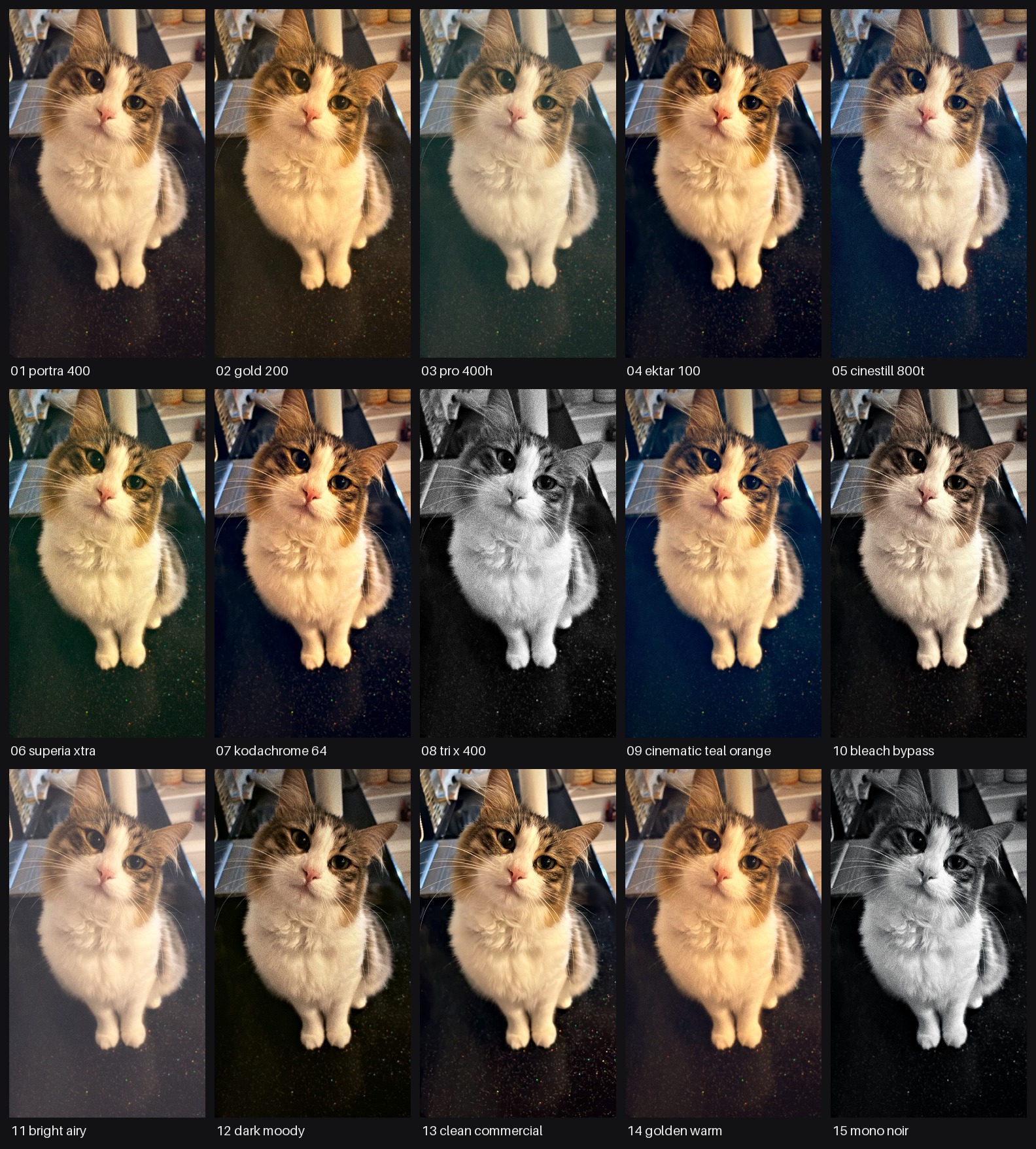
The 15 built-in signature themes, applied to one source image
(python -m postfx sheet).
- Theme = YAML. Code and looks are fully decoupled. 30 themes built in
(15 film-stock/industry
signaturelooks, 15experimental, 3 texture-onlygrain), plus.cubeLUT support. - Pure & deterministic. Every operation is a pure
(array, params) -> arrayfunction. Same image + theme = byte-identical output (grain seed derives from the filename). - Resolution-safe. Aspect ratio and resolution are preserved — no crop/resize. Grain and blur radii scale with image size, so a look is identical at any resolution.
- Fast on CPU. ~0.5 s @ 2 MP on a single core; batch mode fans out across cores.
- Three ways in: a
postfxCLI, a tiny Python API, and drop-in.cubeLUTs.
pip install postfxor with uv:
uv add postfx          # into a project
uv tool install postfx # as a standalone CLI tool# One image or a whole folder (batch = auto-parallel across cores)
postfx run --input photo.jpg --theme portra_400 --condition day_outdoor --out out/
# Preview every signature theme on one image as a labeled grid
postfx sheet --input photo.jpg --out sheet.jpg
# List all themes (grouped by category) and conditions
postfx listimport postfx
from postfx import Theme, Condition
# One-liner: load, process, save. Names are StrEnums — autocomplete + typo-safe.
# (Plain strings like "portra_400" still work everywhere too.)
postfx.process_file("photo.jpg", "graded.jpg",
theme=Theme.Signature.CINEMATIC_TEAL_ORANGE,
condition=Condition.INDOOR_EVENING, strength=1.0)
# Or work with arrays directly (float32 [0,1] RGB in, same out)
from postfx import load_theme, get_condition, imgio, process
rgb, alpha = imgio.load_image("photo.jpg")
out = process(rgb, load_theme(Theme.Signature.PORTRA_400), get_condition(Condition.DAY_OUTDOOR),
strength=1.0, seed=imgio.seed_from_path("photo.jpg"))
imgio.save_image("graded.png", out, alpha)One source image (cat.jpg), four different themes — same pipeline, YAML-only difference:
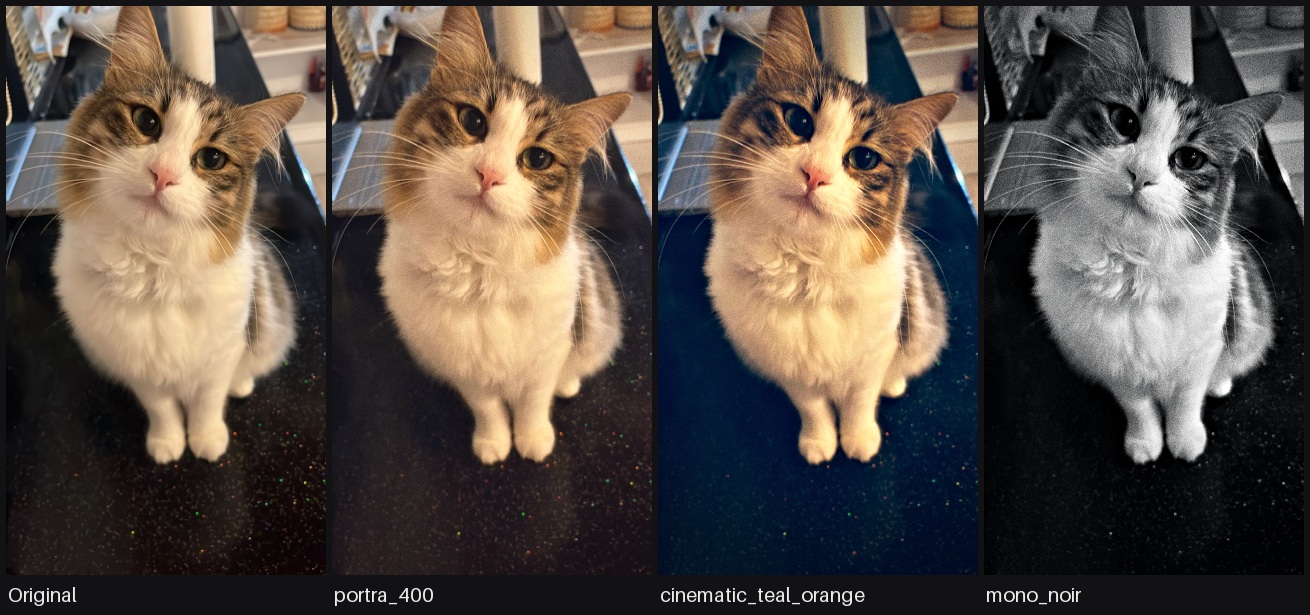
Themes live under postfx/themes/, grouped into categories. Names are unique
across categories, so --theme <name> resolves globally.
| Category | What | Count |
|---|---|---|
grain |
Texture only, colour untouched | 3 |
signature |
Market-standard, reference-grounded looks — the primary set | 15 |
luts |
LUT-based themes (a .cube file is a selectable look) |
1+ |
experimental |
Earlier / exploratory looks | 15 |
Measured from published social stills, not from film stocks: fine, near-monochrome grain over the whole frame at every brightness, generated per pixel so it reads as sensor texture at 100% and disappears at feed size. Colour is untouched — chain a signature theme before one for a look.
| Theme | Character |
|---|---|
fine_grain_light |
luma 0.018 — the default social-still finish |
fine_grain_medium |
luma 0.028 — visible on skin at 100% |
fine_grain_heavy |
luma 0.040 — the compressed re-upload look |
| Theme | Reference / character |
|---|---|
portra_400 |
Kodak Portra 400 — creamy warm skin, soft highlights (portrait/wedding standard) |
gold_200 |
Kodak Gold 200 — nostalgic golden-amber, punchy consumer film |
pro_400h |
Fuji Pro 400H — soft airy pastel, minty cyan-green shadows |
ektar_100 |
Kodak Ektar 100 — vivid saturation, deep blues, fine grain |
cinestill_800t |
Cinestill 800T — tungsten teal cast + signature red halation |
superia_xtra |
Fuji Superia X-TRA 400 — punchy, green-leaning shadows |
kodachrome_64 |
Kodachrome 64 — rich reds/blues, hard micro-contrast, vintage slide |
tri_x_400 |
Kodak Tri-X 400 — classic high-contrast B&W film grain |
cinematic_teal_orange |
Hollywood blockbuster grade — teal shadows, orange skin |
bleach_bypass |
Silver-retention — desaturated, high contrast, silvery, gritty |
bright_airy |
Bright & Airy — high-key wedding/lifestyle staple |
dark_moody |
Dark & Moody — rich, earthy, low-key staple |
clean_commercial |
Neutral, crisp, accurate color, polished skin (e-comm/beauty) |
golden_warm |
Golden-hour grade — warm, glowy, sun-kissed skin |
mono_noir |
Cinematic high-contrast B&W noir, deep blacks, cool tone |
experimental holds 15 earlier looks. Run postfx list for the full set with
descriptions.
A .cube 3D LUT is a selectable look like any other theme. Bundled LUTs live in
postfx/themes/luts/ with a small YAML wrapper. To use your own, drop a .cube
there with a YAML referencing it — or point any theme's lut.file at an external
absolute path. The LUT is applied in display (sRGB) space, with grain/lens/texture
on top. See postfx/themes/luts/README.md.
A separate axis from the theme. A theme sets the look (color); a condition
sets how strongly the capture/optical texture — grain, chroma noise, halation —
reads for the situation a shot was taken in, as a multiplier on the theme's own
values. So one theme stays consistent across shooting conditions. Select with
--condition (default neutral — the theme's texture exactly as authored).
| Condition | grain | chroma noise | halation | Character |
|---|---|---|---|---|
neutral |
1.0× | 1.0× | 1.0× | identity / default — theme as authored |
day_outdoor |
0.2× | 0.0× | 0.7× | clean daylight |
overcast |
0.4× | 0.1× | 0.5× | soft, diffuse, low bloom |
indoor_evening |
1.0× | 0.6× | 1.0× | tungsten interior |
neon_night |
1.4× | 0.9× | 1.7× | neon-lit night, bloom-dominant |
night_flash |
2.2× | 1.5× | 1.4× | direct flash, grittiest |
Conditions live under postfx/conditions/ as YAML — add your own exactly the way
you'd add a theme. neon_night deliberately blooms harder than night_flash
while staying less grainy: the three multipliers are independent, not one slider.
--strength 0.0–1.5 linearly blends the whole theme effect with the original:
0 = untouched, 1 = full theme, 1.5 = over. Additive effects like grain
scale with it too.
1 sRGB→linear · 2 white balance (Bradford) · 3 exposure · 4 highlight
rolloff · 5 lift/gamma/gain · 6 split toning · 7 tone curve · 8
vibrance+saturation · 9 halation (linear) · 10 linear→sRGB · 10b optional
LUT (.cube) · 11 distortion · 12 chromatic aberration · 13 vignette · 14
black point lift · 15 clarity · 16 grain (luminance-weighted) · 17 sharpen
· 18 JPEG re-encode (JPEG output only).
Halation must be in linear space, the LUT right after linear→sRGB, grain in sRGB — this order is deliberate and shouldn't be reordered.
Each theme YAML carries the op blocks below. Omitted keys fall back to a neutral (no-op) default; an unknown key raises an error (so typos fail fast).
| Op | Parameters | Effect |
|---|---|---|
white_balance |
temp, tint |
temp>0 warm (red↑ blue↓); tint>0 magenta, <0 green |
exposure |
stops |
Linear exposure; +1 = 2× light |
highlight_rolloff |
knee, strength |
Soft-compress above knee (breaks clipped highlights) |
lift_gamma_gain |
lift[3], gamma[3], gain[3] |
ASC-CDL: gain=slope, lift=offset, gamma=power |
split_toning |
shadow[3], highlight[3], strength |
Separate shadow/highlight tint (luma-masked) |
tone_curve |
strength, pivot |
S-curve contrast around the pivot |
vibrance |
vibrance, saturation, skin_protect |
Vibrance lifts low-sat pixels & protects skin |
halation |
threshold, radius_frac, tint[3], strength |
Highlight bloom; linear space, red-shifted, screen blend |
lut |
file, intensity |
Optional 3D .cube LUT, display-referred |
distortion |
k |
k<0 barrel, k>0 pincushion |
chromatic_aberration |
amount |
Lateral CA; scales R/B about center |
vignette |
strength, feather, roundness |
Radial darkening; feather = start radius |
black_point |
lift (scalar or [3]) |
Lifts blacks (matte/faded); can be tinted |
clarity |
amount, radius_frac |
Wide-radius local contrast; negative = soften |
grain |
luma, chroma, size, floor |
Luminance-weighted, resolution-independent grain. size is in px at a 1024 px long edge; below 1 it gets finer than that grid, and at size <= 1024 / long edge it is plain per-pixel noise |
sharpen |
amount, radius_frac, halo |
Narrow-radius unsharp + optional halo |
jpeg |
quality, cycles |
JPEG re-encode loop (JPEG output only) |
- Resolution and aspect ratio are preserved — no crop/resize.
- All intermediate work is float32 in
[0,1]RGB; conversion to 8-bit happens only on save. PNG keeps alpha and skips the JPEG step. - The grain seed derives from the filename hash, so the same image + theme is byte-identical every run.
- No EXIF/metadata is written to outputs.
Add postfx/themes/<category>/<name>.yaml. The first comment lines are the
name / character / suited content; parameters follow (see the table above).
Then verify with postfx sheet + pytest.
# my_look
# Warm, low-contrast, soft — a gentle everyday grade.
name: my_look
white_balance: { temp: 0.12, tint: 0.02 }
tone_curve: { strength: 0.15, pivot: 0.45 }
vibrance: { vibrance: 0.1, saturation: 1.03 }
grain: { luma: 0.015, size: 1.5 }git clone https://github.com/0xBeycan/postfx.git
cd postfx
uv sync --extra dev # or: pip install -e ".[dev]"
uv run pytest -q # or: pytest -qMIT © 0xBeycan