
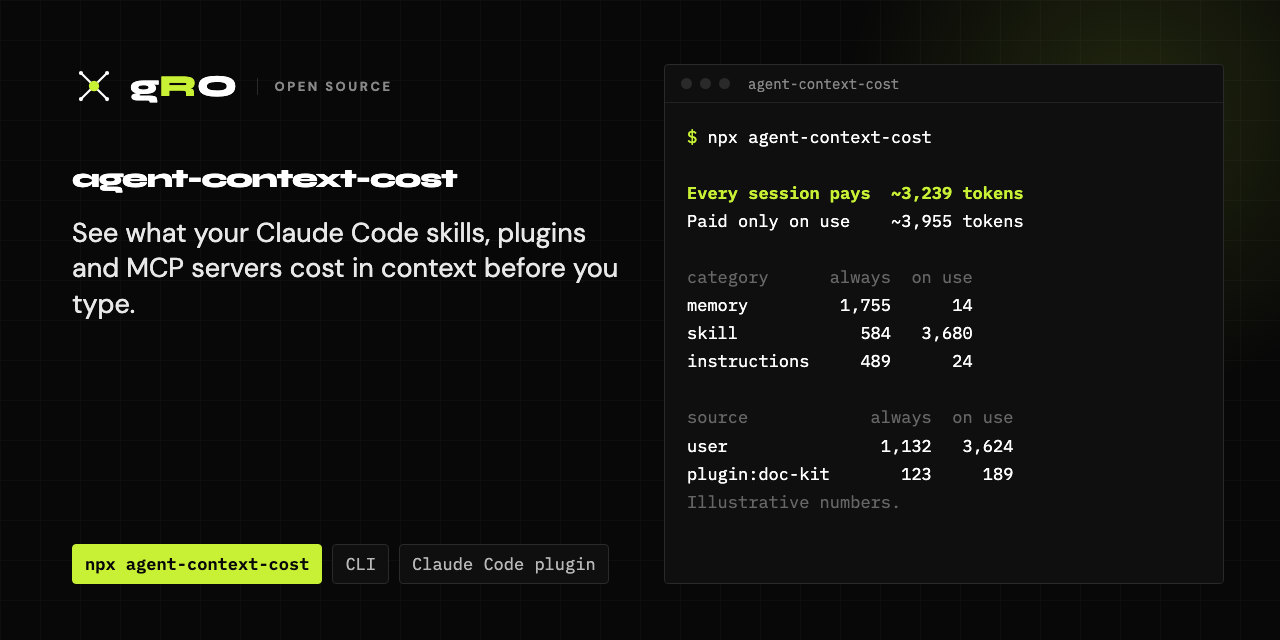
Find out what is using your Claude Code context window (or Cursor's, Codex's or Gemini CLI's) before you type anything, and what each add-on costs you in tokens.
Every CLAUDE.md, rule file, skill description, subagent description, output style and MCP server you install puts tokens into every session. They pile up quietly: a plugin brings twelve skills, two MCP servers configured under different names launch the same package, a memory index grows past the point where it gets cut off. This tool reads the files Claude Code (and optionally Cursor, Codex and Gemini CLI) loads at startup, estimates the tokens for each item, splits what every session pays from what is paid only on use, ranks the biggest costs, flags duplicates, and prints the exact command or edit to remove each one.
It is read-only and offline. It never edits or deletes anything, and it never prints the contents of your files: only names, sizes and paths.
$ npx agent-context-cost

agent-context-cost 0.1.0   project: demo-app
Estimates: ~4 chars/token for prose, ~3.5 for code, ~3 for JSON schemas. Not exact.
MCP: Claude Code default: MCP tool schemas are deferred behind tool search; only tool names load up front.

== Claude Code ==
Every session pays  ~3,239 tokens before you type anything
Paid only on use    ~3,955 tokens
Not measured        5 MCP servers, 2 context-adding hooks

category      always  on use  items
------------  ------  ------  -----
memory         1,755      14      1
skill            584   3,680      9
instructions     489      24      5
agent            280      98      5
command           52      63      3
rule              42      76      3
output-style      37       0      1
hook               0       0      3
mcp            0 +5?       0      6

By source (what each add-on costs)
source               always  on use  items
----------------  ---------  ------  -----
local                 1,778      14      2
user              1,132 +3?   3,624     20
project             206 +1?     128      7
plugin:doc-kit      123 +1?     189      6
plugin:lint-pack          0       0      1

Top 5 always-loaded items
#  tokens  category      name                           source
-  ------  ------------  -----------------------------  -------
1   1,755  memory        auto memory index (MEMORY.md)  local
2     389  skill         api-reference                  user
3     240  instructions  ~/.claude/CLAUDE.md            user
4     186  agent         research-assistant             user
5     145  instructions  ./CLAUDE.md                    project

Findings
  DUPLICATE  skill "pdf-tools" is installed 2 times (user, plugin:doc-kit), ~92 always-loaded tokens between them
             fix: Keep one. claude plugin disable doc-kit@acme-tools  (whole plugin), or hide just this one: "skillOverrides": { "doc-kit:pdf-tools": "off" } in ~/.claude/settings.json
  DUPLICATE  agent "code-reviewer" is defined 2 times (user, project); only one loads, the user copy is ignored here
             fix: If the ignored copy is not needed elsewhere: rm ~/.claude/agents/code-reviewer.md
  DUPLICATE  /commit-helper is defined both as a command (~/.claude/commands/commit-helper.md) and as a skill (~/.claude/skills/commit-helper)
             fix: rm ~/.claude/commands/commit-helper.md
  OVERLAP    MCP servers "github" and "gh-issues" both launch @modelcontextprotocol/server-github
             fix: If they are the same server with different settings, keep the one you use. claude mcp remove gh-issues -s user
  TRUNCATED  memory "auto memory index (MEMORY.md)" (local) is longer than what loads; the tail is never seen
             fix: Trim ~/.claude/projects/<this-project>/memory/MEMORY.md (only the first 200 lines or 25KB load), or set "autoMemoryEnabled": false in ~/.claude/settings.json.
  TRUNCATED  skill "api-reference" (user) is longer than what loads; the tail is never seen
             fix: Hide: "skillOverrides": { "api-reference": "off" } in ~/.claude/settings.json   Delete: rm -r ~/.claude/skills/api-reference
  UNUSED     4 skill(s) have no recorded use but cost ~506 tokens every session: api-reference, release, doc-kit:docx-writer, doc-kit:pdf-tools
             fix: Hide or remove the ones you do not use (see "How to remove").
  UNUSED     skill "pdf-tools" (user) was last used 124 days ago
             fix: Hide: "skillOverrides": { "pdf-tools": "off" } in ~/.claude/settings.json   Delete: rm -r ~/.claude/skills/pdf-tools
  UNMEASURED 2 hook(s) can add their output to context (SessionStart, UserPromptSubmit); each run can add up to 10,000 chars
             fix: Run the hook command by hand to see how much it prints.
  UNMEASURED 5 MCP server(s) have unmeasured tool schemas; 4 are local stdio servers that --probe-mcp can measure (it launches them)

How to remove (printed only; this tool never changes files)
  auto memory index (MEMORY.md): Trim ~/.claude/projects/<this-project>/memory/MEMORY.md (only the first 200 lines or 25KB load), or set "autoMemoryEnabled": false in ~/.claude/settings.json.
  api-reference: Hide: "skillOverrides": { "api-reference": "off" } in ~/.claude/settings.json   Delete: rm -r ~/.claude/skills/api-reference
  ~/.claude/CLAUDE.md: Trim ~/.claude/CLAUDE.md: move task-specific sections into a skill, or into a .claude/rules/ file with a paths: header so they load only when relevant.
  research-assistant: rm ~/.claude/agents/research-assistant.md
  ./CLAUDE.md: Trim ./CLAUDE.md: move task-specific sections into a skill, or into a .claude/rules/ file with a paths: header so they load only when relevant.
Illustrative output from a synthetic fixture with invented plugins, skills and
agents (node examples/sample.mjs). Your numbers will differ.
npx agent-context-cost                      # Claude Code, current project
npx agent-context-cost --tool all           # also Cursor, Codex, Gemini CLI
npx agent-context-cost --project ~/code/app # a different project
npx agent-context-cost --markdown > context-report.md
npx agent-context-cost --json | jq '.totals'
npx agent-context-cost --all # every always-loaded item, not just the top 10| Option | |
|---|---|
--tool <list> |
claude (default), cursor, codex, gemini, or all |
--project <dir> |
project to scan (default: current directory) |
--home <dir> |
home directory to scan (default: yours). Also AGENT_CONTEXT_COST_HOME |
--json, --markdown |
machine-readable report, or Markdown for sharing |
--top <n>, --all |
how many items to rank |
--probe-mcp |
opt-in: start each local MCP server to measure its tool schemas (see below) |
--probe-only <names> |
the same, limited to the servers you name (the only way to measure a project's own servers) |
--yes |
confirm the launch without a prompt; required when there is no terminal |
--mcp-cache <file> |
reuse MCP measurements from an earlier --json report |
--tool-search on|off |
override detection of Claude Code's MCP tool search |
--chars-per-token <n> |
change the estimate ratio (default 4 for prose) |
--managed |
also count the organization-managed CLAUDE.md |
--fail-over <n> |
exit 2 if an agent's always-loaded total is over n tokens, for CI |
Each agent has its own context window, so the report gives one total per agent and never adds them together.
"Always" is paid by every session before your first message. "On use" is paid only when the thing is invoked or a matching file is read. These rules come from the Claude Code docs and the files on disk:
| Item | Where it is read from | Always | On use |
|---|---|---|---|
| CLAUDE.md | ~/.claude/CLAUDE.md, plus CLAUDE.md, .claude/CLAUDE.md and CLAUDE.local.md in the project and each directory above it |
whole file | |
@imports |
@path lines in those files, up to four hops, outside code spans and fences |
whole file | |
| AGENTS.md | only when no CLAUDE.md exists in the project or above | whole file | |
| Subdirectory CLAUDE.md | below the project | whole file, when Claude reads files there | |
| Rules | ~/.claude/rules/ and .claude/rules/ |
files without paths: |
files with paths: |
| Auto memory | ~/.claude/projects/<project>/memory/MEMORY.md |
first 200 lines or 25KB | other memory files |
| Skills | ~/.claude/skills/, .claude/skills/, plugin skills/ |
name: description line (capped at 1,536 chars) |
SKILL.md body |
| Commands | ~/.claude/commands/, .claude/commands/, plugin commands/ |
name: description line |
body |
| Subagents | ~/.claude/agents/, .claude/agents/ (walking up), plugin agents/ |
name, description and tools | body (it runs in its own context) |
| Output styles | ~/.claude/output-styles/, .claude/output-styles/, plugin output-styles/ |
the selected style's body | |
| Hooks | hooks in settings files and plugin hooks/hooks.json |
0 for the definition (see below) | |
| MCP servers | ~/.claude.json (user and local scope), .mcp.json (project), plugin .mcp.json |
tool names and server instructions | full tool schemas |
Things that cost nothing are still listed so you can see them: skills hidden
with skillOverrides or disable-model-invocation: true, disabled plugins,
output styles that are not selected, project MCP servers that were never
approved, a subagent or MCP server shadowed by a same-named one with higher
precedence.
Hooks. A hook definition never enters the context. Its output can:
SessionStart output is added at the start of a session, UserPromptSubmit
output on every prompt, each capped at 10,000 characters. The tool can't know
how much a hook prints without running it, so these are listed as not
measured.
MCP and tool search. Claude Code defers MCP tool schemas behind tool search
by default, so only the tool names load up front and a tool's full schema
loads when Claude looks it up. If ENABLE_TOOL_SEARCH=false or
ANTHROPIC_BASE_URL is set, tool search is off and every schema loads up
front. The report says which mode it assumed, and --tool-search on|off
overrides it.
By default nothing is launched and nothing goes over the network, so an MCP server's tool count and schema size show as unmeasured. To measure them:
npx agent-context-cost --probe-mcp
npx agent-context-cost --probe-only github,postgres
This starts the commands in your MCP config, on your machine, with your environment, the same way your agent would. So it is gated:
- Before anything starts, it prints the full command, args and env key names
of every server it would launch, then asks for confirmation. With no
terminal to ask in, it refuses unless you pass
--yes. - Servers defined by the project itself (
.mcp.json,.cursor/mcp.json, the project's.gemini/settings.json) are never launched by--probe-mcp, because they come from whatever repository you cloned. Approval written into the project's checked-in.claude/settings.json(such asenableAllProjectMcpServers) does not change that. To measure one, name it:--probe-only <name>, and confirm. - Remote (http/sse) servers are never contacted.
- If a probe fails, the report says how (could not start, timed out, exited, returned an error) without repeating the server's own error text, which can contain secrets.
Each launched server is sent initialize and tools/list (following
pagination) and then stopped. Save a probed report with
--json > report.json and pass --mcp-cache report.json later to reuse the
measurements without launching anything.
- The same skill, command or subagent name in more than one place (for example a personal copy and a plugin copy).
- Skills, commands or subagents with identical content under different names.
- A command and a skill that both create the same
/name. - Instruction files with identical content that are all loaded.
- MCP servers that run the same command or URL under different names, launch the same package, or (when probed) share most of their tool names.
- Single items over 2,000 always-loaded tokens; CLAUDE.md files over the 200 lines the docs suggest; skill descriptions past the 1,536-character cut; a memory index past its 200-line load limit; subagent descriptions over Claude Code's 15,000-token warning.
- Skills with no recorded use, or none in 60 days, from the usage counter
Claude Code keeps in
~/.claude.json.
With --tool cursor,codex,gemini (or all) it reads only documented locations:
- Cursor:
.cursor/rules/**/*.mdc(alwaysApply: trueis always loaded; a description-only rule costs its description up front; glob and manual rules are on use), legacy.cursorrules,AGENTS.md, and MCP servers in~/.cursor/mcp.jsonand.cursor/mcp.json. User rules live in Cursor's app settings, not on disk, so they are not counted. - Codex:
~/.codex/AGENTS.override.mdorAGENTS.md(or$CODEX_HOME), theAGENTS.mdchain from the git root down to the project with the 32 KiBproject_doc_max_bytescap, and[mcp_servers.*]in~/.codex/config.toml. - Gemini CLI:
~/.gemini/GEMINI.md,GEMINI.mdin the project and the directories above it (or the names set incontext.fileName),@imports, subdirectory files as on use, MCP servers insettings.json, and extensions in~/.gemini/extensions/.
There is no public offline tokenizer for current Claude models, so these are
estimates from a documented heuristic: about 4 characters per token for
English prose, 3.5 for fenced code, 3 for JSON tool schemas, and about one
token per non-ASCII character. In a spot check against Claude Code's own
claude plugin details projection, these estimates came out roughly 25%
lower, so treat them as a floor and use them to compare items, not to
predict an exact bill. --chars-per-token 3 gives a more conservative read.
Inside a live session, Claude Code's /context command shows real numbers.
/contextin Claude Code shows the real token breakdown of the session you are in. This tool works outside a session, attributes the cost to each file, skill, plugin and server, finds duplicates, and prints how to remove each item. Use both.claude plugin details <name>shows one plugin's inventory and its projected token cost. This covers everything installed at once: personal files, the project, every plugin, and MCP servers.- claude-hud is a status line plugin that shows live context usage, tools and agents during a session. It does not audit what is installed.
- codeburn tracks token usage and spend across many coding tools after the fact. This looks at what loads before any work happens.
- unclog (Python) audits agents, skills, commands and MCP servers and lets you delete them from an interactive picker; its deletions are destructive by design, and it leaves per-server MCP token counts blank rather than launch servers. This tool never deletes, and measures MCP schemas when you opt in.
- claude-crusts analyzes a
session's context (stale file reads, duplicate tool schemas, unused MCP
servers) and generates trim and
/compactsteps. This looks at the install, not a session.
- Read-only: it opens files for reading and never writes, renames or deletes anything. Removal steps are printed for you to run.
- No network. The only way it starts anything is
--probe-mcp, which you have to ask for and then confirm, and which skips project-defined servers unless you name them. - It never prints file contents, MCP args, env values, headers or URL paths
(an MCP server shows as its command name and package, or its host; a
package name that looks like a URL or a path is dropped). Control and
ANSI escape characters in names from config files are stripped. The
auto-memory folder name, which repeats the full project path, is shown as
<this-project>. - The test suite runs against a synthetic home in
examples/fixture-home.
/plugin marketplace add GroMarketing/agent-context-cost
/plugin install context-cost@agent-context-cost
It adds a context-cost skill (also /context-cost) that runs the audit,
summarizes it per agent, and waits for you to choose what to remove. It never
runs --probe-mcp or a removal step on its own.
import { scan, format } from 'agent-context-cost';

const report = await scan({ project: process.cwd(), tools: ['claude'] });
console.log(report.totals.always);
console.log(format(report, { markdown: true }));- It counts what is on disk. Claude Code's system prompt, built-in tools,
bundled skills and claude.ai connectors are not files it can read, so they
are not in the totals.
/contextshows them. - Remote MCP servers are never measured, and local ones only with
--probe-mcp. - Hook output is not measured.
- The on-disk layout of Claude Code changes over time. The rules above match the docs and a local install as of October 2026; open an issue if a location moved.
MIT