

A CLI gem for generating valid YAML snippet configs for Espanso, with utilities to validate match files and detect conflicting triggers.
Tip
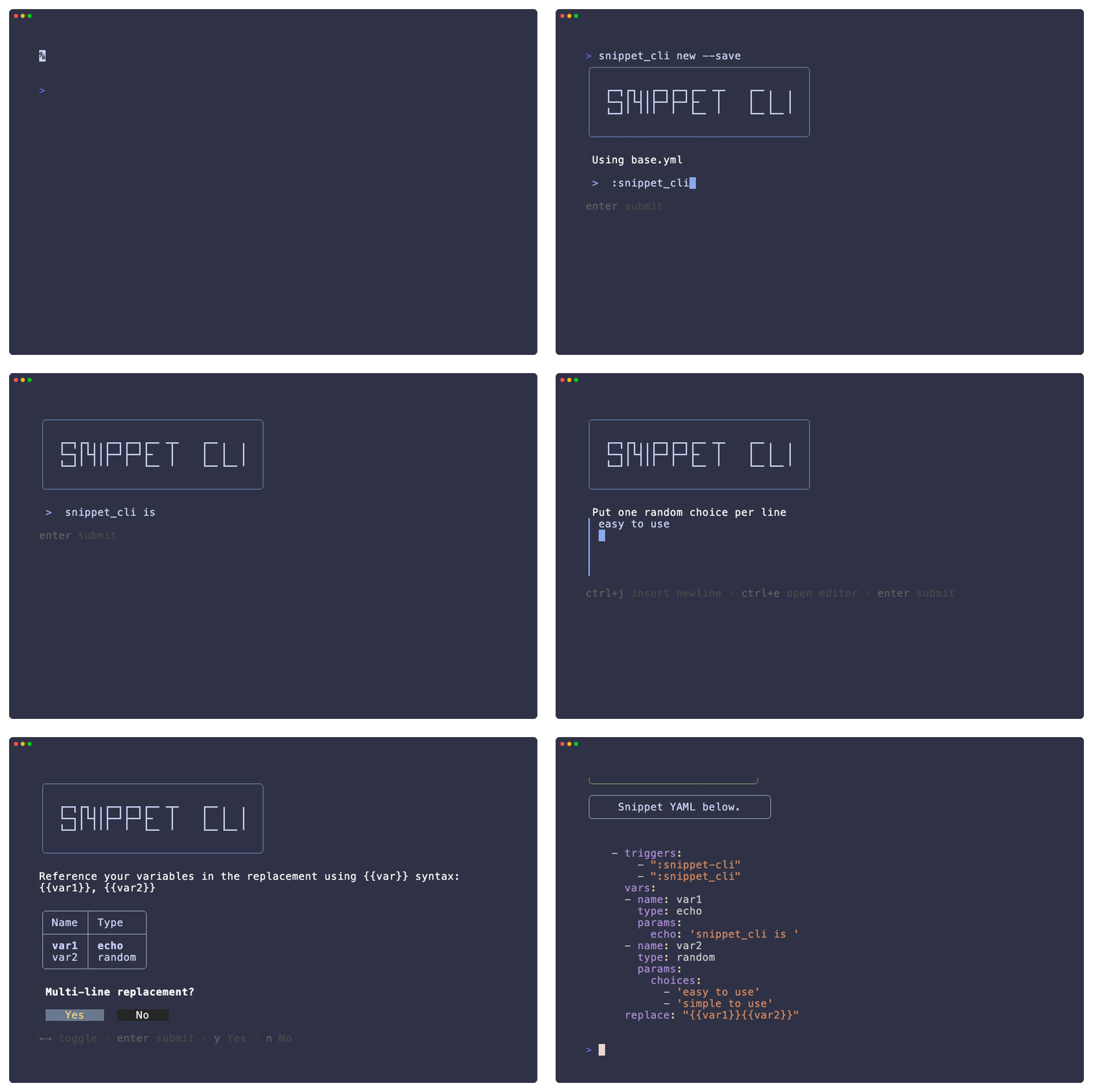
To get started, run snippet_cli new --save to build a snippet interactively and append it directly to your config file.
Needs Ruby 3.2 or newer.
| Platform | Supported |
|---|---|
| macOS (Apple Silicon and Intel) | Yes |
Linux (x86_64, arm64) |
Yes |
| Windows | No |
snippet_cli drives its prompts with gum,
which ships as a platform-specific gem. No Windows build of that gem is published,
so Windows is not supported. WSL works, since it installs the Linux build.
gem install snippet_cliThe flake builds snippet_cli and every gem it needs against a pinned Ruby, and
wires up the gum binary for you. Nothing
is written to ~/.gem, so the install cannot break when your system Ruby changes.
Run it without installing — nix run
Try the latest release straight from GitHub:
nix run github:ajmarkow/snippet_cliPass arguments after --:
nix run github:ajmarkow/snippet_cli -- new --save
nix run github:ajmarkow/snippet_cli -- check ~/.config/espanso/match/base.yml
Install into your profile — nix profile add
nix profile add github:ajmarkow/snippet_cliOn Nix older than 2.30, the subcommand is install instead of add:
nix profile install github:ajmarkow/snippet_cliThen upgrade or remove it with:
nix profile upgrade snippet_cli
nix profile remove snippet_cli
Add it to your system config — flake input, Home Manager, or NixOS
Add the flake as an input:
{
  inputs = {
    nixpkgs.url = "github:NixOS/nixpkgs/nixos-unstable";
    snippet_cli.url = "github:ajmarkow/snippet_cli";
  };
}
Simplest: apply the overlay, then refer to the package by name everywhere pkgs
is in scope — no need to thread system through:
nixpkgs.overlays = [ inputs.snippet_cli.overlays.default ];home.packages = [ pkgs.snippet_cli ]; # Home Manager
environment.systemPackages = [ pkgs.snippet_cli ]; # NixOSWithout the overlay, reach the package directly instead:
home.packages = [ inputs.snippet_cli.packages.${pkgs.system}.default ];Build from a local checkout
git clone https://github.com/ajmarkow/snippet_cli
cd snippet_cli
nix build .#snippet_cli   # result appears at ./result/bin/snippet_cli
nix run .#snippet_cli -- version
Flakes only see files tracked by git, so git add any new file before building.
Note
The Nix commands above need flakes enabled. If your Nix predates flakes being
on by default, prefix them with
--extra-experimental-features 'nix-command flakes'.
- Designed to make adding complex snippets to your Espanso config completely painless (
newcommand). - Handles quoting, escaping, and multiline replacements for you.
- Supports
trigger,triggers, orregexfor snippet matching. - Supports all replacement types:
replace,markdown,html,image_path. - Supports advanced snippet options:
label,comment,search_terms, andwordtrigger. - Offers
--no-varsand--bareflags onnewfor defining simpler snippets without the variable builder or advanced options.--no-vars- Snippet builder without variables.--bare- Bare-bones snippet builder with just basic trigger and replace types.
- Offers an interactive variable builder to define as many variables as you'd like.
- Can be invoked separately (
varscommand) to add variables to theglobal_varsarray in your config. - Supports the following variable types:
echo,random,choice,date,shell,script,form,clipboard. - No guessing at parameters or double-checking schema, asks for all required fields and prompts for optional ones if you choose to set them.
- Can be invoked separately (
- Defined variables are shown as you enter your snippet text for easy reference.
- Warns you if you forgot to use a variable or referenced an undefined one.
- Allows you to re-order variables after defining them.
- Automatically uses the Espanso default config path for appending variables or snippets to your match file(s).
- If you have multiple match files, the wizard will ask which one to append to.
- Supports piped output if you don't want to save directly to a match file. Use
--save/-sto append directly.
- Validate a match file against the Espanso schema (
checkcommand). - Detect duplicate triggers in a match file (
conflictcommand).
More Info
| Command | Alias | Description |
|---|---|---|
new |
n |
Interactively build and optionally save to your match file |
vars |
v |
Interactively build a vars block and optionally save it to global_vars |
check |
k |
Validate a match file against the Espanso schema |
conflict |
c |
Detect duplicate triggers in a match file |
version |
— | Print the current version |
More Info
| Flag | Alias | Commands | Description |
|---|---|---|---|
--save |
-s |
new, vars |
Save output to match file |
--no-vars |
-n |
new |
Skip variable builder; still offers alt types and advanced options |
--bare |
-b |
new |
Trigger(s) + plaintext only; no vars, alt types, or advanced |
--file |
-f |
check, conflict |
Path to match file |
--trigger |
-t |
conflict |
Trigger(s) to look up (comma-separated or repeated) |
--help |
-h |
all | Show help info for commands |
Note
This project uses devenv (Nix-based) for environment management. Use devenv shell for local development.
Devenv Install Instructions
- Install Nix and devenv
- Clone the repo:
git clone https://github.com/ajmarkow/snippet_cli.git cd snippet_cli - Enter the development environment:
devenv shell
- Install dependencies:
bundle install
- Run the tests to verify everything works:
bundle exec rake spec
Instructions
- Update the version number in
lib/snippet_cli/version.rb - Commit with the message containing
gem-release-ready— CI will build and push the gem to RubyGems automatically once tests pass
Contributing, Code of Conduct
Bug reports and pull requests are welcome on GitHub at ajmarkow/snippet_cli. This project is intended to be a safe, welcoming space for collaboration, and contributors are expected to adhere to the code of conduct.
Everyone interacting in the SnippetCli project's codebases, issue trackers, chat rooms and mailing lists is expected to follow the code of conduct.