
Pop!_OS 24.04 on COSMIC in charcoal, sage and orange: desktop, terminal, shell, Firefox, Brave, cursor, wallpapers. The dark half of a pair; the light half is cosmic-dossier-theme.


From the Omarchy Greek Noir theme: a near-black base, grey-sage neutrals, one loud orange. The accent is kept as is. Every text colour is at least 4.5:1 on the window background.
| Role | Color | Hex |
|---|---|---|
| Background |  Charcoal Charcoal |
#171717 |
| Containers |  Soot / Slate Soot / Slate |
#222222 / #2A2A2A |
| Text |  Fog Fog |
#CCD0CF |
| Accent |  Orange Orange |
#F25623 |
| Warning |  Ember Ember |
#F56E0F |
| Success |  Sage Sage |
#88A57D |
| Khaki |  Symlinks, yellow slot Symlinks, yellow slot |
#AEAB94 |
| Grey-sage |  Directories Directories |
#959C95 |
| Muted |  Secondary text Secondary text |
#7D837D |
| Dim |  Comments Comments |
#686C69 |
| Lines |  Box lines, inactive Box lines, inactive |
#525252 |
Error shares the orange: the upstream palette has no red, and its "red" slot is khaki. Errors are told apart by bold and underline.
| Role | Noir | Dossier |
|---|---|---|
| Background | #171717 |
#D0D0C8 |
| Text | #CCD0CF |
#242424 |
| Accent | #F25623 |
#953B19 |
| Success | #88A57D |
#51573B |
.
├── brave
│   ├── theme                    # Chromium theme (manifest + icons), Load unpacked
│   └── README.md
├── btop
│   └── Noir.theme               # btop colour theme
├── claude-desktop
│   ├── cosmic-noir.jsonc        # Claude Desktop theme (claude-desktop-extra), dark + light
│   └── install.sh
├── cosmic
│   ├── Noir.ron                 # COSMIC Appearance import (Dark)
│   ├── config/                  # baseline settings: fonts, icons, terminal look
│   └── install.sh
├── cosmic-term
│   ├── Noir-term.ron            # COSMIC Terminal colour scheme
│   ├── Noir-term-*.ron          # dimmer plain-text variants, same ANSI colours
│   └── README.md                # previews and which one to pick
├── cursors
│   ├── Oxygen-Noir-*/            # cursor themes, one per icon colour, patched for COSMIC apps
│   ├── recolour.py              # makes a variant from any other, see cursors/README.md
│   ├── install.sh
│   ├── uninstall.sh
│   └── README.md
├── icons
│   └── install.sh               # Cosmic-Noir icon pack from cosmic-icon-themes
├── fastfetch
│   ├── config.jsonc             # orange / grey-sage fastfetch config
│   ├── cosmic.txt               # COSMIC logo
│   └── install.sh
├── firefox
│   ├── theme                    # Cosmic Noir theme add-on (manifest + icons)
│   ├── chrome
│   │   ├── userChrome.css       # rounded chrome, soot menus
│   │   └── userContent.css      # new tab accent
│   ├── install.sh
│   └── README.md
├── lsd
│   ├── config.yaml              # theme: custom
│   ├── colors.yaml              # permission / size / date / git columns
│   └── install.sh
├── nvim                         # Neovim colorscheme, LazyVim spec, RON syntax, install.sh
├── telegram
│   ├── colors.tdesktop-theme    # Telegram Desktop colour scheme (source)
│   ├── cosmic-noir.tdesktop-theme  # built theme, open this in Telegram
│   └── build.sh                 # rebuilds it, optionally with a wallpaper
├── vscode
│   ├── themes/                  # Cursor / VS Code colour themes, Noir (dark) + Dossier (light)
│   ├── package.json             # extension manifest
│   ├── install.sh               # packs a .vsix, installs it with cursor --install-extension
│   └── README.md
├── scripts
│   ├── update_system.sh         # nala + flatpak, orange / sage ANSI
│   └── switch.sh                # make this the active rice (see Switching rice)
├── zsh
│   ├── noir.zsh                 # LS_COLORS, highlighting colours, aliases, starship
│   └── install.sh
├── assets
│   ├── cursors/                 # cursor preview
│   ├── cosmic-term/             # scheme previews for cosmic-term/README.md
│   ├── screenshot.png           # README screenshot
│   └── wallpaper.png            # the anime portrait on the bare desktop
├── backgrounds/                 # wallpapers, noir-<subject>.png (see Icons and wallpaper)
├── docs
│   └── showcase.md              # the rice describing itself, for the Postilla pane of the screenshot
├── LICENSE
└── README.md
Settings → Desktop → Appearance → Dark → Import → cosmic/Noir.ron
Accent is orange #F25623. Use the + control if you want a custom swatch.
Frosted glass is on in the .ron at frosted: Low with an opacity table of
0.66 to 0.96, tinted with the palette's middle neutral, for windows, panel,
applets and system UI (maximized apps stay solid), and corners are squared
(radius_*: 2.0), the same as the DarkGold baseline. Adjust frosted glass on
Appearance → Style → Frosted glass after import; those sliders survive a theme switch.
Export from Appearance if you tweak backgrounds / tints so you do not lose them.
Pairing tip: import Dossier.ron from
cosmic-dossier-theme into
the Light slot and COSMIC's Dark / Light toggle flips between the two.
Wallpaper, Firefox and the shell layer do not follow the toggle; those are
per-rice files.
cosmic/config/ holds the settings that make up the look and rarely change
(panel, dock, applets and shortcuts are left out on purpose):
| Where | Setting |
|---|---|
| Fonts | Interface Maple Mono Normal Light, monospace Maple Mono Normal NFM |
| Icons | Cosmic-Noir-Orange |
| Windows | Minimize / maximize buttons hidden, theme applied to GNOME apps |
| Terminal | Maple Mono 15 (weights 500 / bold 800 / dim 300), 77% opacity, no header bar, Noir |
Install the Maple fonts (Maple Mono Normal and Maple Mono Normal NFM) and the Cosmic-Noir icons (see Icons below) and import the terminal scheme first, then:
./cosmic/install.shIt backs up each file it replaces to *.bak and COSMIC applies it live.
The interface font is the Light weight on purpose. COSMIC sets interface text
brightness itself (the text tint only picks the hue), so on these dark panels
labels land near #DFE7DF whatever tint you choose; the thinner strokes are
what calms them at night. Settings → Fonts lists only families, so the weight
lives in cosmic/config/com.system76.CosmicTk/v1/interface_font.
The desktop .ron does not colour ANSI text.
- COSMIC Terminal → View → Color schemes… (not Settings → Appearance)
- Dark tab → Import →
cosmic-term/Noir-term.ron - View → Settings → Appearance → Color scheme (dark) → Noir
If a profile is set as default, set the scheme on that profile too or the dropdown will look like it did nothing.
Fog text on charcoal; orange for errors and the cursor, sage for strings and success, khaki in the yellow slot, grey-sage for directories.
If fog glares at night, there are five dimmer variants with the same ANSI
colours, from Smoke #7D837D up to Pale #BCBFBC. Previews and which to
pick: cosmic-term/README.md.
Two layers:
- Theme (colours): install cosmic-noir-theme on addons.mozilla.org. This is the main look.
- Stylesheets (optional):
firefox/chrome/adds rounded corners, orange menu hover, orange accents and blank new-tab tiles on top of the add-on (they also work with Firefox's built-in Dark theme):
./firefox/install.shFully quit Firefox afterward. Details and CSS rules: firefox/README.md.
brave/theme is a Chromium theme with the Firefox theme's colours: charcoal
frame, soot toolbar, sage icons and inactive tabs, orange on the active tab.
Brave, Chrome, Chromium and Edge take it, and it loads straight from the
clone, so no Chrome Web Store or Google account is needed:
brave://extensions → Developer mode → Load unpacked → brave/theme
Leave the clone in place, Brave keeps reading the folder. Colours, limits and
packing a .crx: brave/README.md.
For the unofficial claude-desktop-extra
Linux build. claude-desktop/cosmic-noir.jsonc is one theme with both halves:
Noir in dark mode and Dossier in light mode, so Claude's own
Settings → Appearance toggle switches between the two rices.
Colours come from cosmic/*.ron, contrast-checked (text and button text
4.5:1, accents 3:1).
./claude-desktop/install.shIt copies the file into ~/.config/Claude/themes.d/. Then press
Ctrl+Shift+T in Claude Desktop and pick cosmic-noir.
The same file ships in cosmic-dossier-theme,
so installing from either repo gives the same theme.
vscode/ is a colour theme extension for Cursor with
both halves of the pair: Cosmic Noir and Cosmic Dossier. It is a plain
VS Code theme extension, so VS Code and VSCodium take it too, and the same
folder ships in cosmic-dossier-theme. Code is coloured the way Neovim is in
each rice; the workbench is charcoal with soot menus, hovers and inputs,
orange on the active tab, buttons and menu highlight, and the integrated
terminal uses the COSMIC Terminal scheme. Cursor builds its Agent and chat
panels from the same theme colours, so they follow along.
./vscode/install.shIt packs vscode/ into a .vsix and installs it with
cursor --install-extension; run it again after editing the theme. Then press
Ctrl+K Ctrl+T in Cursor and pick
Cosmic Noir. Three lines in Cursor's settings.json make it follow
COSMIC's Dark / Light toggle between Noir and Dossier; they, the colours and
the contrast notes are in vscode/README.md.
telegram/cosmic-noir.tdesktop-theme is a Telegram Desktop theme: charcoal
chat list and background, soot incoming and dark-sage outgoing bubbles, orange
for the accent, links, unread badges and buttons (with charcoal text on them),
sage for online status and read ticks. Group member names cycle through eight
of the rice's colours: orange, sage, khaki, grey-sage, pale khaki, amber, light
sage and ember. Text and badge colours are contrast-checked at 4.5:1 or better,
except disabled menu items.
Settings → Chat Settings → Chat wallpaper → Choose from file →
telegram/cosmic-noir.tdesktop-theme → Apply this theme.
The colours live in telegram/colors.tdesktop-theme, which is plain text;
build.sh zips it with the chat background into the .tdesktop-theme. The
background is plain charcoal; to put a wallpaper behind the chat instead
(ImageMagick re-encodes it to a 2560px JPEG, Telegram caps theme files at 5 MB):
./telegram/build.sh --wallpaper backgrounds/noir-anime.pngBuilt against Telegram Desktop 7.3.1. Calls, group calls, statistics charts and premium badges keep Telegram's own colours.
Telegram has no dark / light pairing, so Dossier, the light half, ships its own theme.
Oxygen cursors recoloured to the icon colours, one per folder colour of the Cosmic-Noir icon pack: Orange (default), Sage, Dark. Patched with the cursor names COSMIC apps ask for. COSMIC has no cursor picker yet, so the script sets it:
./cursors/install.sh                      # Orange
./cursors/install.sh --variant Sage      # or another, see --list
reboot
Previews, what the script touches, how to undo it and how the colours are made:
cursors/README.md.
nala + flatpak updater. Headers in orange, info in grey-sage, success in sage, errors in orange; the banner ramps from sage to fog, orange only in the rule below it.
chmod +x scripts/update_system.sh
./scripts/update_system.shMakes this the active rice, coming from any other cosmic-*-theme rice. See
Switching rice.
./scripts/switch.shNeed a Nerd Font in the terminal for the icons (Maple Mono NFM in the baseline above).
zsh/noir.zsh is the rice part of the shell only: LS_COLORS (also used by
lsd for file names and by the completion menu), orange / sage / khaki colours
for zsh-autosuggestions and zsh-syntax-highlighting, lsd / bat / nvim aliases
and the starship prompt. Your own ~/.zshrc stays private and sources it.
Needs zsh + oh-my-zsh. install.sh clones the two
plugins if missing and appends one source line to ~/.zshrc (backup in
~/.zshrc.bak):
./zsh/install.sh
exec zsh
In ~/.zshrc keep ZSH_THEME="" and
plugins=(git sudo zsh-autosuggestions zsh-syntax-highlighting).
File names are coloured by LS_COLORS from zsh/noir.zsh;
lsd/colors.yaml colours the other columns with the 256-colour codes nearest
the palette (202 orange, 208 ember, 108 sage, 144 khaki, 246 grey-sage,
243 muted, 240 dim). lsd 1.0.0 does not accept #hex there.
./lsd/install.sh
lsd -lCOSMIC logo in orange, Hardware / Software / Age boxes in dim grey with
grey-sage keys. install.sh backs up any existing
~/.config/fastfetch/config.jsonc to config.jsonc.bak.
./fastfetch/install.sh
fastfetchnvim/ carries the rice into Neovim: a dependency-free colorscheme built from
the palette (nvim/colors/noir.lua), a LazyVim spec that selects it and makes
sure the treesitter parsers for the files in this repo are installed
(nvim/lua/plugins/noir.lua), and a small RON syntax file so cosmic/*.ron
is coloured even before the parser exists. :terminal inside Neovim uses the
Noir scheme.
./nvim/install.sh
# restart nvim; LazyVim switches to the noir colorscheme
Without LazyVim, copy nvim/colors/noir.lua to ~/.config/nvim/colors/ and
run :colorscheme noir.
btop/Noir.theme: charcoal background, dim grey boxes, orange titles, meters
ramp from sage through khaki to orange.
mkdir -p ~/.config/btop/themes
cp btop/Noir.theme ~/.config/btop/themes/
# btop → Esc → Options → Color theme → NoirIcons: Cosmic-Noir, the Kanagawa icons
by Fausto Korpsvart recolored to this palette in
cosmic-icon-themes. Folders come in
three colors: Orange #F25623 (default), Sage #88A57D and Dark #2A2A2A with orange symbols.
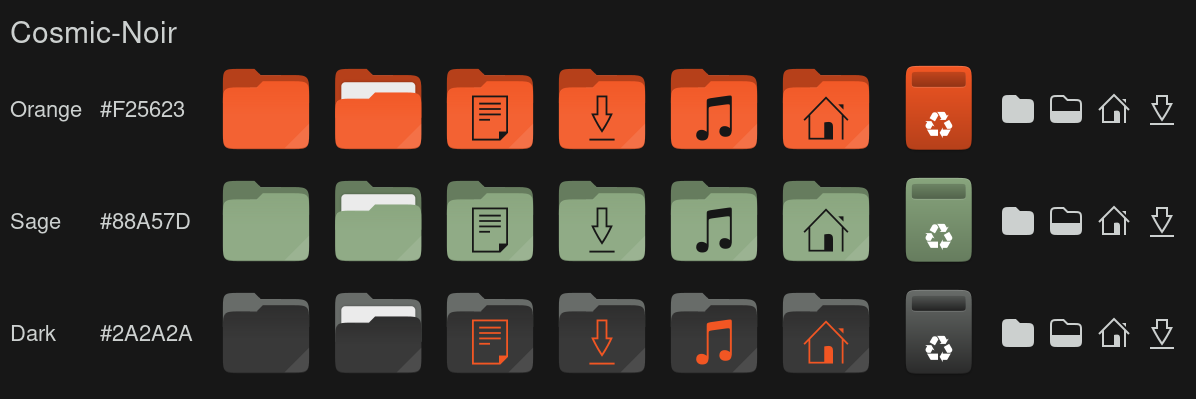
./icons/install.sh                 # Orange folders
./icons/install.sh --variant Sage  # or Dark
It downloads the pack from the latest cosmic-icon-themes release, checks its SHA256,
installs it to ~/.local/share/icons/ and sets it as the COSMIC icon theme.
Restart open apps afterwards (Files caches icons per window).
Add --system to install to /usr/share/icons instead, for every user and the
login screen (asks for sudo); --user is the default.
Wallpapers ship in backgrounds/, named noir-<subject>.png:
the thirteen subjects every dark rice has, rendered in sage and orange on charcoal:
the Harbor Dark reaper and Hyundai blueprint, the COSMIC astronaut, the samurai,
sushi switch, geisha, JS mug and neon street from the Tokyo Night set, The Greek
eagle and ink portrait, and three new scenes: city, panel and tower.
The anime portrait (noir-anime.png) is the one in the screenshot.
The subjects come from HANCORE-linux (MIT) and
cool-wallpapers; each was rendered again in this palette, then upscaled.
More from the upstream theme in cool-wallpapers, folder
omarchy/greek-noir/ (MIT).
Settings → Wallpaper → Add image → a file from backgrounds/, or one you downloaded.

git clone https://github.com/atraxsrc/cosmic-noir-theme.git
cd cosmic-noir-theme

# desktop
# Settings → Appearance → Dark → Import cosmic/Noir.ron

# terminal
# View → Color schemes → Import cosmic-term/Noir-term.ron

# firefox add-on
# https://addons.mozilla.org/en-US/firefox/addon/cosmic-noir-theme/

# optional extra chrome
./firefox/install.sh

# brave: brave://extensions → Developer mode → Load unpacked → brave/theme

# claude desktop (claude-desktop-extra), then Ctrl+Shift+T
./claude-desktop/install.sh

# cursor editor, then Ctrl+K Ctrl+T → Cosmic Noir
./vscode/install.sh

# telegram desktop
# Settings → Chat Settings → Chat wallpaper → Choose from file → telegram/cosmic-noir.tdesktop-theme

# cursor (then reboot), see cursors/README.md
./cursors/install.sh                      # Orange
./cursors/install.sh --variant Sage      # or another, see --list
reboot

# shell + terminal tools (see Terminal extras above)
./zsh/install.sh
./lsd/install.sh
./fastfetch/install.sh
./nvim/install.sh
mkdir -p ~/.config/btop/themes && cp btop/Noir.theme ~/.config/btop/themes/

# wallpaper
# Settings → Wallpaper → Add image → a file from backgrounds/ (see Icons and wallpaper above)

./icons/install.sh                  # icons (see Icons above)
# Maple fonts (https://github.com/subframe7536/maple-font), then
# fonts, icons, terminal look from cosmic/config/
./cosmic/install.shThe installers replace what they own (with a *.bak copy), but some things
pile up instead: shell layers in ~/.zshrc, LazyVim specs, the updater link and
btop's theme setting. scripts/switch.sh makes Noir the active rice, coming
from any other cosmic-*-theme rice, and tidies those up. Every rice repo ships
the same script.
./scripts/switch.sh               # switch, icons included
./scripts/switch.sh --keep-icons  # leave the current icon theme alone
It backs up every file it replaces, then:
- copies
cosmic/config/(fonts, terminal look, icons) and turns dark mode on. The terminal scheme and icon theme are only replaced when the current one is not already a Noir variant, so a dimmer text variant or another icon colour survives. Icons stay as they are until./icons/install.shhas run. - runs the fastfetch, lsd, Neovim and Claude Desktop installers and sets
btop's
color_theme - moves every other rice's LazyVim spec from
~/.config/nvim/lua/plugins/to~/.config/nvim/rice-off/(LazyVim loads every spec there and the last colorscheme wins); your own specs stay - comments out every other rice's
sourceline in~/.zshrc, and cosmic-ricing'sricing/zsh/colors.zsh, then uncomments Noir's or adds it - points
~/update_system.shat this repo's updater - installs the Firefox userChrome / userContent
The GUI steps it cannot do are printed at the end:
- Settings → Desktop → Appearance → Dark → Import
cosmic/Noir.ron - COSMIC Terminal → View → Color schemes → Dark tab → Import
cosmic-term/Noir-term.ron - Firefox: disable the old rice's add-on, enable this one, restart Firefox
- Settings → Wallpaper → a file from
backgrounds/ - Claude Desktop: Ctrl+Shift+T →
cosmic-noir, Appearance → Dark exec zsh, restart Neovim (:Lazy cleandrops plugins only the old specs used)
Skip 1 and 2 when that slot already holds Noir. The first time on this rice, run Setup once for the fonts, icons and cursor.
Within the pair (Noir ↔ Dossier): the two halves
sit side by side in COSMIC's Dark and Light slots and share one Claude Desktop
theme, so after the first time only the Firefox add-on and the wallpaper are
left by hand. Add --keep-icons to keep one icon colour across the pair.
Leaving Noir is the next rice's ./scripts/switch.sh. ./cursors/uninstall.sh
puts the Pop cursor back.
| Tool | What it does |
|---|---|
| Pop!_OS 24.04 | Base OS by System76 |
| COSMIC DE | Desktop environment |
| oh-my-zsh | zsh framework + plugins |
| lsd | ls with icons and colours |
| fastfetch | System info |
| btop | Resource monitor |
| cosmic-icon-themes | Icon pack (Cosmic-Noir), recolored from Kanagawa icons |
| Oxygen-Cursors | Cursor, recoloured to the icon colours |
- Palette and wallpapers: omarchy-greek-noir-theme
by HANCORE-linux (MIT). This repo is a COSMIC port; the upstream wallpapers
are mirrored in cool-wallpapers, the renders for this palette are in
backgrounds/. - Light half: cosmic-dossier-theme. Shared baseline (frosted glass, squared corners, fonts) from cosmic-darkgold-theme.
MIT. The cursor artwork keeps the terms of KDE's Oxygen project, see
cursors/README.md.