

English | 中文
Website · Marketplace · Showcase · For Agents · Ecosystem
Connect AI agents to creative tools for scene editing, asset processing, and production workflows.
DCC-MCP helps artists, technical artists, and tool developers connect AI agents to applications such as Maya, Blender, and Houdini. DCC stands for Digital Content Creation; MCP stands for Model Context Protocol, an interface between AI applications and external tools. An agent can call these tools to carry out a task and check the results.
Alongside desktop DCC applications, DCC-MCP connects game engines, 2D design tools, production systems, asset services, profilers, and custom studio software. They share application discovery, tool calls, permission checks, and monitoring. DCC-MCP provides the connections; you choose the agent.
A Skill is a task guide for agents. Start with dcc-mcp to operate an integrated
application, or choose a creator Skill below to develop adapters or Skill
packages. See the agent guide for installation
and configuration.
| Agent task | Public Skill |
|---|---|
| Operate running DCC applications, find tools, install extensions, diagnose failures, and prepare sanitized bug reports | @loonghao/dcc-mcp |
| Build or improve a DCC-MCP adapter and runtime | @loonghao/dcc-mcp-creator |
| Create, validate, or improve a DCC-specific Skill package | @loonghao/dcc-mcp-skills-creator |
The dcc-mcp Skill guides agents through dcc-mcp-cli: find a running
application and its available tools, read the selected tool's parameter
definition (schema), validate the arguments, call the tool, and check the result.
These typed tools define their inputs, outputs, and argument types so agents
can inspect requirements before calling them. When a call fails, the Skill
guides agents to preserve traces and submit a sanitized report to the responsible
Skill, adapter, or Core repository.
Find guides and adapters for Maya MCP, 3ds Max MCP, Blender MCP,
Unreal MCP, Unity MCP, Tuanjie MCP, and Godot MCP below.
Existing Maya CLI, 3ds Max CLI (3dsmax or 3ds max), and Blender CLI
workflows can continue to use each application's command line. DCC-MCP adds
application discovery, tool search, parameter inspection, calls, and result
verification.
| Application | Website guide | Adapter repository |
|---|---|---|
| Maya | Control Maya with AI | dcc-mcp-maya |
| 3ds Max | Control 3ds Max with AI | dcc-mcp-3dsmax |
| Blender | Control Blender with AI | dcc-mcp-blender |
| Unreal Engine | Control Unreal Engine with AI | dcc-mcp-unreal |
| Unity | Control Unity with AI | dcc-mcp-unity |
| Tuanjie / 团结引擎 | Control Tuanjie workflows with AI | dcc-mcp-unity |
| Godot | Control Godot with AI | dcc-mcp-godot |
- Unreal Engine: inspect and author levels, assets, Blueprints, cinematics, and effects, then validate through PIE or Unreal Automation. On supported editors, the adapter can bridge installed Epic toolsets while Epic continues to own and distribute its experimental MCP plugin.
- Unity: inspect project and scene state, make bounded Undo-backed editor changes, run tests, capture Play Mode, and produce verified builds through the Unity adapter's typed tools.
- Tuanjie / 团结引擎: inspect the optional native Codely
CustomToolcatalog before using its image, sprite, 3D, material, audio, video, or terrain generators. Tuanjie continues to own sign-in, credits, downloads, and task recovery; DCC-MCP owns the surrounding discovery, routing, and verification. - Godot: inspect and edit projects and scenes, exercise editor and game runtime tools, and validate 2D or 3D results through the Godot adapter.
A model can write and run a mayapy, hython, or Blender Python script to
demonstrate a DCC task. Everyday production also needs permission controls,
parameter checks, execution records, and verification of the results.
Generating fresh code for each task means reviewing whether it fits the current scene. Adapter authors also repeat work on transport, main-thread dispatch, process management, instance selection, and logging.
DCC-MCP brings those shared functions into a reusable framework:
| Layer | Shared capability |
|---|---|
| Integration | MCP and REST endpoints, Host RPC/IPC, typed schemas, resources, prompts, and structured results |
| DCC runtime | Main-thread dispatch, readiness checks, multi-instance routing, async jobs, cancellation, checkpoints, workflows, and artefact hand-off |
| Skill delivery | Versioned SKILL.md packages, progressive discovery, lint/schema validation, hot reload, persistence, marketplace distribution, and project/team scopes |
| Operations | CLI, gateway, Admin UI, policies, audit records, traces, logs, metrics, health checks, and replay |
Teams can maintain their existing DCC interfaces, permission rules, and production workflows, then reuse those tools when changing agents or models.
DCC-MCP uses MCP to connect agents and can connect creative applications through Python, C++, HTTP, command ports, or native plugins. Stable application APIs can join the same discovery, execution, and management workflow.
Vendor tools can join that workflow too. Unreal Engine 5.8 introduced an
experimental official MCP server and Toolset Registry.
Our
unreal-official-mcp Skill
enables and bridges those official toolsets without redistributing Epic's
plugin or changing its tool names and schemas. Vendor tools, DCC-MCP tools, and
studio tools can share one agent-facing workflow.
Unity projects can use the same pattern with Tuanjie Editor's optional AI
packages. The
unity-tuanjie-ai Skill
inspects the native Codely CustomTool catalog and only executes a tool from a
fresh inspection result. Tuanjie's packages continue to own sign-in, credits,
downloads, and task recovery; DCC-MCP provides the typed discovery, routing,
and verification workflow around those vendor capabilities.
Some older tools have no API and cannot be modified. Other operations are only
available through windows, dialogs, or embedded web pages. dcc-mcp-core provides
UI Control for these tasks through Qt, native accessibility, webviews, or
application-specific UI backends. UI actions use the project's
DCC-CUA and UI Control routing. The workflow follows a
snapshot -> find -> act -> wait -> verify loop.
Native Skills and APIs remain preferred. UI actions must stay scoped, policy-checked, audited, and verified; whole-desktop access is denied by default. See the UI Control workflow guide.
A Skill can combine task instructions, tool definitions, and existing scripts to make a team's tested production workflows available to agents. Each Skill can be versioned, tested, and distributed independently.
Clear tool descriptions and parameter definitions let agents reuse operations instead of generating code repeatedly for the same task. Parameter validation and result checks remain necessary; outcomes depend on the tool, model, and task. Large studios can distribute different Skills by project, department, or production stage.
Technical directors (TDs) and technical artists (TAs) can package naming rules,
scene checks, asset preparation, pre-publish checks, cache/export rules, and
review hand-offs in SKILL.md, tools.yaml, and existing studio scripts.
Core and the adapter handle connectivity, main-thread execution, routing,
permissions, and execution records. Teams can distribute Skills through a public
or private Marketplace while reusing the same infrastructure and adapters.
| Area | Projects and Skills |
|---|---|
| Foundation and distribution | dcc-mcp-core, marketplace |
| Desktop DCCs | Maya MCP, Blender MCP, Houdini, 3ds Max MCP, Marmoset Toolbag, Nuke, Katana, MotionBuilder, ZBrush |
| Design and content tools | Photoshop, Substance 3D Designer, Substance 3D Painter, After Effects, Premiere, GIMP, Krita |
| Game and 2D engines | Unreal Engine official MCP bridge, Unity and Tuanjie AI, Godot, Tiled, Material Maker |
| Pipeline and quality | OpenUSD, Flow Production Tracking, MaterialX, Texture Pipeline, Pipeline Publish, RenderDoc, Tracy |
| Extension Skills | Asset services, 2D/3D generation, UI automation, rigging, procedural authoring, game delivery, and runtime acceptance |
The official Marketplace makes those optional capabilities searchable, installable, upgradeable, and suitable for private studio catalogs too. Browse real outputs and reusable prompts, or inspect the catalog source.
Find the extensions below in the official catalog. Agents should search the latest catalog to confirm package availability before installation:
dcc-mcp-cli marketplace search --query "<capability>" --limit 20
dcc-mcp-cli marketplace install <package_name> --dcc <dcc_name>| Extension Skill | Capability |
|---|---|
dcc-mcp-maya-mgear |
Inspect, build, and manage mGear Shifter rigs in Maya |
dcc-mcp-maya-advancedskeleton |
Inspect templates and create, import, build, or rebuild AdvancedSkeleton rigs |
dcc-mcp-maya-procedural-architecture |
Generate seeded Maya house styles with Arnold materials and optional CC0 HDR lighting |
dcc-ui-qt-inspector |
Discover Qt windows, widgets, and selector state across PySide/PyQt DCC hosts |
dcc-ui-qt-actions |
Click widgets, trigger actions, set values, and drive legacy Qt UI workflows |
dcc-ui-workflow-memory |
Remember verified UI selectors, recipes, and failures for later automation |
| Extension Skill | Capability |
|---|---|
dcc-ai-hunyuan3d |
Submit and inspect Tencent Hunyuan text/image-to-3D jobs |
dcc-ai-tripo3d |
Create, inspect, and download Tripo text/image/multiview 3D tasks |
dcc-asset-polyhaven |
Browse and download CC0 Poly Haven models, HDRIs, and textures |
dcc-asset-godot-store |
Search and download reusable Godot Asset Store add-ons and projects |
dcc-asset-blender-extensions |
Search and download checksum-verified official Blender extensions |
dcc-asset-ambientcg |
Search and download free ambientCG materials, HDRIs, and models |
dcc-asset-nasa3d |
Search and download NASA 3D resources with usage notices |
dcc-asset-smithsonian3d |
Search and download Smithsonian Open Access CC0 3D files |
dcc-asset-kenney |
Search and download CC0 Kenney game asset packs |
dcc-asset-quaternius |
Search and inspect CC0 Quaternius game asset packs |
dcc-asset-objaverse |
Browse Objaverse metadata and download Creative Commons GLB objects |
dcc-asset-gltf-sample-assets |
Download Khronos glTF Sample Assets for testing and validation |
dcc-asset-sketchfab |
Download eligible Sketchfab models with attribution metadata |
dcc-asset-google-scanned-objects |
Search and download Google Scanned Objects from Gazebo Fuel |
| Extension Skill | Capability |
|---|---|
dcc-ai-openai-image |
Generate and edit texture source images with validated asset descriptors |
dcc-texture-pipeline |
Inspect, color-convert, and optimize textures with OpenImageIO and OpenColorIO |
dcc-materialx |
Create, inspect, and validate portable MaterialX documents |
dcc-asset-pexels-video |
Search and download Pexels stock video with attribution metadata |
dcc-asset-mixkit-free-media |
Download Mixkit video, music, sound effects, and After Effects templates with license metadata |
dcc-asset-game-icons |
Search and download CC BY SVG icons for game interfaces |
dcc-asset-google-fonts |
Search Google Fonts and download verified fonts with license metadata |
dcc-asset-openstreetmap-city |
Download bounded OpenStreetMap city features as attributed GeoJSON |
dcc-asset-overture-city |
Download bounded Overture Maps city features as licensed GeoJSON |
dcc-plugin-github-releases |
Inspect licensed open-source projects and download release plugins with SHA-256 metadata |
| Extension Skill | Capability |
|---|---|
dcc-pipeline-publish |
Create verified manifests connecting DCC exports, OpenUSD, render farms, and ShotGrid/FPT |
dcc-game-release-package |
Package prebuilt Unreal, Unity, and Godot Windows games for installers, SteamPipe, or WeGame |
dcc-game-runtime-acceptance |
Run bounded game-runtime acceptance and preserve hash-bearing evidence |
dcc-game-pv-capture |
Plan and preserve exact-window gameplay shots for HyperFrames PV editing |
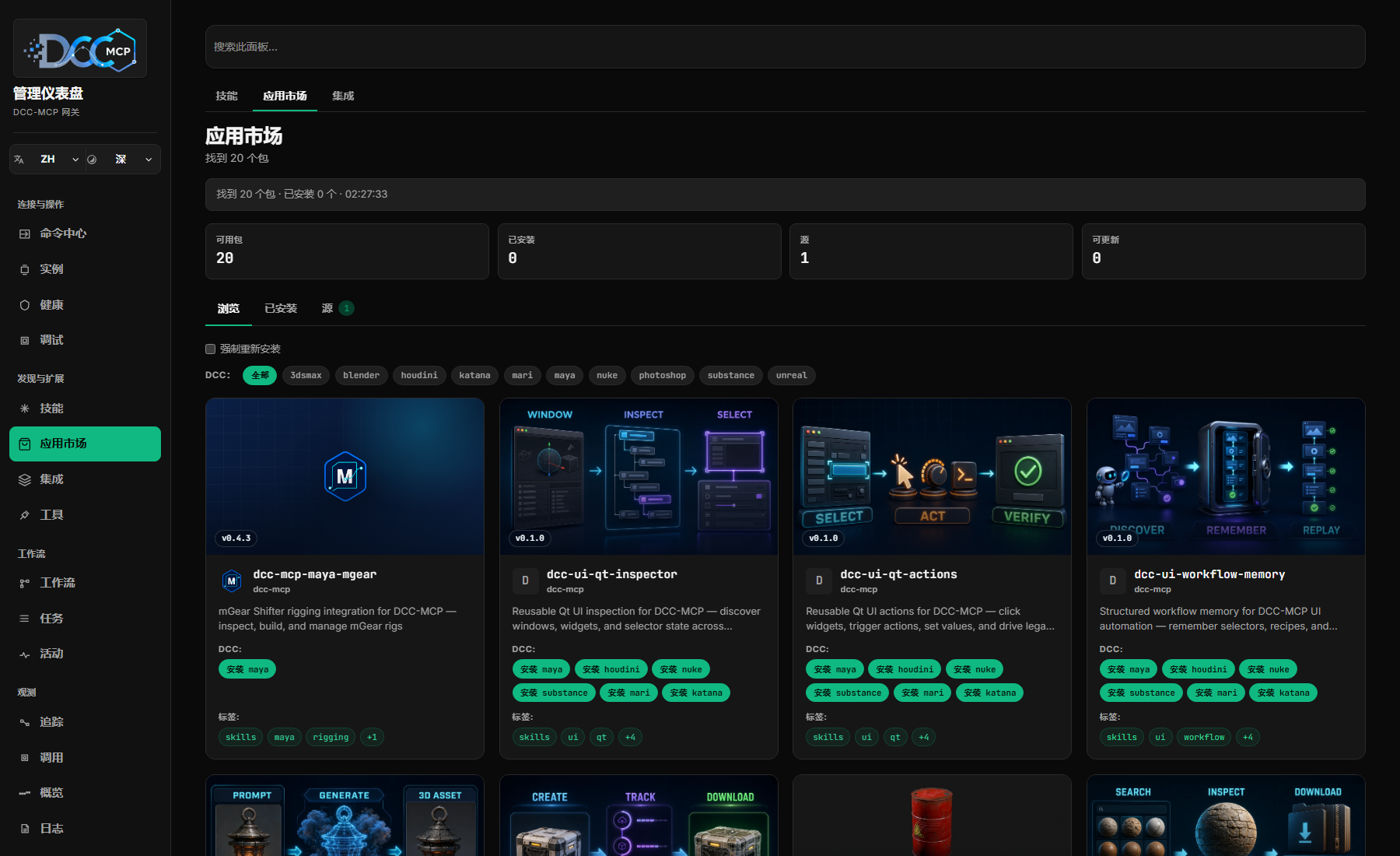
The Gateway Admin UI exposes calls, traces, logs, health, statistics, and usage activity. Teams can see which tools agents selected, where calls failed, and which Skills are used most often. Use those records to improve a description, parameter definition, or implementation, then check the changes through real calls.
| Need | Project |
|---|---|
| Learn about the project or configure an agent | Website, For Agents, Showcase |
| Build an adapter or explore the shared runtime | dcc-mcp-core |
| Discover and distribute reusable Skills | marketplace |
| Explore the full ecosystem | All DCC-MCP repositories |
| Integrate game engines | Unreal Engine official MCP bridge, Unity and Tuanjie AI, Godot |
| Build pipeline integrations | OpenUSD, Flow Production Tracking, Texture Pipeline |
Browse the DCC-MCP repositories for more adapters, asset services, UI automation, profilers, and production Skills.
Core provides shared connectivity and runtime services. Adapters and Skills implement each application's production rules. If an application has no transaction API, Core cannot guarantee safe rollback.
Try DCC-MCP in your own production workflows. If it helps, support the project with a Star.
Issues and pull requests are welcome. Please report bugs, integration gaps, and production workflow needs in the relevant repository. Focused adapters, Skills, tests, documentation, and interoperability improvements are especially useful.
