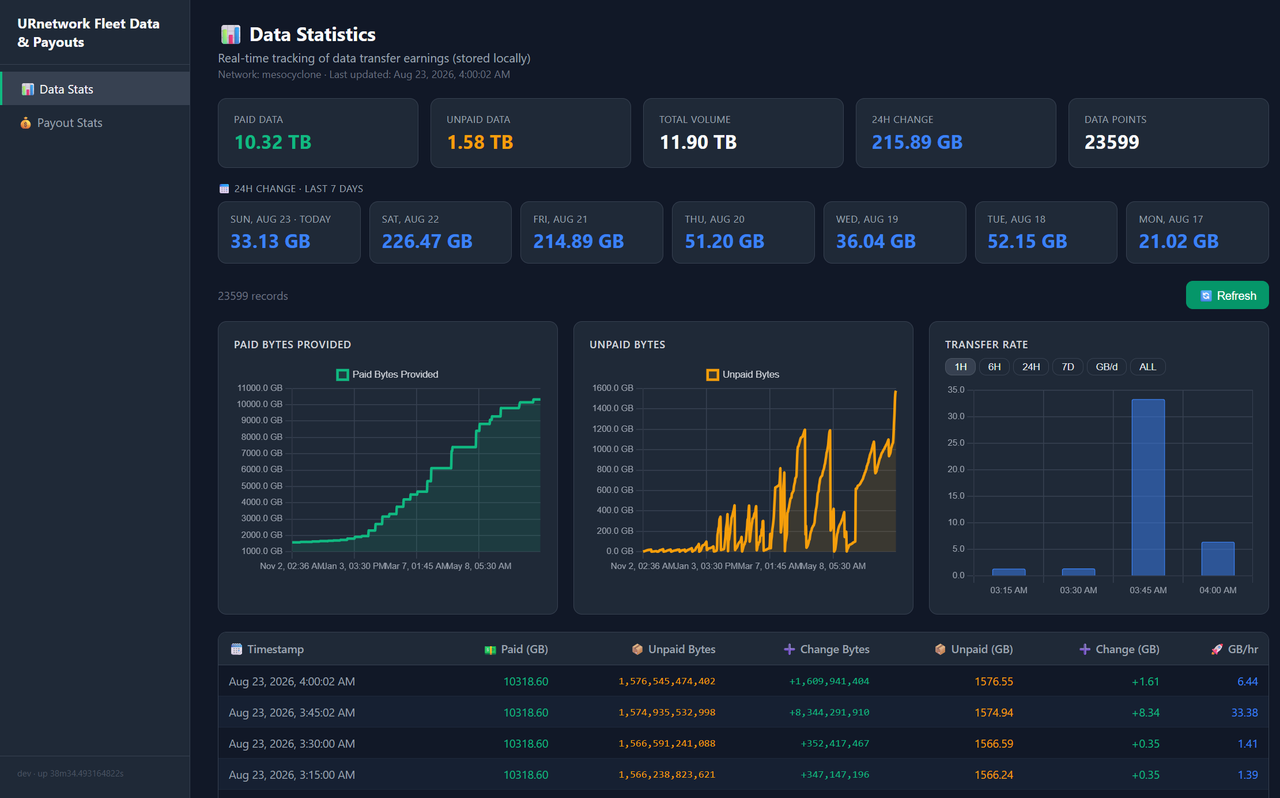
Self-hosted wallet and payout stats dashboard for URnetwork providers. Polls the bringyour.com API, stores history in local SQLite, and serves a dark-theme Chart.js UI.
Features
- Paid/unpaid bytes tracking with hourly snapshots and transfer-rate charts
- Last-7-days usage strip (calendar-day buckets, DST-safe)
- Full payment history: amounts, points per payment, Solana tx links
- Estimated amounts for pending payouts
- Optional Discord notifications on new/completed payments and traffic spikes — configured from the dashboard's 🔔 Webhook section or the
DISCORD_WEBHOOK_URLenv var - Auto-refresh: dashboard every 30s, payout stats every 5m
Linux / macOS / WSL2:
curl -fsSL https://raw.githubusercontent.com/full-bars/URWebDash/master/install.sh | bashThe installer downloads the binary and runs urwebdash setup as your regular user (no sudo). Setup:
- Prompts for an auth code, but only if you have no session token yet.
- Optionally asks for a Discord webhook URL and a traffic spike threshold. You can also add or change the webhook later in the dashboard under 🔔 Webhook.
- Auto-starts the poller and dashboard, and adds
~/.local/binto your PATH in your shell rc.
When it finishes it starts the dashboard and prints the URL. The first poll happens immediately, so charts populate right away. The dashboard binds loopback only; for remote access see Hosting options.
Re-run the install command above. It replaces the binary and restarts services if installed. Data survives untouched.
curl -fsSL https://raw.githubusercontent.com/full-bars/URWebDash/master/uninstall.sh | bashIt asks before deleting data and never touches your URnetwork JWT.
By default urwebdash setup runs the poller and dashboard directly under your user session. To run them as systemd services instead, so they survive reboots and restart on failure:
sudo ~/.local/bin/urwebdash setup --install-servicesUse the full path. Sudo does not see ~/.local/bin.
This installs two units, urwebdash-run.service (poller) and urwebdash-serve.service (dashboard), managed the normal way:
sudo systemctl status urwebdash-run urwebdash-serve
sudo systemctl restart urwebdash-run urwebdash-serveThe dashboard is unauthenticated by design. To reach it remotely, put something in front:
- Tailscale: install it, done. Dashboard reachable only on your tailnet.
sudo tailscale serve --bg 3001adds HTTPS with a stable name. - Cloudflare Tunnel: public hostname without open ports. Add Cloudflare Access for auth.
- Caddy + basic auth on a VPS with a domain:
# /etc/caddy/Caddyfile
dash.example.com {
    # hash: caddy hash-password  (bcrypt; htpasswd -nB also works)
    basic_auth {
        admin $2a$14$Zkx19XLiW6VYouLHR5NmfOFU0z2GTNmpkT/5qqR7hx4IjWJPDhjvG
    }
    reverse_proxy localhost:3001
}
To let your own home IP skip the password:
dash.example.com {
    @trusted remote_ip 203.0.113.7

    handle @trusted {
        reverse_proxy localhost:3001
    }
    handle {
        basic_auth {
            admin $2a$14$Zkx19XLiW6VYouLHR5NmfOFU0z2GTNmpkT/5qqR7hx4IjWJPDhjvG
        }
        reverse_proxy localhost:3001
    }
}One container runs everything: polling in the background, dashboard in the foreground.
docker run -d --name urwebdash \
  -p 127.0.0.1:3001:3001 \
  -v urwebdash-data:/data \
  -e URNETWORK_AUTH_CODE='AUTH_CODE_HERE' \
  ghcr.io/full-bars/urwebdash
Replace AUTH_CODE_HERE with a real code from https://ur.io (keep the single quotes). The code is exchanged once on first start, then removable from the container config.
The Discord webhook can be set in .env (DISCORD_WEBHOOK_URL) or configured later in the dashboard's 🔔 Webhook section — the URL is saved to /data/.urwebdash/discord_webhook and persists in the volume across container recreation. If both are set, the env var wins.
For Compose instead of plain docker run:
mkdir urwebdash && cd urwebdash
curl -fsSL https://raw.githubusercontent.com/full-bars/URWebDash/master/example.env -o .env
curl -fsSL https://raw.githubusercontent.com/full-bars/URWebDash/master/docker-compose.yml -o docker-compose.yml
$EDITOR .env   # every line optional and commented
docker compose up -d
Auth options in Compose (pick one):
- Set
URNETWORK_AUTH_CODEin.env. - Uncomment the
~/.urnetwork/jwt:/host-jwt:romount. The file is copied into the volume once; the host copy is never written.
All state lives in the urwebdash-data volume (or ./data with Compose). Back up the data and .env together, neither alone is complete.
Port binding controls exposure (0.0.0.0 inside the container is normal):
| Mapping | Reachable from |
|---|---|
127.0.0.1:3001:3001 (default) |
this machine only |
192.168.0.100:3001:3001 |
devices on your LAN only |
100.x.y.z:3001:3001 |
your tailnet only |
3001:3001 |
all interfaces, public too if the host has a public IP or port-forward |
Docker uninstall: docker rm -f urwebdash, add -v urwebdash-data to also drop the data.
Commands (urwebdash <command>):
| Command | Description |
|---|---|
run |
Polling daemon. Fetches stats every 15m on quarter-hour marks |
serve [port] |
HTTP server. Dashboard on port 3001 by default |
import <file> |
Import wallet-stats history from a JSON export |
history |
Print stored history |
cleanup |
Delete off-schedule entries for today |
testwebhook |
Send a sample Discord notification |
Environment variables:
| Variable | Default | Description |
|---|---|---|
STATS_INTERVAL |
15m |
Polling interval, minimum 1m |
JWT_PATH |
~/.urnetwork/jwt |
URnetwork session token file |
STATS_DB |
~/.urwebdash/wallet_stats.db |
SQLite database path |
DISCORD_WEBHOOK_URL |
(unset) | Webhook for alerts, or ~/.urwebdash/discord_webhook file (Docker: /data/.urwebdash/discord_webhook). Get one: Server Settings -> Integrations -> Webhooks. Also configurable in the dashboard under 🔔 Webhook; the env var wins if both are set |
SPIKE_THRESHOLD |
1GB |
Per-window traffic delta that triggers an alert. Accepts 500M, 0.5G, 1.5GB, plain bytes |
PAYOUT_NOTIFY_STORE |
~/.urwebdash/payout_notified.json |
Notification dedup store |
HOST |
127.0.0.1 |
Listen address. Inside Docker set 0.0.0.0; exposure is controlled by the port mapping |
Troubleshooting:
| Symptom | Fix |
|---|---|
read jwt: no such file or directory |
No JWT at ~/.urnetwork/jwt. Re-run the installer or copy one from your provider machine. |
| Empty charts | The poller fetches immediately on start. If still empty, wait for the next quarter-hour or lower STATS_INTERVAL. |
| API errors after a while | JWT expired or rotated. Get a fresh one and restart. |
| Port already in use | urwebdash serve 3002 |
| No Discord notifications | Run urwebdash testwebhook, or open the dashboard's 🔔 Webhook section and click 📣 Send Test — it reports Discord's actual response. |
| Duplicate rows today | urwebdash cleanup |
Go 1.27+, no CGO:
git clone https://github.com/full-bars/URWebDash.git && cd URWebDash
go build -o urwebdash .See repository. Contributions welcome, open an issue first for bigger changes.