
One TypeScript codebase, compiled native—from microcontrollers to consoles.
TypeScript. JSX. Real CSS. Native binaries for every screen you ship on.
GeaStack is a native device UI stack for building product interfaces with
TypeScript, JSX, and real CSS, then compiling them ahead of time to native
binaries for microcontrollers, Linux and Windows desktops, macOS, iOS,
Android, and Xbox—and to native servers, where the same compiler turns
node:http applications into binaries.
The device runs no browser and no JavaScript VM. The compiled binary is the app.
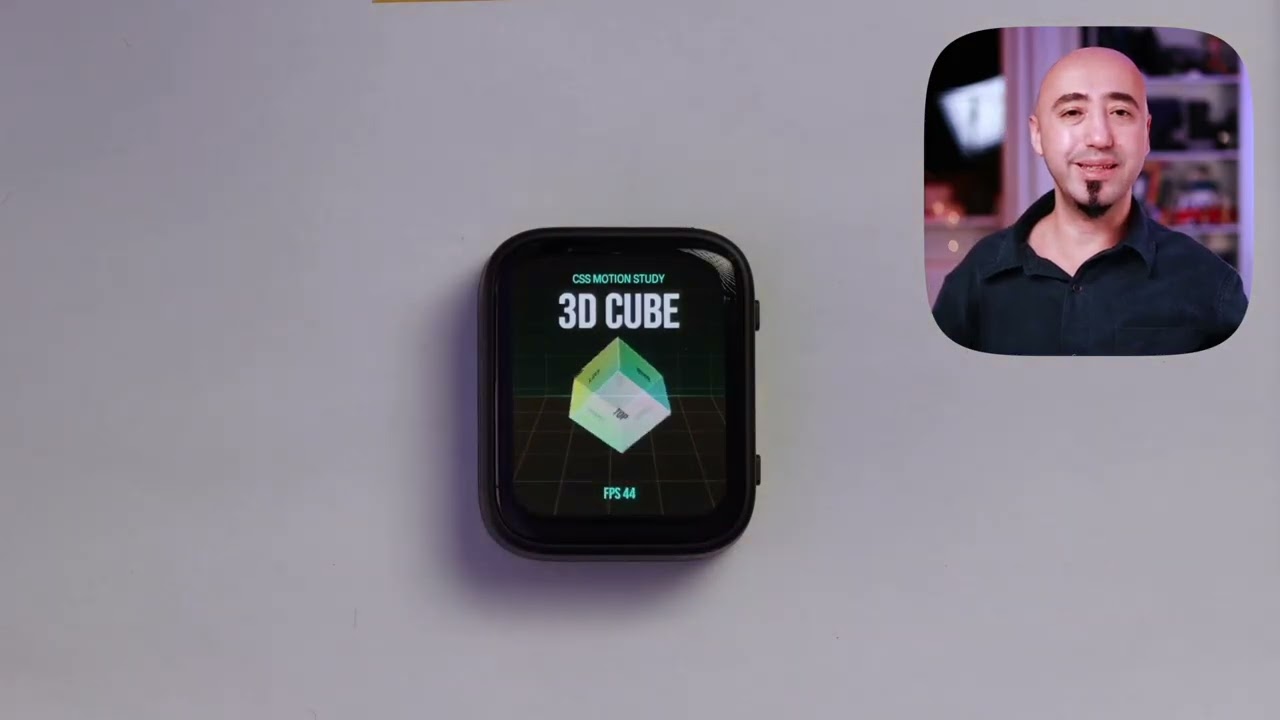
Real CSS transforms, perspective, and keyframes running natively on an ESP32-S3 AMOLED board.
This is the shape of a Gea app: a small TypeScript store, a component class that reads it, and normal CSS classes compiled into the native target.
src/counter-store.ts
import { Store } from '@geastack/core'

class CounterStore extends Store {
  count = 0

  decrement() { this.count = this.count - 1 }
  increment() { this.count = this.count + 1 }
  reset() { this.count = 0 }
}

export const counter = new CounterStore()
src/App.tsx
import { ReactiveComponent } from '@geastack/core'
import { counter } from './counter-store'
import './styles.css'

export class App extends ReactiveComponent {
  template() {
    return (
      <div class="screen">
        <span class="eyebrow">GEASTACK</span>
        <span class="title">Shared store</span>
        <span class="count">{counter.count}</span>
        <div class="controls">
          <button class="button secondary" onClick={() => counter.decrement()}>−</button>
          <button class="button primary" onClick={() => counter.increment()}>+</button>
        </div>
        <button class="reset" onClick={() => counter.reset()}>Reset</button>
      </div>
    )
  }
}
src/index.tsx
import { mount } from '@geastack/core'
import { App } from './App'

mount(App)
src/styles.css
.screen {
  display: flex;
  flex-direction: column;
  width: 100vw;
  height: 100vh;
  gap: 16px;
  align-items: center;
  justify-content: center;
  background-color: #080b12;
  color: #f8fafc;
}

.count {
  font-size: 76px;
  line-height: 1;
}

.controls {
  display: flex;
  flex-direction: row;
  gap: 16px;
}

.button {
  width: 92px;
  height: 58px;
  border-radius: 14px;
  border-width: 2px;
  font-size: 30px;
}
Create, set up, and flash an app with:
npx @geastack/create-geastack my-app
cd my-app
npx gea setup
npx gea flash --board <your-board> --monitor
gea setup walks you through your board, names it, and prints the exact
gea flash line to run—<your-board> is the alias you pick there.
Packages are published under the @geastack scope: @geastack/create-geastack
for project creation and @geastack/cli for the project-local CLI. Both keep
the product-facing commands as create-geastack and gea.
Modern hardware products usually become several UI products at once: one stack for firmware, another for desktop tooling, another for mobile, and another for web previews. GeaStack keeps the productive app model developers already know—components, state, JSX, CSS, and Canvas-style drawing—and lowers it to native targets.
| What you write | What GeaStack builds |
|---|---|
| TypeScript and JSX components | Target-native application code |
| Real CSS | Native layout, styling, animation, and media behavior |
| Canvas-style drawing | Native device draw calls for maps, charts, games, and dashboards |
| One app manifest | Web preview, ESP32-class boards, GeaOS/Linux, Windows, macOS, iOS, Android, and Xbox targets |
| Target | Use it for |
|---|---|
| Web simulator | Fast local iteration and screenshots |
| ESP32 / ESP32-S3 / ESP32-P4 | Watches, panels, knobs, dashboards, and product UI bring-up |
| GeaOS | Linux-backed devices and shellable hardware targets |
| Linux desktop | Desktop apps and Raspberry Pi OS panels |
| macOS | Native desktop apps and companion tools |
| iOS | Native mobile apps and device companion experiences |
| Windows | Win32 desktop apps driven by real child-window controls |
| Android | Native Android apps: compiled with the NDK, rendered with real Android views |
| Node services | node:http servers compiled to native binaries |
| Xbox | Games and 3D scenes on a retail Series X/S in Dev Mode, through ANGLE on D3D11 |
For a new app:
npx @geastack/create-geastack my-app
cd my-app
npx gea setup
npx gea dev
For a Waveshare ESP32-S3 AMOLED board:
npx @geastack/create-geastack my-panel
cd my-panel
npx gea setup
npx gea flash --board <your-board> --monitor
For a richer example:
npx @geastack/create-geastack watch-demo --starter example --example watch
cd watch-demo
npx gea setup
npx gea flash --board <your-board> --monitor| Repository | Purpose |
|---|---|
cli |
gea and create-geastack: project creation, setup, build, flash, monitor, examples, and diagnostics |
core |
App-facing API, runtime sources, UI engine scaffolding, host abstractions, and Gea compiler plugin |
compiler |
geatsc, the TypeScript-to-native compiler path |
examples |
Example apps for web, ESP32, GeaOS, Windows, macOS, and iOS |
tutorials |
Step-by-step learning paths for node and embedded targets |
targets |
ESP32, RP2350, board metadata, device helpers, flash, monitor, OTA, and screenshots |
apple |
macOS and iOS native targets |
windows |
Native Windows (Win32) build target and Windows SDK bindings |
android |
Native Android target |
linux |
Native Linux desktop build targets |
simulator |
Web simulator and browser-based development loop |
node-compat |
node:http applications compiled to native binaries |
native-webgl-angle |
Native WebGL compatibility layer for the Three.js path |
skills |
Agent skills for building GeaStack apps and targets |
- Ahead-of-time native output. TypeScript, JSX, and CSS compile before the app reaches the device.
- No browser dependency. The target runs a native binary, not a webview.
- One app model across product surfaces. MCU displays, Linux panels, Windows and macOS desktops, mobile apps, console games, and native servers can share architecture and source patterns.
- Real CSS where it matters. Layout, transforms, animations, media queries, custom properties, gradients, shadows, and font rasterization are part of the native UI path.
- Hardware-aware tooling. Board selection, serial discovery, ESP-IDF setup, flashing, monitoring, OTA, screenshots, and target metadata are built into the CLI.
Contributing does not require memorizing the whole stack. Good first contributions usually live at one boundary:
- improve an example app;
- add or verify board metadata;
- improve CLI diagnostics;
- document a hardware bring-up path;
- add tests around a target helper;
- polish docs where a first-time user would get stuck.
If you are bringing up a new board, start with:
npx gea setupChoose Custom board profile, pick the closest base target, and save the
generated .gea/boards/<alias>.json profile with links to the schematic,
display controller, touch controller, storage, wireless, audio, GPS, and sensor
details.
| Part | License |
|---|---|
| Framework, compiler, CLI, simulator, and the desktop, mobile, and Node targets | Apache-2.0 |
Embedded board support—the targets repository and @geastack/chips |
GPL-3.0-only |
| Examples, tutorials, and skills | MIT |
The embedded board support is the only part under copyleft. Building a product on the framework, the compiler, or the desktop, mobile, and Node targets carries no obligation to publish your source.
- Open-source firmware: free.
- Evaluation, prototypes, and internal devices: free. The GPL's conditions apply when you distribute, not when you use.
- Closed-source firmware shipped through the embedded target: needs a commercial license. Contact contact@geastack.com.
- Website: geastack.com
- Docs and examples: geastack.com/docs
- GitHub organization: github.com/geastack