Free up disk space on macOS with a single command. Removes caches, logs, Homebrew leftovers, Xcode DerivedData, and junk files — all from your terminal.
No subscription. No telemetry. No bloatware.








🪟 Also available for Windows: windows-cleaner-cli
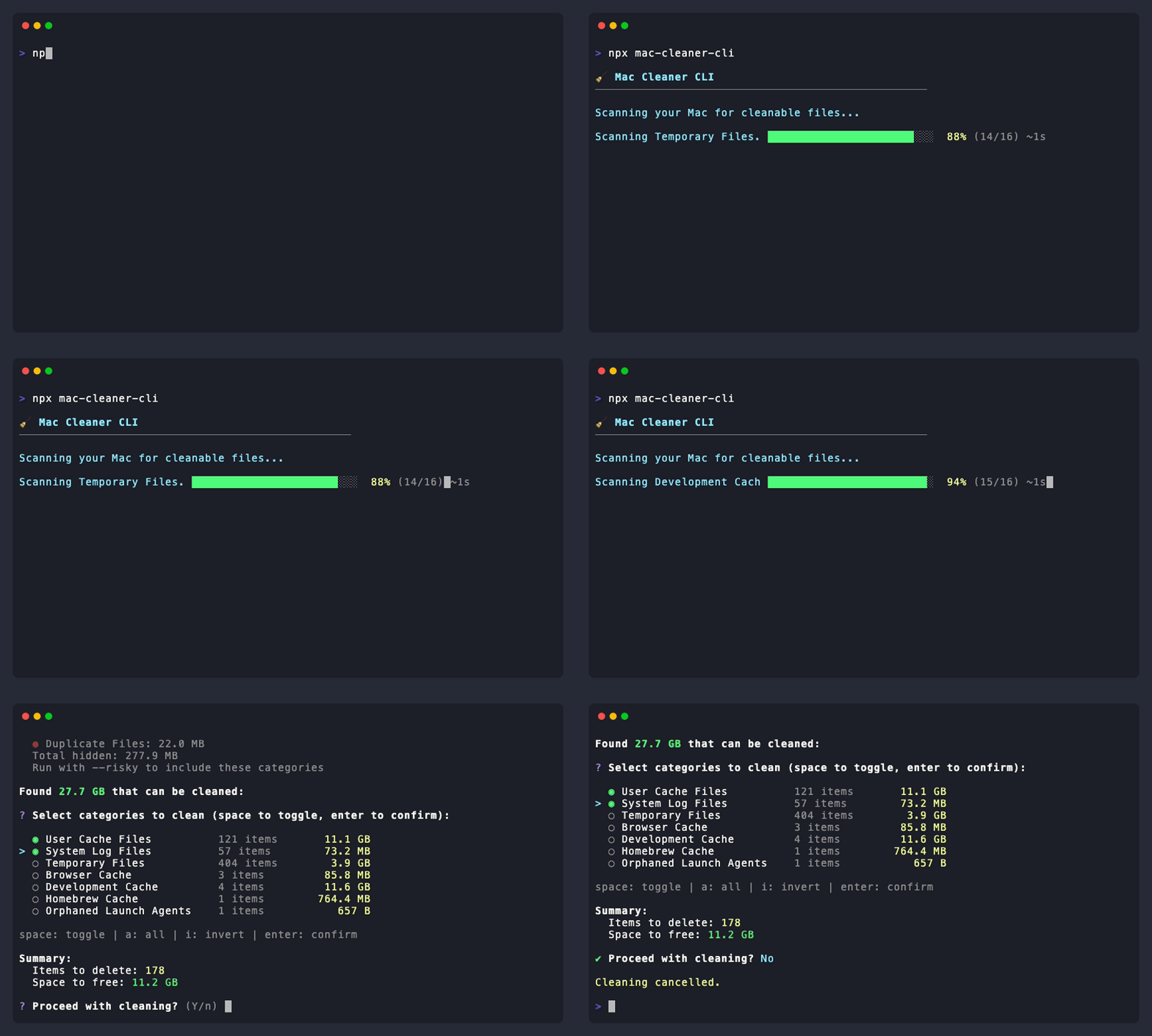
npx mac-cleaner-cliThat's it. No installation needed. The CLI will:
- 🔍 Scan your Mac for cleanable files
- 📋 Show you what was found with sizes
- ✅ Let you select exactly what to clean
- 🗑️ Clean only what you chose
Prefer not to open a terminal? Mac Cleaner is a menu bar app built on the same scanners as the CLI:
- 🧹 Cleans automatically every day (temp files, browser cache, Homebrew cache, logs — you choose)
- ⚡ Clean Now from the menu bar whenever you want
- 🔥 Deep Clean — scan more places, review what was found and permanently delete it
- 📊 Shows how much space every run freed, with a full history
Download the latest .dmg from Releases. See desktop/ for details and how to build it yourself.
| Feature | Description |
|---|---|
| 🚀 One Command | Just run npx mac-cleaner-cli — no complex setup |
| 🎯 Interactive | Select exactly what you want to clean with checkboxes |
| 📁 File Explorer | Drill down (→) into categories to select specific folders/files |
| 🛡️ Safe by Default | Risky items hidden unless you use --risky |
| 🔍 Smart Scanning | Finds caches, logs, dev files, browser data, and more |
| 📱 App Uninstaller | Remove apps completely with all associated files |
| 🔧 Maintenance | Flush DNS cache, free purgeable space |
| 🔒 Privacy First | 100% offline — no data ever leaves your machine |
| 📦 Minimal Dependencies | Only 5 runtime deps, all from trusted maintainers |
| Mac Cleaner CLI | CleanMyMac X | DaisyDisk | |
|---|---|---|---|
| Price | Free | $39.95/year | $9.99 one-time |
| Open Source | ✅ | ❌ | ❌ |
| Telemetry / Analytics | ❌ None | ||
| Works via terminal | ✅ | ❌ | ❌ |
| CI/CD friendly | ✅ | ❌ | ❌ |
| Customizable | ✅ Fork it | ❌ | ❌ |
| App Uninstaller | ✅ | ✅ | ❌ |
| File-level selection | ✅ | ✅ | ✅ |
| Category | What it cleans |
|---|---|
trash |
Files in the Trash bin |
temp-files |
Temporary files in /tmp and /var/folders |
browser-cache |
Chrome, Safari, Firefox, Arc cache |
| Category | What it cleans |
|---|---|
system-cache |
Application caches in ~/Library/Caches |
system-logs |
System and application logs |
dev-cache |
npm, yarn, pip, Xcode DerivedData, CocoaPods |
node-modules |
Orphaned node_modules in old projects |
homebrew |
Homebrew download cache and old formula versions (brew cleanup --prune=all) |
docker |
Unused images, stopped containers, build cache — only the types you select |
dockerandhomebreware not "safe": their cleanup is performed by the external tool, and it removes more than downloaded files. Docker removes images that aren't used by a running container (they must be pulled or rebuilt again), and Homebrew removes old formula versions. Docker volumes are never touched — that's your data, not cache.
| Category | What it cleans |
|---|---|
downloads |
Downloads older than 30 days |
ios-backups |
iPhone and iPad backup files |
mail-attachments |
Downloaded email attachments |
duplicates |
Duplicate files (keeps newest) |
large-files |
Files larger than 500MB |
language-files |
Unused language localizations — breaks the app's code signature |
git-worktrees |
Stale or orphaned git worktrees (agents, feature checkouts) |
# Interactive mode — scan, select, and clean
npx mac-cleaner-cli

# Include risky categories
npx mac-cleaner-cli --risky

# Preview what would be deleted, without deleting anything
npx mac-cleaner-cli --dry-run

# Enable file picker for all categories
npx mac-cleaner-cli --risky -fIn interactive mode, press → on supported categories to drill into specific folders/files:
↑↓navigate •←back •→enter •spaceselect •aall •iinvert •⏎submit
Supported categories: User Cache Files, Temporary Files, System Log Files, Development Cache, Browser Cache, Homebrew Cache.
# Scan only — see what can be cleaned without deleting anything
npx mac-cleaner-cli scan

# Machine-readable output for scripts and integrations
npx mac-cleaner-cli scan --json
npx mac-cleaner-cli scan --json --verbose   # include item paths

# Clean specific categories without prompts (great for cron/CI)
npx mac-cleaner-cli clean --categories trash,browser-cache,homebrew --yes

# Preview first
npx mac-cleaner-cli clean --categories dev-cache --dry-run

# Clean everything that is safe, no selection UI
npx mac-cleaner-cli clean --all --yes
Risky categories (downloads, iOS backups, etc) are always skipped unless you pass --unsafe.
Remove applications completely with all their preferences, caches, and support files:
npx mac-cleaner-cli uninstall# Flush DNS cache (may require sudo)
npx mac-cleaner-cli maintenance --dns
# Free purgeable space
npx mac-cleaner-cli maintenance --purgeable
# Delete Time Machine local snapshots (requires sudo, asks for confirmation)
sudo npx mac-cleaner-cli maintenance --timemachine
# Preview it first, or skip the prompt
npx mac-cleaner-cli maintenance --timemachine --dry-run
sudo npx mac-cleaner-cli maintenance --timemachine --yesLocal snapshots are taken automatically by Time Machine and can grow to hundreds of gigabytes. Deleting them is irreversible — they are your only local rollback point while the backup disk is disconnected — but macOS recreates them as needed once it is reconnected.
# List all available categories
npx mac-cleaner-cli categories

# Manage configuration
npx mac-cleaner-cli config --init
npx mac-cleaner-cli config --show

# Manage backups
npx mac-cleaner-cli backup --list
npx mac-cleaner-cli backup --restore <dir>
npx mac-cleaner-cli backup --cleanBy default, cleaning is permanent: files are removed with rm -rf and do
not go to the Trash.
You can opt into backups by setting backupEnabled in ~/.maccleanerrc:
{ "backupEnabled": true }With backups on, selected items are moved to ~/.mac-cleaner-cli/backup/<timestamp>/
instead of being deleted, and can be brought back with backup --restore.
Two honest caveats:
- Moving does not free disk space. The files still occupy the same volume.
Space is only reclaimed by
backup --clean, which deletes backups older than 7 days permanently. - Docker and Homebrew cannot be backed up. Their cleanup is performed by the
external tool (
docker system prune,brew cleanup), so there is no file for us to move. The CLI warns you before proceeding when these are selected.
If a backup fails, the item is not deleted — it stays where it is and the failure is reported.
-V, --version          Show version number
-h, --help             Show help
-r, --risky            Include risky categories
-f, --file-picker      Force file picker for ALL categories
-A, --absolute-paths   Show absolute paths
--no-progress Disable progress barsScans tolerate unreadable paths (missing Full Disk Access, permission errors), so a
category can come back empty without an obvious reason. Set MAC_CLEANER_DEBUG=1 to
print every skipped path and the underlying error:
MAC_CLEANER_DEBUG=1 npx mac-cleaner-cli scanExit codes: 0 on success, 1 when a category could not be scanned or an item could
not be deleted. scan --json also reports failures in an errors array.
If you use this tool frequently:
npm install -g mac-cleaner-cli
mac-cleaner-cli| ✅ Open Source | All code publicly available for audit |
| ✅ No Network | Operates 100% offline |
| ✅ No Root Required | All operations run as current user |
| ✅ Minimal Deps | Only 5 runtime dependencies |
| ✅ CI/CD | Every release tested with TypeScript, ESLint, and automated tests |
| ✅ Socket.dev | Dependencies monitored for supply chain attacks |
Found a vulnerability? Report it via GitHub Security Advisories.
git clone https://github.com/guhcostan/mac-cleaner-cli.git
cd mac-cleaner-cli
bun install
bun run dev      # Run in dev mode
bun run test     # Run tests
bun run lint     # Run linter
bun run build    # Build for production
Desktop app (Electron, lives in desktop/):
cd desktop
bun install
bun run start    # Build and launch the menu bar app
bun run test     # Run desktop tests
bun run dist # Package .dmg/.zip into desktop/release (macOS only)Contributions are very welcome! Whether it's a new scanner, a bug fix, or a documentation improvement — we'd love your help.
Read the full guide: CONTRIBUTING.md
Quick steps:
- Fork the repo
- Create your branch:
git checkout -b feat/my-feature - Make your changes and add tests
- Run
bun run lint && bun run test - Open a Pull Request
Looking for a place to start? Check issues labeled good first issue or help wanted.
- GitHub Discussions — questions, ideas, show & tell
- Issues — bug reports and feature requests
If this tool saved you disk space, a star goes a long way! It helps more Mac users discover this free alternative to paid cleaners.
If this tool saved you time or disk space, consider supporting the project!

Your support helps maintain and improve this tool. Thank you! 🙏
MIT License — see LICENSE for details.
This tool deletes files from your system. While we've implemented safety measures, always ensure you have backups of important data.
Made with ❤️ for Mac users everywhere