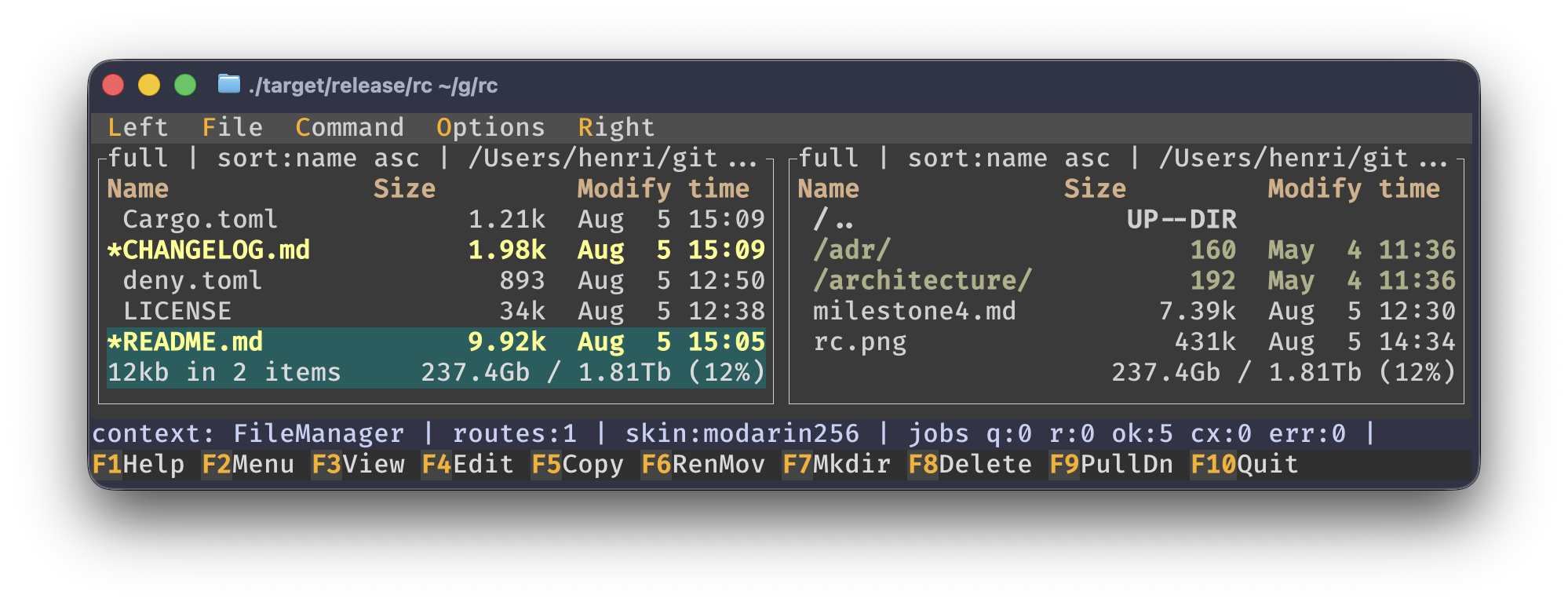
rust commander is an in-progress Rust TUI file manager inspired by GNU Midnight
Commander. I'm already using it as a daily driver and, even after 20 years of using mc,
I find it improves over the original in multiple ways:
- faster startup
- async operations
- better keybindings due to the removal of immediate shell
- Quick CD is really quick (keybinding:
/)
The goal is to provide mc-inspired behavior and keymaps, with a modern internal architecture that keeps the UI responsive while long operations run, without requiring a strict 1:1 reimplementation of every mc subsystem.
This repository is actively developed with AI assistance but human oversight and already usable for core workflows.
Implemented milestones:
- Milestone 0: workspace skeleton, app loop, tracing, CLI
- Milestone 1: dual panels, navigation, sorting, tagging, dialogs
- Milestone 2: copy/move/mkdir/delete with background jobs, progress, overwrite policies, and cancellation
- Milestone 3: read-only viewer with search, goto, wrap, syntax highlighting
- Milestone 4: complete find workflow, directory tree, labeled hotlist, external/find panelize, Quick CD, mouse interaction, and core Left/Right panel controls
- Settings overhaul (partial): mc-shaped Options menu, typed settings model, Save setup persistence
- External editor workflow: deterministic resolution, terminal suspend/resume, command templates
- Product direction update: external-editor-first workflow, command-based diff output, optional FTP/SFTP support
- Deliberate shell-key policy: there is no always-live shell input, so file-manager
keys remain available;
/opens Quick CD and>is reserved for a future explicit shell-command prompt
Recent Milestone 4 and reliability progress:
- Find compiles glob or regular-expression matchers once per search, supports optional whole-word content matching and ignored directories, streams stable selections, and reports truncation and bounded read errors distinctly from cancellation or failure.
- Tree scanning is iterative, cancellation-aware, request-correlated, sorted in preorder, and indexed for parent/child/subtree operations. Static/dynamic navigation, incremental search, rescan/forget, and file operations are complete.
- Hotlist entries persist editable labels and paths with legacy migration, duplicate/path
validation, optional deletion confirmation, and
Ctrl-X Hquick-add. - External panelize uses named presets, bounded adaptive streaming, exact-job cancellation, and per-panel result history; find results use the same virtual-panel layer.
- Quick CD supports quoted relative/absolute paths,
~, Unix~user, and per-panelcd -history. Arbitrary case-insensitive substrings search directories from the current directory, home, and filesystem root in a bounded, cancelable background scan; ranked results stream into an arrow-selectable list. - Find results, tree, hotlist, and panelize preset lists support click selection and double-click activation from a renderer-shared hit-test layout.
- Left/Right menus provide targeted File listing, Quick view, Info, Tree, Panelize, and Rescan actions; persisted Full/Brief/Long formats, complete sort fields, and glob/regex filters are independent for each panel.
- Quick view uses cancelable request-correlated background reads. Listing filters preserve hidden tags and selection where possible, and reuse cached panelized results instead of rerunning a command.
- Tagged selection totals use cancelable background traversal and include complete directory contents, while overlapping trees are counted once and unreadable entries are reported as a partial total.
The remaining inactive Left/Right entries are explicitly later work: user-defined listing formats in Milestone 5, FTP/SFTP in Milestone 8, Shell links in Milestone 9, and lossless legacy filename transcoding in Milestone 10.
Planned next major milestones include mc.ext.ini, user menu, command-based diff
integration (difftastic/diff), optional remote VFS, and subshell integration.
See doc/roadmap.md.
Requirements:
- Rust 1.88.0 or newer
- A terminal with ANSI support
Install Rust Commander from crates.io:
cargo install rust-commander --lockedThen launch it with:
rcThe package is named rust-commander; the installed executable is intentionally named
rc.
To build and run from a local checkout instead:
cargo run -p rust-commander --lockedOptional arguments:
rc --path /some/start/dir --tick-rate-ms 200Select an mc skin:
rc --skin modarin256
rc --skin julia256 --skin-dir /path/to/mc/skins
rc embeds its bundled original skins in the binary and also discovers custom and system
skins in locations such as /usr/share/mc/skins and Homebrew paths.
-
Options menu now follows MC categories:
Configuration,Layout,Panel options,Confirmation,Appearance,Display bits,Learn keys,Virtual FS, andSave setup. -
Settings are loaded with deterministic precedence: built-in defaults -> persisted config -> environment overrides -> CLI flags.
-
Save setuppersists to:~/.config/rc/settings.inifor rc-owned settings.~/.config/mc/inifor MC-compatible skin key.
-
Skin discovery uses ordered search roots: custom configured dirs, then bundled/system MC skin directories.
Main file manager:
Tab: switch active panelEnter/F3: open directory or open file in viewerF4: edit file usingeditor_command,$EDITOR,$VISUAL, or PATH probes (hx,nvim,vim,vi,emacs)Space/Insert/Ctrl-T: toggle selected itemBackspace: go to parent directory/orAlt-C: Quick CD; enter an exact path (~, Unix~user, relative, absolute, or-for previous) or any substring, then choose ranked matches withUp/Down>: reserved for a future explicit shell-command prompt; rc has no always-live shell inputF2: reserved for the MC-compatible user menu coming in Milestone 5F5copy,F6rename/move,F7mkdir,F8deleteCtrl-J: open jobs screenAlt-J: cancel latest/selected jobAlt-F,M-?,Ctrl-/: open find dialogAlt-T: open treeAlt-H: open hotlistAlt-P/Ctrl-PorCtrl-Xthen!: open external panelizeF9: open menus; Left/Right configure either panel's view, format, sort, and filterCtrl-X i/Ctrl-X q: show Info / Quick view in the passive panelAlt-Shift-T: cycle Full, Brief, and Long formats on the active panelLeft/Right: move across responsive columns in Brief formatShift-F6/Shift-F8: cycle sort field / toggle reverse orderq/Esc: quit
Milestone 4 screens:
- Find results:
F4search again,F5panelize,F6pause/continue,Alt-Jcancel the exact search. - Tree: arrows navigate,
F2rescan,F3forget subtree,F4static/dynamic mode,F5/F6/F7/F8copy/move/mkdir/delete. - Hotlist:
aadd,e/F4edit,d/Deleteremove,Enteropen. - Panelize presets:
Tabcustom command,F2add,F4edit,F8remove,Enterrun. The side-panelPanelizemenu entry restores that panel's latest results. - Mouse: click a result/list entry to select it; double-click to open or run it.
Viewer:
F7/Ctrl-S: searchShift-F7: search backwardn/Shift-n: continue search forward/backwardg/Alt-L: gotow: toggle wraph: toggle hex/text modeEsc/q/F10: close viewer
Notes:
- Default bindings are loaded from
crates/core/assets/mc.default.keymap. - Common macOS Option-symbol variants are normalized for keymap matching.
crates/app(rust-commander): terminal app entrypoint, event loop, input normalizationcrates/core(rust-commander-core): domain model, commands, routes, operations, jobscrates/ui(rust-commander-ui): ratatui rendering and bundled skin supportcrates/shell(rust-commander-shell): cancelable process backend primitivesdoc/roadmap.md: feature plan and milestone breakdowndoc/architecture/: bounded contexts, crate contracts, ownership mapdoc/adr/: architecture decision records
Runtime tracing is written to ~/.config/rc/rc.log instead of the terminal so
diagnostics cannot corrupt the alternate-screen UI. Set RC_LOG_FILE to use a
different path and RUST_LOG to change the default warn filter. Logs at or
above 8 MiB are reset on the next startup.
Run baseline checks locally:
cargo fmt --all -- --check
cargo clippy --workspace --all-targets --all-features --locked -- -D warnings
cargo test --workspace --all-targets --all-features --locked
Additional local equivalents of CI policy/perf checks (requires extra cargo tools):
cargo +1.88.0 check --workspace --all-targets --locked
cargo nextest run --workspace --all-targets --all-features --locked
./scripts/validate_rust_advisory_waivers.sh
cargo deny check bans licenses sources
./scripts/run_cargo_deny.sh \
  --manifest-path Cargo.toml --all-features --locked \
  check --config deny.toml advisories
./scripts/verify_release_packages.sh
cargo +nightly udeps --workspace --all-targets --all-features --locked
mkdir -p target/coverage
cargo llvm-cov --workspace --all-targets --all-features --locked --json --output-path target/coverage/llvm-cov.json
./scripts/coverage_trend.sh target/coverage/llvm-cov.json .github/coverage-baseline.json
CI runs all required gates on pushes and pull requests via:
.github/workflows/ci.yml.github/workflows/rust-security.yml, which also runs weekly against the latest RustSec advisory database
GPL-3.0-or-later, as this project is derived from the original midnight commander. See LICENSE for the complete terms.