
A GNOME Shell 40+ Extension






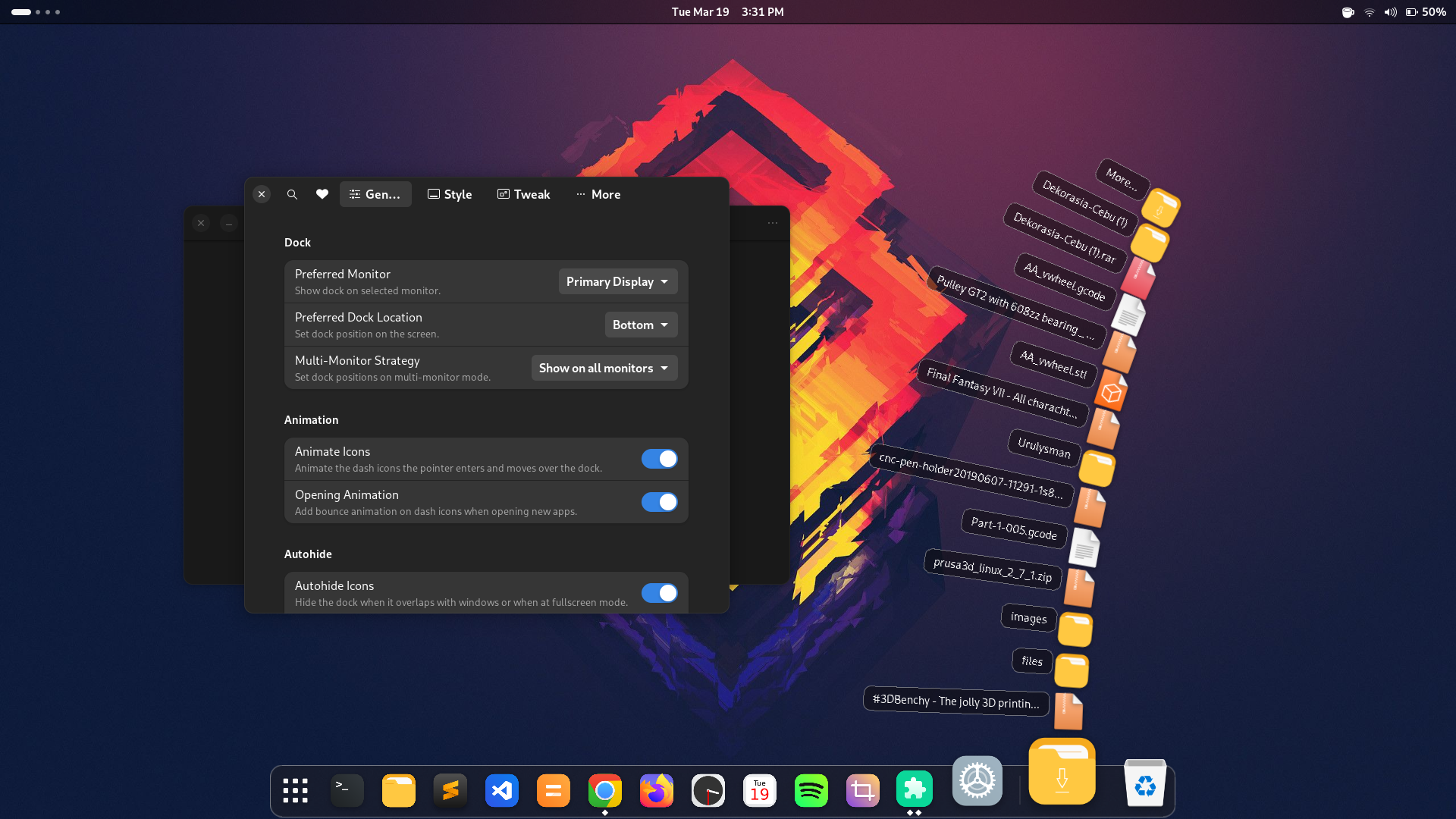
Maintenance and GNOME version compatibility updates are now primarily assisted by AI.
Due to GNOME Extensions reviewer policies regarding AI tooling, updates may no longer be available at extensions.gnome.org and will be published primarily through this repository. Releases will include simple installation instructions.
If you prefer strictly human-maintained code, feel free to skip this extension. If you enjoy having updates keep pace with new GNOME releases and want to help fund the AI compute tokens keeping it alive, support via Buy Me A Coffee or Ko-fi is greatly appreciated.
- Supports GNOME 42, 43, 44, 45, 46, 47, 48, 49, 50
- Older versions are largely unsupported
- Multi-monitor support (new!)
- Dash docked at the desktop
- Animated dock icons
- Resize icons
- Autohide/intellihide
- Dock positions: bottom, top, left, right
- Scroll wheel to cycle windows
- Click to maximize/minimize windows
- Style top panel
- Panel mode
- Show/Hide Apps icon
- Analog clock
- Dynamic calendar
- Dynamic trash icon
- Mounted devices
- Downloads icon with fan animation (new!)
- Icon color effects (Tint, Monochrome)
- Custom icons
- GNOME Shell (version 42+)
Run the one-line installer in your terminal. It automatically detects your GNOME Shell version, presents compatible releases, downloads, installs, and offers to enable the extension:
bash <(curl -sSL https://raw.githubusercontent.com/icedman/dash2dock-lite/main/install.sh)or
curl -sSL https://raw.githubusercontent.com/icedman/dash2dock-lite/main/install.sh | bash- Clone this repository:
git clone https://github.com/icedman/dash2dock-lite.git
- Build and install using the
Makefile:cd dash2dock-lite make
This requires an Arch-based distribution to work:
git clone https://aur.archlinux.org/gnome-shell-extension-dash2dock-lite.git
cd gnome-shell-extension-dash2dock-lite
makepkg -siVisit https://extensions.gnome.org/extension/4994/dash2dock-lite/
Export your settings under Style > Themes Button > "Export"...
This will be saved to /tmp/theme.json. Edit this JSON file and save it under ~/.config/d2da/themes or at {extension_path}/themes so that it becomes available in the extension settings app.
Create a folder under ~/.config/d2da/icons and place your SVG icons there. Then create a file under ~/.config/d2da/icons.json using the following format:
{
  "icons": {
     "view-app-grid-symbolic": "icons/show-apps-icon.svg",
     "user-trash": "icons/my-own-trash.svg",
     "user-trash-full": "icons/my-own-trash-full.svg"
  }
}
You may also use icon names from your favorite icon theme using the following format:
{
  "icons": {
     "view-app-grid-symbolic": "show-apps-icon",
     "user-trash": "trash",
     "user-trash-full": "trash-full"
  }
}
The icons show-apps-icon, trash, and trash-full must be available in your icon theme folder.
Alternatively, you may override icons via app ID:
{
   "apps": {
      "spotify_spotify": "icons/spotify.svg"
   }
}
Check the logs to see the icon names currently being used by Dash2Dock Animated. Search for log text such as:
Icon created "user-trash"Create a file config.json under the folder ~/.config/d2da/
{
  "file-explorer": "nemo",
  "icon-size": "24"
}- Disable then enable the extension to load the configuration
file-exploreroverrides the default "nautilus"icon-sizeoverrides the icon scale from the preferences panel
Create a file style.css under the folder ~/.config/d2da/
For now, you will have to use Looking Glass (GNOME's built-in debugger) to inspect class names and styles.
The blurred background feature requires ImageMagick to be installed on the system. This generates the blurred image based on the desktop wallpaper.
To build and install Dash2Dock Animated for older versions (prior to GNOME 45), run:
make g44When reporting bugs, please include the following details:
- Linux Flavor/Distribution and version
- GNOME version (e.g. 45.xx)
- Dash2Dock Animated release number
Check for any exceptions in the logs by running the following in the terminal:
journalctl /usr/bin/gnome-shell -f -o catTo check for incompatibilities with other extensions, try running Dash2Dock Animated with all other extensions disabled.
To check for lag or inefficiency, run the following in the terminal and observe gnome-shell CPU usage:
top -d 0.5On a Dell XPS 13 (i5-6200U), CPU usage is about 50% with icon quality set to High, frame rate set to High, and shadows enabled.
Please be specific about the errors encountered, and attach screenshots if possible.
- Fedora 43 (GNOME 49)
- Arch Linux (GNOME 49)
- Fedora 37 Live (GNOME 42)
- Ubuntu 23 (GNOME 45)
Distributed under the GPL 3.0 License. See LICENSE for more information.