

An Inputfield and Fieldtype to store various times on each day, fe business hours for a company. This input field can also be used to enter times of courses (first course runs from 08:00-09:30, second from 10:00-11:30, ...), times for theater performances, workshops and so on, but it was primarily developed for opening hours of a company. Each day can have multiple times (max. 5) or nothing at all (closed).
- ProcessWire 3.0.181 or newer
- PHP 8.0 or newer
To let you use this field without reading the docs first, a quick-start guide is included inside the configuration of the inputfield. So if you have created a new field of this field type, you will find this quick-start guide in the field configuration, inside the input tab.

You only have to copy the preferred code from there and paste it inside your template, and you can then output the opening times. For more advanced integration you will need to read the docs.
This module lets you enter various times per day using a specially designed UI. You can add more times by clicking an add button. The new input will be created dynamically via jQuery. The status (open/closed) can be set via a toggle switch.
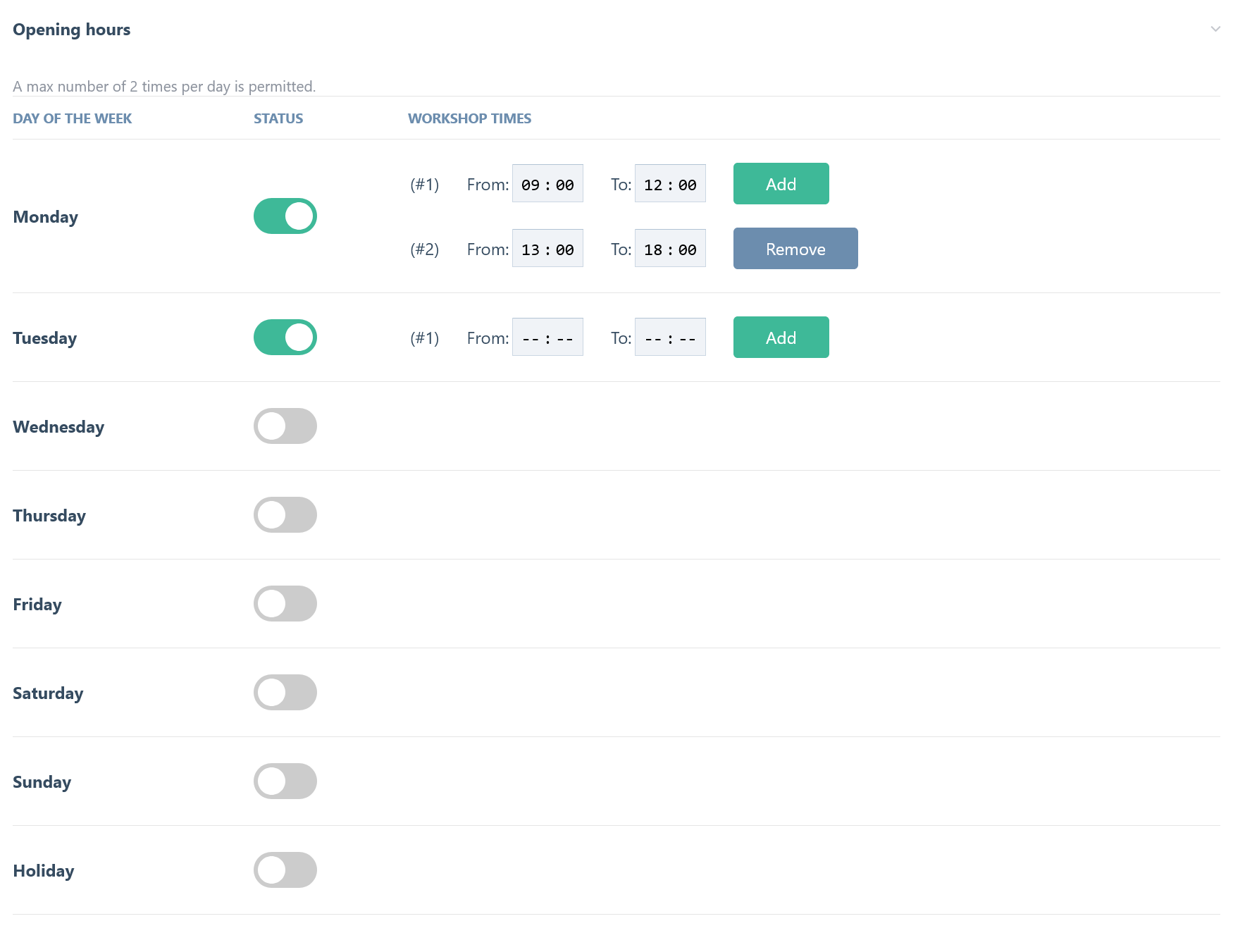
The values are stored in the database in a single column, in JSON format. By the way: storing multiple values in one column is not generally best practice, but in this case it seems to be the best solution, because we have an unknown number of times per day.

Number of times per day: You can select how many times are allowed on each day (minimum 1, maximum 5, default 2). In most cases, you will need two times on each day: morning and afternoon.Output formatting of time string: You can also set the output formatting of the time string (default is %R, which is equal to an output like 08:00 in 24-hour format) on the frontend. The format of the time can be set in date() or strftime() format.Change tableheader text in input field: You can alter the text of the table header of the "times" column. If you are showing opening hours, you will set the table header to "Opening hours". If you want to enter times for courses, you would probably add a table header like "Times of courses" or something similar. You can alter the heading of the "times" column in the backend to fit your requirements (supports multi-language values).Show/hide Holiday input: You can select whether you want to use the input field for Holiday or not (default is yes).
In addition to the regular weekly schedule, the field also supports date-based exceptions - fe a public holiday, a company vacation, or a single day with reduced hours. Each exception has a start and end date, an optional multi-language label, and can either be marked "closed all day" or have its own set of times, independent of the regular weekly schedule. An exception can also be set to repeat every year (fe for a fixed-date holiday like Christmas), in which case only its month and day are used for matching, not the specific year it was entered with.
Exceptions are configured directly below the weekly schedule table in the field's input, and are validated and stored per page, together with the regular times. If two exceptions' date ranges overlap, a warning is shown when saving, since only the first matching exception in the list is ever applied on the overlapping days.
A lot of sanitization and validation takes place inside the processInput method to "clean" user input. This happens separately for the regular weekly schedule and for exceptions (holidays/company vacation), since they're validated a little differently.
duplicate times on one day will be removed: Only one entry remains of each kind per day (it doesn't make sense to have the same time twice on one day).multiple empty times (empty inputs) will be removed: This can result from clicking the add button multiple times to create new inputs without entering any values.incomplete times (only start or end time) will be removed: Every opening time must have a start and end time; an incomplete pair is reset to empty and a warning is shown.inputs that are not a string and/or not in a valid time format will be deletedthe number of times per day is limited to the configured maximum: Any additional times beyond the "Number of times per day" setting are silently dropped.multiple times on each day are re-ordered by sorting the start times: Fe if the first time is 14:00-18:00 and the second is 07:00-12:00, the second one will become the first after ascending re-ordering.checking if the start time equals the end time: If so, an error message is shown, because this doesn't make sense.checking if two time ranges on the same day overlap: Fe 08:00-12:00 and 10:00-14:00 entered for the same day. If so, a warning message is shown (the times themselves are kept as entered - nothing is dropped or auto-corrected).checking if the start time is before the end time: If not, a warning message is shown. This can only be valid if the end time is on the next day, fe 20:00-03:00.
the start date must be a valid, well-formed date: If not, the whole exception is silently discarded.the end date must be a valid, well-formed date: If missing or invalid, it falls back to the start date (fe a single-day exception).the end date must be on or after the start date: If not, an error message is shown and the end date is reset to match the start date.the label is sanitized against XSS: Plain text sanitization is applied to the label; on a multi-language site, only the site's actual language keys are accepted - any other key is silently dropped, which also prevents a crafted key (fe__proto__) from being stored."Closed all day" exceptions don't require any times: The Hours field is ignored while this is checked.the number of times is limited to the configured maximum, same as for the regular weekly schedule.inputs that are not a string and/or not in a valid time format will be deleted, same as for the regular weekly schedule.checking if the start time is before the end time: Unlike the regular weekly schedule, an exception's Hours field doesn't allow an overnight wraparound, so an end time before the start time is always an error and the time pair is removed.incomplete times (only start or end time) will be removed: An error is shown, since both must be filled in together.at least one time is required unless the exception is marked "Closed all day": If neither is true, an error message is shown.checking if two exceptions' date ranges overlap: Since only the first matching exception applies on any given date, overlapping ranges (fe a company-vacation exception and a public-holiday exception covering some of the same days) would silently mean the second one is never applied - a warning is shown in this case. For a year-recurring exception, only the month and day are compared, not the specific year it was entered with.
There are several methods to output the times in templates. The following methods return the results as (multidimensional) arrays. You can use these arrays to create your own markup for the output.
The array methods don't render any markup. They output an array of values that can be displayed, fe via a foreach
loop inside the template.
These methods provide raw data for your own markup creation.
print_r($page->fieldname->times);
This call always outputs all times for each day of the week (including holiday) as a multidimensional associative array.
[mo] => Array (
    [0] => Array (
        [start] => 14:00
        [finish] => 18:00
        )
    )
[tu] => Array (
    [0] => Array (
        [start] => 08:00
        [finish] => 12:00
        )
    [1] => Array (
        [start] => 14:00
        [finish] => 18:00
        )
    [2] => Array (
        [start] => 20:30
            ...
            ...
[ho] => Array (
    [0] => Array (
        [start] =>
        [finish] =>
        )
    )
]
If a day has no times (like ho in this example), it means the company is closed on that day.
You can use the day abbreviation as an array key to get the times on a specific day:
Abbreviations that can be used: mo, tu, we, th, fr, sa, su, ho. ho stands for Holiday in this case.
Example to get all times on Monday:
print_r($page->fieldname->times['mo']);
This outputs all opening times on Monday as an array:
[0] => Array (
    [start] => 14:00
    [finish] => 18:00
    )
As you can see in the example above, you always get an array. This is because there can be multiple times on each day (not only one, as in this example).
You can use this array on the frontend to create the markup yourself.
Sometimes you have the same opening hours on different days. With this method, you can combine and output them as an array.
print_r($page->fieldname->combinedDays());
This outputs an array like this:
[mo] => Array (
    [days] => Array (
        [0] => mo
        [1] => tu
        )
    [opening_hours] => Array (
        [0] => Array (
            [start] => 08:00
            [finish] => 16:00
            )
        )
    )
[we] => Array (
    [days] => Array (
        [0] => we
        )
    [opening_hours] => Array (
        [0] => Array (
            [start] => 16:00
            [finish] => 23:05
            )
        )
    )
[th] => Array (
    [days] => Array (
        [0] => th
        [1] => fr
        [2] => sa
        [3] => su
        [4] => ho
        )
    [opening_hours] => Array (
        [0] => Array (
            [start] =>
            )
        )
    )
You can pass a boolean parameter to control whether closed days are displayed:
print_r($page->fieldname->combinedDays(false));
Passing false removes days with no times from the array (default is true, showing all days).
This method was inspired by Spatie/Openinghours (https://github.com/spatie/opening-hours).
The following method returns an array with combined opening times for a week. You can use it to create your own render function for schema.org markup.
print_r($page->fieldname->getjsonLDTimes());
This returns an array that combines all days with the same hours.
Array ( [0] => Mo,Tu,We 08:00-12:00 [1] => Mo,Th 13:00-18:00 [2] => Th 08:00-11:00 )
As you can see, days with the same opening times are combined. You can use this array to create the markup yourself. The times are always in H:i format (independent of language settings), because Schema.org only accepts this format. Keep this in mind if you are running a multilingual site.
Besides times, the field also exposes the configured exceptions (holidays, company vacation, reduced hours) as
a plain array, the same way times works:
print_r($page->fieldname->exceptions);
Array (
    [0] => Array (
        [label] => Christmas
        [startDate] => 2026-12-24
        [endDate] => 2026-12-26
        [recurring] => 1
        [closed] => 1
        [times] => Array ( )
        )
    [1] => Array (
        [label] => Christmas Eve
        [startDate] => 2026-12-24
        [endDate] => 2026-12-24
        [recurring] => 1
        [closed] =>
        [times] => Array (
            [0] => Array (
                [start] => 08:00
                [finish] => 12:00
                )
            )
        )
    )
label can also be a multi-language array (fe [default => 'Christmas', 5 => 'Weihnachten']) if you entered a
label per language. recurring means the exception repeats every year and only its month/day is relevant, not the
year it was originally entered with.
print_r($page->fieldname->getExceptionForDate());

or for a specific date:

print_r($page->fieldname->getExceptionForDate(new DateTime('2026-12-24')));
$date defaults to today if omitted. This returns a single exception (same shape as one entry of exceptions
above), or null if no exception applies to that date.
This method combines the regular weekly schedule and the exceptions into one result, so you don't need to check both yourself.
print_r($page->fieldname->getStatusForDate());
$date defaults to today if omitted. On a day with an exception, this returns:
Array (
    [closed] => 1
    [label] => Christmas
    [times] => Array ( )
    [start] =>
    [finish] =>
    [exception] => 1
    )
On a normal day without an exception, it falls back to the regular weekly schedule for that weekday:
Array (
    [closed] =>
    [label] =>
    [times] => Array (
        [0] => Array ( [start] => 08:00 [finish] => 16:00 )
        )
    [start] => 08:00
    [finish] => 16:00
    [exception] =>
    )
start/finish are only the first time pair (kept for convenience); use times if a day can have more than one.
If you want to list upcoming or past exceptions (fe for a "special opening hours" notice), you can fetch them grouped by week, month or year instead of checking one date at a time:
print_r($page->fieldname->getExceptionsForWeek());       // week containing today, or pass a DateTime
print_r($page->fieldname->getExceptionsForMonth());      // current month, or pass a month number (1-12); always
                                                           // uses the current year
print_r($page->fieldname->getExceptionsForYear());        // current year, or pass a year number
Each of these returns a plain array of exceptions (same shape as exceptions above), or an empty array if none
apply. getExceptionsForYear() also includes a non-recurring exception whose date range spans across New Year's
Eve into the given year, even if it was entered under the other year.
print_r(\ProcessWire\OpeningHours::filterActiveExceptions($page->fieldname->exceptions));
This static helper method removes non-recurring exceptions whose end date is already in the past (relative to
today, or an optional second DateTime parameter), while keeping every recurring exception. Useful if you're
looping over exceptions yourself and only want to show what's still relevant.
Tip: If you need the values as stored in the database, without output formatting, you have to prevent output formatting by setting it to false. This prevents the formatValue() method from changing the times to the format you have set in the backend. This is nothing specific to this module - it's a standard ProcessWire technique.
$page->setOutputFormatting(false);
// put your method/property call here
$page->setOutputFormatting(true);
If you want to output how many times were set, you can use this method, which returns the number of times as set in the backend.
echo $page->nameOfMyField->getNumberOfTimes(); // returns fe 5
You can use this method if you want to check whether at least one time has been set.
if($page->nameOfMyField->getNumberOfTimes()){
    echo "There is at least one opening time set";
}
The render methods return a string for direct output inside templates. You can use these methods if they satisfy your needs. If you want to customize your markup, it's better to use the array methods above and create the markup yourself. By the way: the render methods also have some parameter settings to influence the output, so a little customization is always possible ;-)
This is the base rendering method. You have a lot of options to customize the output:
- wrappertag: set the tag for the outer container (default is ul)
- wrapperclass: add a CSS class to the wrapper tag (default: '')
- itemtag: set the outer tag for the container holding each day's opening times (default is li)
- daytag: the tag element that surrounds the day name (default: false -> no surrounding element)
- dayclass: a CSS class for the daytag element (default: false -> no class)
- timetag: the tag element that surrounds the opening times on that day (default: false -> no surrounding element)
- timeclass: a CSS class for the timetag element (default: false -> no class)
- daytimeseparator: a string to separate the day name and the times, or false to remove it (default is :)
- fulldayName: show the full name (true) or the day name abbreviation (false) -> (default: false)
- timeseparator: separator between multiple times (default: ,)
- timesuffix: text to add after the time string (default: '')
- showClosed: true/false, show closed days or not (default: true)
- closedText: overwrite the default text for closed days (default is "closed")
All of these parameters can be set as an array inside the parentheses of the method to overwrite the defaults. By default, the opening times are rendered as an unordered list.
echo $page->fieldname->render();
This renders all times as an unordered list, like this:
<ul class="opening-list">
  <li class="time day-mo">Monday: 11:00-11:30 h; 12:00-13:00 h; 14:00-15:00 h</li>
  <li class="time day-tu">Tuesday: closed</li>
  <li class="time day-we">Wednesday: closed</li>
  <li class="time day-th">Thursday: closed</li>
  <li class="time day-fr">Friday: closed</li>
  <li class="time day-sa">Saturday: closed</li>
  <li class="time day-su">Sunday: closed</li>
  <li class="time day-ho">Holiday: closed</li>
</ul>
A little more advanced, with some parameters changed:
- wrappertag: set the tag for the outer container (default is ul)
- daytag: set the tag for the container holding each day's opening times (default is li)
- wrapperclass: enter a class for the wrapping element (default: none)
- fulldayName: output the full name (fe Monday) if set to true, or the abbreviation (fe Mo) if set to false (default: false)
- timeseparator: separator string between the different times per day (default: ',')
- timesuffix: text to display after the time (default: none)
- showClosed: true: closed days are displayed; false: closed days are not displayed (default: true)
Please use these parameters as an array (see the example below) inside the parentheses to adapt the markup to your needs.
echo $page->fieldname->render(['wrappertag' => 'div', 'itemtag' => 'div', 'daytag' => 'span', 'timetag' => 'span', 'wrapperclass' => 'opening-list', 'fulldayName' => true, 'timeseparator' => '; ',
    'timesuffix' => ' h', 'showClosed' => false]);
This renders all times in a list like this:
<div class="opening-list">
<div class="time day-mo"><span class="day-mo">Monday:</span> <span class="time mo">8:00 - 12:00 h</span></div>
<div class="time day-tu"><span class="day-tu">Tuesday:</span> <span class="time tu">8:00 - 12:00 h</span></div>
<div class="time day-we"><span class="day-we">Wednesday:</span> <span class="time we">8:00 - 12:00 h; 14:00 - 18:00 h</span></div>
<div class="time day-th"><span class="day-th">Thursday:</span> <span class="time th">12:00 - 16:00 h</span></div>
<div class="time day-fr"><span class="day-fr">Friday:</span> <span class="time fr"></span></div><div class="time day-sa"><span class="day-sa">Saturday:</span> <span class="time sa"></span></div>
<div class="time day-su"><span class="day-su">Sunday:</span> <span class="time su"></span></div><div class="time day-ho"><span class="day-ho">Holiday:</span> <span class="time ho"></span></div>
</div>
There are also 3 predefined functions to render the opening times as a table, a definition list, or using div and span containers.
You will find the description of these methods later in these docs.
Available parameters:
- timeseparator: separator string between the different times per day (default: ',')
- timesuffix: text or markup to show after the time string (default: none)
- showClosed: show (true) or hide (false) days with no opening times (default: true)
echo $page->fieldname->renderDayTime('mo');

or more advanced, with parameters:

echo $page->fieldname->renderDayTime('mo', ['timeseparator' => '; ', 'timesuffix' => ' hour', 'showClosed' => true]);
This results, fe, in the following output:
08:00-12:00; 14:00-18:00
Please note: the deprecated method renderDay() does the same and can still be used, but this method's name fits the result better, so it was renamed.
You can set the following parameters inside an options array to control the output:
echo $page->fieldname->renderCombinedDays();

or a little more advanced, with some parameters:

echo $page->fieldname->renderCombinedDays(['ulclass' => 'uk-list', 'fulldayName' => true, 'timeseparator' => '; ',
'closedText' => '-']);
This renders all combined days with the same times as an unordered list:
<ul class="uk-list">
<li class="oh-item">Monday, Tuesday:8:00 - 12:00</li>
<li class="oh-item">Wednesday:8:00 - 12:00, 14:00 - 18:00</li>
<li class="oh-item">Thursday:12:00 - 16:00</li>
<li class="oh-item">Friday, Saturday, Sunday, Holiday:-</li>
</ul>
As an addition, and to keep things short and easy, you can use these methods to get another kind of markup:
For every method, you can pass 2 parameters: the first is the options array described above, and the second is a boolean parameter to render combined times or not.
This outputs all opening times inside a table.
echo $page->fieldname->renderTable();
or with parameters:
echo $page->fieldname->renderTable(['wrapperclass' => 'myclass'], true);
The first parameter adds the CSS class "myclass" to the table tag, and the second parameter forces the output of combined times.
This outputs all opening times as a definition list.
echo $page->fieldname->renderDefinitionList();
or with parameters:
echo $page->fieldname->renderDefinitionList(['wrapperclass' => 'mydefinitionlist'], true);
The first parameter adds the CSS class "mydefinitionlist" to the dl tag, and the second parameter forces the output of combined times.
This outputs all opening times using classic div and span containers.
echo $page->fieldname->renderDiv();
or with parameters:
echo $page->fieldname->renderDiv(['wrapperclass' => 'mycontainer'], true);
The first parameter adds the CSS class "mycontainer" to the wrapping div tag, and the second parameter forces the output of combined times.
If you want to display upcoming or past exceptions (holidays, company vacation, reduced hours) as ready-made
markup instead of building it yourself from exceptions/getExceptionForDate()/etc., you can use one of these
three methods:
echo $page->fieldname->renderExceptionsForWeek();     // week containing today, or pass a DateTime
echo $page->fieldname->renderExceptionsForMonth();    // current month, or pass a month number (1-12); always
                                                        // uses the current year
echo $page->fieldname->renderExceptionsForYear();     // current year, or pass a year number
All three accept an options array as their last parameter. They reuse the same option keys as render() above,
but only these have an effect here:
- wrappertag: set the tag for the outer container (default is ul)
- wrapperclass: add a CSS class to the wrapper tag (default: '')
- itemtag: set the tag for each item (default is li)
- dateformat: PHP date() format used for each date shown (default is d.m.Y)
- fulldayName: show the full weekday name (true) or the abbreviation (false) -> (default: false)
- daytimeseparator: separator between the date/day text and the times/closed text (default is :)
- timeseparator: separator between multiple time pairs on the same exception (default: ', ')
- closedText: text shown when the exception is closed all day (default is "closed")
echo $page->fieldname->renderExceptionsForWeek(new DateTime('2026-12-21'));
This renders every exception falling within that week as a list, grouping consecutive days that belong to the same exception into a single item:
<ul>
  <li>Th 24.12.2026: closed (Christmas Eve)</li>
</ul>
With a multi-day exception, fe a company vacation from 12.12. to 31.12.2026:
<ul>
  <li>Th 24.12.2026: closed (Christmas Eve)</li>
  <li>Sa 12.12.2026 - Th 31.12.2026: closed (Company vacation)</li>
</ul>
renderExceptionsForMonth()/renderExceptionsForYear() work the same way, just scanning a whole month or year
instead of a week. If there are no exceptions in the given period, you get just the empty wrapper, fe <ul></ul>.
echo $page->fieldname->renderjsonLDTimes();
This method renders a string like this:
"Mo,Tu,We 08:00-12:00", "Mo,Th 13:00-18:00", "Th 08:00-11:00"
This string can be used in the schema.org markup for a local business's opening hours, like this:
.....
"openingHours": [
    "Mo-Sa 11:00-14:30",
    "Mo-Th 17:00-21:30",
    "Fr-Sa 17:00-22:00"
  ],
.....
The times are always in H:i format (independent of language settings), because Schema.org only accepts this format. You can find examples of how to represent opening hours as structured data at https://schema.org/LocalBusiness
Schema.org also has a specialOpeningHoursSpecification property for holidays/exceptions, similar to
openingHours above. You can render it the same way:
echo $page->fieldname->renderJsonLDSpecialOpeningHours();
This renders a string like this (one JSON object per exception/time pair, comma-separated - a full closure is
represented as opens/closes both being 00:00, which is Google's recommended way to mark a closure):
{"@type":"OpeningHoursSpecification","opens":"00:00","closes":"00:00","validFrom":"2026-12-24","validThrough":"2026-12-26"}
Used inside your markup the same way as openingHours above:
.....
"openingHours": [<?= $page->fieldname->renderjsonLDTimes() ?>],
"specialOpeningHoursSpecification": [<?= $page->fieldname->renderJsonLDSpecialOpeningHours() ?>]
.....
If there are no currently active exceptions, this returns an empty string, so the property above simply becomes
an empty array ([]).
All static texts are fully translatable (frontend and backend). The time format on the frontend can also be set per language in the backend configuration of the input field (fe the default is %R, and English is %r). This is only taken into account if output formatting is not set to false (the default is true). This module also includes a German translation file.
-
Download and place the module folder named "FieldtypeOpeningHours" in: /site/modules/
-
In the admin control panel, go to Modules. At the bottom of the screen, click the "Check for New Modules" button.
-
Now scroll to the FieldtypeOpeningHours module and click "Install". The required InputfieldOpeningHours module will be installed automatically.
-
Create a new field with the new "OpeningHours" Fieldtype.