


Send cross platform native notifications using Node.js. Notification Center for macOS,
notify-osd/libnotify-bin for Linux, Toasters for Windows 8/10, or taskbar balloons for
earlier Windows versions. Growl is used if none of these requirements are met.
Works well with Electron.

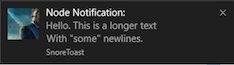
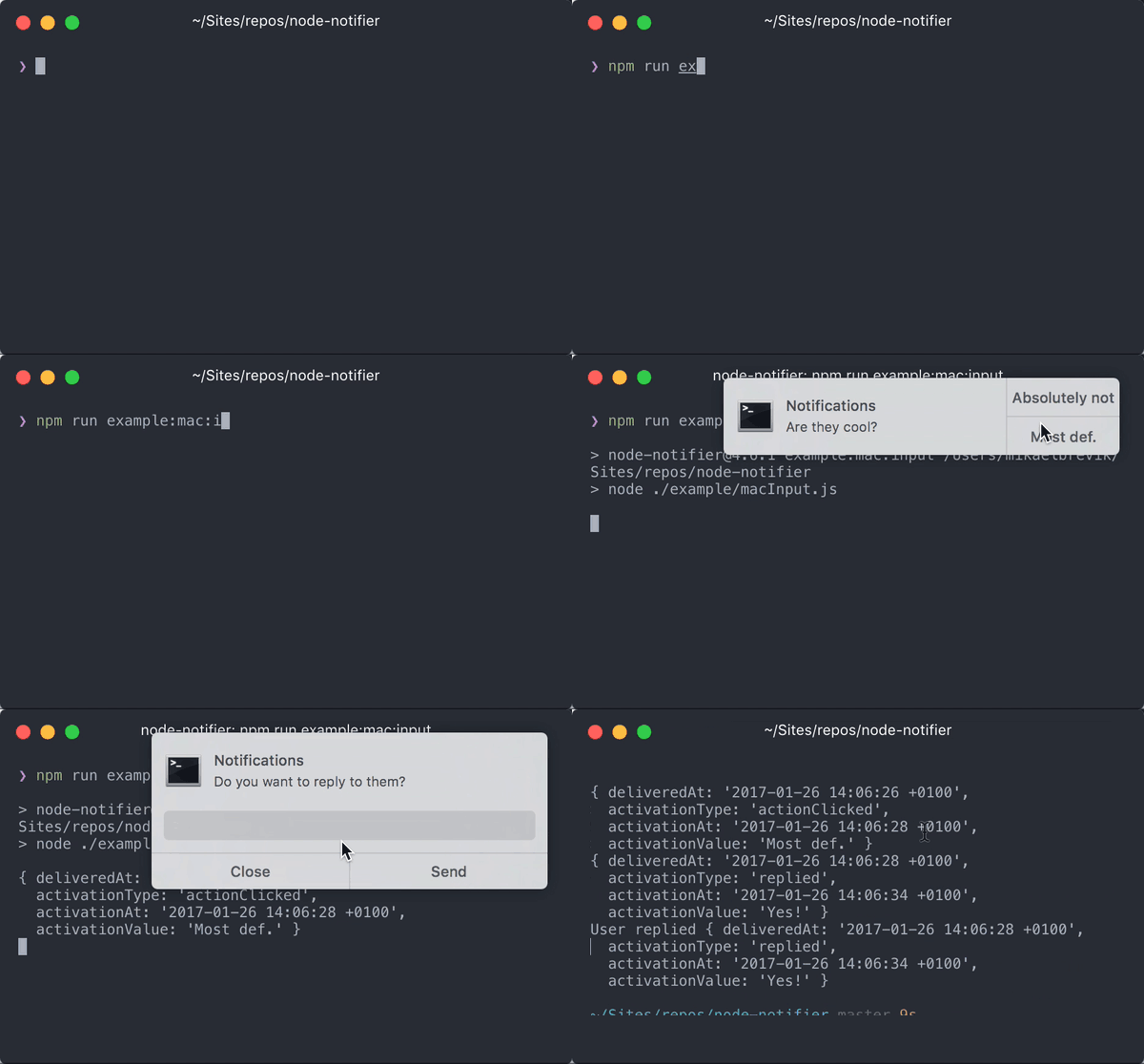
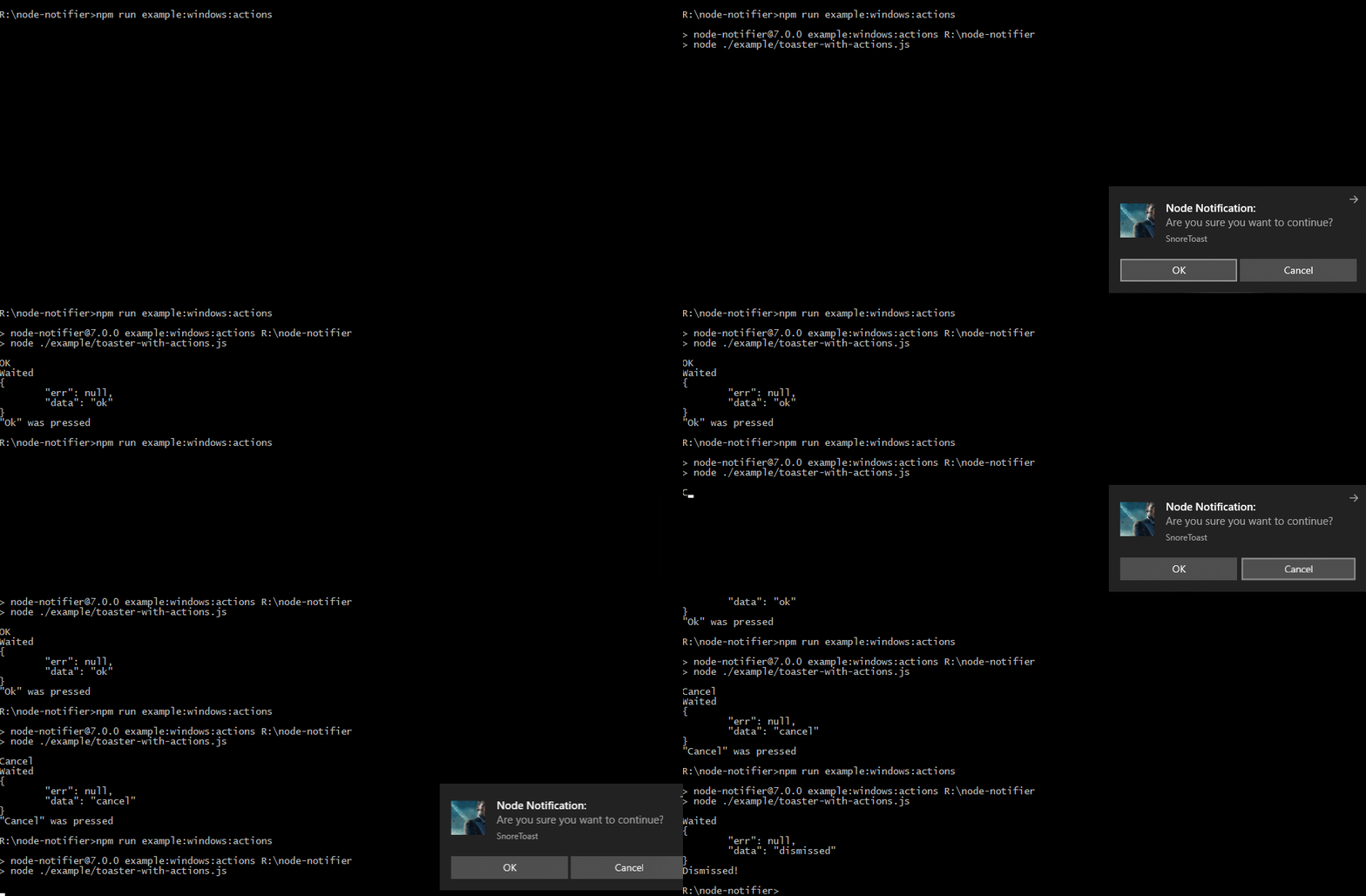
Show a native notification on macOS, Windows, Linux:
import notifier from 'node-notifier';
// String
notifier.notify('Message');

// Object
notifier.notify({
  title: 'My notification',
  message: 'Hello, there!'
});- macOS: >= 10.14 for native notifications, or Growl if earlier.
- Linux:
notify-osdorlibnotify-bininstalled (Ubuntu should have this by default) - Windows: >= 8, or task bar balloons for Windows < 8. Growl as fallback. Growl takes precedence over Windows balloons.
- General Fallback: Growl
See documentation and flow chart for reporter choice.
npm install --save node-notifiernode-notifier is published as ES modules only. Use import (named exports
such as { notify, NotificationCenter } are also available). CommonJS still works
through Node's require(esm) support, and require('node-notifier') returns the
same notifier instance as before:
const notifier = require('node-notifier');CLI has moved to separate project: https://github.com/mikaelbr/node-notifier-cli
Standard usage, with cross-platform fallbacks as defined in the reporter flow chart. All of the options below will work in some way or another on most platforms.
import path from 'node:path';
import notifier from 'node-notifier';

notifier.notify(
  {
    title: 'My awesome title',
    message: 'Hello from node, Mr. User!',
    icon: path.join(import.meta.dirname, 'coulson.jpg'), // Absolute path (doesn't work on balloons or macOS)
    sound: true, // Only Notification Center or Windows Toasters
    wait: true // Wait with callback, until user action is taken against notification, does not apply to Windows Toasters as they always wait, or macOS and notify-send without actions
  },
  function (err, response, metadata) {
    // Response is response from notification
    // Metadata contains activationType, and activationValue for actions or replies
  }
);

notifier.on('click', function (notifierObject, options, event) {
  // Triggers if `wait: true` and user clicks notification
});

notifier.on('timeout', function (notifierObject, options) {
  // Triggers if `wait: true` and notification closes
});
If you want super fine-grained control, you can customize each reporter individually, allowing you to tune specific options for different systems.
See below for documentation on each reporter.
Example:
import NotificationCenter from 'node-notifier/notifiers/notificationcenter';
new NotificationCenter(options).notify();

import NotifySend from 'node-notifier/notifiers/notifysend';
new NotifySend(options).notify();

import WindowsToaster from 'node-notifier/notifiers/toaster';
new WindowsToaster(options).notify();

import Growl from 'node-notifier/notifiers/growl';
new Growl(options).notify();

import WindowsBalloon from 'node-notifier/notifiers/balloon';
new WindowsBalloon(options).notify();
Or, if you are using several reporters (or you're lazy):
// NOTE: Technically, this takes longer to load
import nn from 'node-notifier';

new nn.NotificationCenter(options).notify();
new nn.NotifySend(options).notify();
new nn.WindowsToaster(options).notify(options);
new nn.WindowsBalloon(options).notify(options);
new nn.Growl(options).notify(options);- Notification Center documentation
- Windows Toaster documentation
- Windows Balloon documentation
- Growl documentation
- Notify-send documentation
Same usage and parameter setup as terminal-notifier.
Native Notification Center requires macOS version 10.14 or higher. If you have an earlier version, Growl will be the fallback. If Growl isn't installed, an error will be returned in the callback.
Because node-notifier wraps around terminal-notifier,
you can do anything terminal-notifier can, just by passing properties to the notify
method.
For example:
- if
terminal-notifiersays-message, you can do{message: 'Foo'} - if
terminal-notifiersays-list ALL, you can do{list: 'ALL'}.
Notification is the primary focus of this module, so listing and activating do work, but they aren't documented.
import { NotificationCenter } from 'node-notifier';

const notifier = new NotificationCenter({
  withFallback: false, // Use Growl Fallback if < 10.14
  customPath: undefined // Relative/Absolute path to binary if you want to use your own fork of terminal-notifier
});

notifier.notify(
  {
    title: undefined,
    subtitle: undefined,
    message: undefined,
    sound: false, // Case Sensitive string for location of sound file, or use one of macOS' native sounds (see below)
    contentImage: undefined, // Absolute Path to Attached Image (Content Image). Local files only
    open: undefined, // URL to open on Click
    group: undefined, // String. Notifications with the same group replace each other

    // See `example/macInput.js` for usage
    actions: undefined, // String | Array<String>. Action button label(s)
    reply: false, // Boolean | String. Adds a text field, a string is used as placeholder. Value passed as third argument in callback and event emitter.
    wait: false, // Same as timeout = 5 seconds
    timeout: 10 // Seconds to wait for a response to actions or reply. Takes precedence over wait if both are defined.
  },
  function (error, response, metadata) {
    console.log(response, metadata);
  }
);
Note: Only notifications with actions or reply wait for the user. Other
notifications are sent and the callback is called right away, so click and
timeout events are only emitted for notifications with actions or reply.
Clicking the notification itself is reported as a click, unless open,
execute or activate is set, in which case that is run instead.
For those notifications timeout (default 10) is how many seconds to wait for a
response before the notification is withdrawn and timeout is reported. wait is
shorthand for timeout: 5. Set timeout to false to wait until the user responds.
The callback metadata contains activationType (contentsClicked, actionClicked,
replied, closed or timeout) and, for actions and replies, activationValue.
While a notification waits for its timeout, the terminal-notifier process keeps
your application running. Call clearAll() to stop waiting on every notification
sent from that notifier instance, for example when your program is done:
notifier.notify({ message: 'Working…', open: 'https://example.com', timeout: 600 });
await doLongRunningTask();
notifier.clearAll(); // Lets the process exit without waiting for the timeout
Callbacks of cleared notifications are called without an error or response, and no
events are emitted for them. clearAll() is only available on NotificationCenter
and does not affect notifications sent through the Growl fallback.
For macOS notifications: icon, sender, closeLabel and dropdownLabel are
not supported by terminal-notifier 3 and are ignored. See custom icon.
Sound can be one of these: Basso, Blow, Bottle, Frog, Funk, Glass,
Hero, Morse, Ping, Pop, Purr, Sosumi, Submarine, Tink.
If sound is simply true, Bottle is used.
See Also:
Custom Path clarification
customPath takes a value of a relative or absolute path to the binary of your
fork/custom version of terminal-notifier.
Example: ./vendor/mac.noindex/terminal-notifier.app/Contents/MacOS/terminal-notifier
Bundled terminal-notifier
The bundled terminal-notifier.app is the unmodified official
terminal-notifier 3.0.0 release,
a universal binary for Intel and Apple silicon. CI checks it against the release's
pinned SHA-256 checksum with ./scripts/vendor-terminal-notifier.sh --check, and the
same script is used to update it.
Notification permission is granted per app, so macOS asks for it again the first
time terminal-notifier 3 sends a notification.
Spotlight clarification
terminal-notifier.app resides in a mac.noindex folder to prevent Spotlight from indexing the app.
Note: There are some limitations for images in native Windows 8 notifications:
- The image must be a PNG image
- The image must be smaller than 1024×1024 px
- The image must be less than 200kb
- The image must be specified using an absolute path
These limitations are due to the Toast notification system. A good tip is to use
something like path.join or path.delimiter to keep your paths cross-platform.
From mikaelbr/gulp-notify#90 (comment)
You can make it work by going to System > Notifications & Actions. The 'toast' app needs to have Banners enabled. (You can activate banners by clicking on the 'toast' app and setting the 'Show notification banners' to On)
Windows 10 Fall Creators Update (Version 1709) Note:
Snoretoast is used to get native Windows Toasts!
The default behaviour is to have the underlying toaster applicaton as appID.
This works as expected, but shows SnoreToast as text in the notification.
With the Fall Creators Update, Notifications on Windows 10 will only work as
expected if a valid appID is specified. Your appID must be exactly the same
value that was registered during the installation of your app.
You can find the ID of your App by searching the registry for the appID you
specified at installation of your app. For example: If you use the squirrel
framework, your appID will be something like com.squirrel.your.app.
import { WindowsToaster } from 'node-notifier';

const notifier = new WindowsToaster({
  withFallback: false, // Fallback to Growl or Balloons?
  customPath: undefined // Relative/Absolute path if you want to use your fork of SnoreToast.exe
});

notifier.notify(
  {
    title: undefined, // String. Required
    message: undefined, // String. Required if remove is not defined
    icon: undefined, // String. Absolute path to Icon
    sound: false, // Bool | String (as defined by http://msdn.microsoft.com/en-us/library/windows/apps/hh761492.aspx)
    id: undefined, // Number. ID to use for closing notification.
    appID: undefined, // String. App.ID and app Name. Defaults to no value, causing SnoreToast text to be visible.
    remove: undefined, // Number. Refer to previously created notification to close.
    duration: undefined, // 'short' (~7s, default) | 'long' (~25s). How long the toast stays on screen. x64 only with the bundled binary.
    install: undefined, // String (path, application, app id).  Creates a shortcut <path> in the start menu which point to the executable <application>, appID used for the notifications.
    application: undefined // String. Absolute path to an executable to start when the notification is clicked and node-notifier is no longer listening (e.g. from the action center).
  },
  function (error, response) {
    console.log(response);
  }
);
Note: wait and timeout don't change how long a Windows toast stays on
screen. Use duration instead: Windows only offers 'short' (about 7 seconds)
or 'long' (about 25 seconds), and the user's own Windows settings can change
this. A toast can't stay on screen indefinitely. After it hides it is still
listed in the Action Center. duration is x64 only with the bundled binary, as
the bundled 32-bit SnoreToast (0.7.0) lacks -d. On other architectures it is
dropped, unless you set customPath to a SnoreToast 0.8.0 or newer.
import { Growl } from 'node-notifier';

const notifier = new Growl({
  name: 'Growl Name Used', // Defaults as 'Node'
  host: 'localhost',
  port: 23053
});

notifier.notify({
  title: 'Foo',
  message: 'Hello World',
  icon: fs.readFileSync(path.join(import.meta.dirname, 'coulson.jpg')),
  wait: false, // Wait for User Action against Notification

  // and other growl options like sticky etc.
  sticky: false,
  label: undefined,
  priority: undefined
});
See more information about using growly.
For earlier versions of Windows, taskbar balloons are used (unless
fallback is activated and Growl is running). The balloons notifier uses a great
project called notifu.
import { WindowsBalloon } from 'node-notifier';

const notifier = new WindowsBalloon({
  withFallback: false, // Try Windows Toast and Growl first?
  customPath: undefined // Relative/Absolute path if you want to use your fork of notifu
});

notifier.notify(
  {
    title: undefined,
    message: undefined,
    sound: false, // true | false.
    time: 5000, // How long to show balloon in ms
    wait: false, // Wait for User Action against Notification
    type: 'info' // The notification type : info | warn | error
  },
  function (error, response) {
    console.log(response);
  }
);
See full usage on the project homepage: notifu.
Note: notify-send doesn't support the wait flag. Only notifications with actions wait for the user.
import { NotifySend } from 'node-notifier';

const notifier = new NotifySend();

notifier.notify(
  {
    title: 'Foo',
    message: 'Hello World',
    icon: path.join(import.meta.dirname, 'coulson.jpg'),

    wait: false, // Defaults no expire time set. If true expire time of 5 seconds is used
    timeout: 10, // Alias for expire-time, time etc. Time before notify-send expires. Defaults to 10 seconds.
    actions: undefined, // String | Array<String>. Action button label(s). Requires notify-send 0.7.10+
    transient: false, // Don't keep the notification in the notification list/history (e.g. GNOME Shell)

    // .. and other notify-send flags:
    'app-name': 'node-notifier',
    urgency: undefined,
    category: undefined,
    hint: undefined
  },
  function (error, response, metadata) {
    console.log(response, metadata);
  }
);
With actions, notify-send keeps running until an action is chosen, the
notification is closed or timeout has passed, and then calls the callback. Choosing
an action emits click, and running out of time emits timeout. The callback metadata
contains activationType (actionClicked, closed or timeout) and, for actions,
activationValue with the label of the chosen action. See example/notify-send-actions.js.
actions needs notify-send (libnotify) 0.7.10 or newer, for example Ubuntu 24.04 or
Debian 12, and a notification daemon that supports actions. Older versions of
notify-send fail with an error.
See flags and options on the man page notify-send(1)
node-notifier is made possible through Open Source Software.
A very special thanks to all the modules node-notifier uses.


The bundled 64-bit SnoreToast (0.9.1) reports clicks and action buttons back when using a custom appID. On 32-bit Windows, see this issue by Araxeus.
See note on "Windows 10 Fall Creators Update" in Windows section.
Short answer: update your appID.
If you don't see notifications within WSL2, you might have to change permission of exe vendor files (snoreToast). See issue for more info
Under WSL, the default notifier is WindowsToaster, which shows the notification in Windows. If you run an X server and a notification daemon and want Linux notifications instead, set NODE_NOTIFIER_WSL_NOTIFIER=linux:
NODE_NOTIFIER_WSL_NOTIFIER=linux node app.jsThe only accepted value is linux (lowercase). Any other value keeps the default. The variable only has an effect under WSL, and it is read when node-notifier is imported, so set it before the process starts. Setting process.env after the import has no effect.
You can also skip the default instance and use NotifySend directly:
import { NotifySend } from 'node-notifier';

new NotifySend().notify({ title: 'Hello', message: 'From WSL' });When using node-notifier within a tmux session, it can cause a hang in the system.
This can be solved by following the steps described in this comment
There’s even more info here #61 (comment).
Even if you define an icon in the configuration object for node-notifier, you will
see a small Terminal icon in the notification (see the example at the top of this
document).
This is the way notifications on macOS work. They always show the icon of the
parent application initiating the notification. For node-notifier, terminal-notifier
is the initiator, and it has the Terminal icon defined as its icon.
To use a custom icon, build a copy of terminal-notifier with your icon
(make icon ICON=logo.png APP_NAME=my-tool in the
terminal-notifier repository) and
point customPath to it.
See Issue #71 for more info #71.
If packaging your Electron app as an asar, you will find node-notifier will fail to load.
Due to the way asar works, you cannot execute a binary from within an asar.
As a simple solution, when packaging the app into an asar please make sure you
--unpack the vendor/ folder of node-notifier, so the module still has access to
the notification binaries.
You can do so with the following command:
asar pack . app.asar --unpack "./node_modules/node-notifier/vendor/**"Or if you use electron-builder without using asar directly, append build object to your package.json as below:
...
build: {
  asarUnpack: [
    './node_modules/node-notifier/**/*',
  ]
},
...For issues using with the pkg module. Check this issue out: #220 (comment)
When using node-notifier inside of webpack, you must add the snippet below to your webpack.config.js.
This is necessary because node-notifier runs bundled binaries from its vendor/
folder, which it finds relative to its own files (import.meta.dirname). When
webpack bundles the module, those paths no longer point at the binaries, causing
node-notifier to error on certain platforms.
To fix this, keep node-notifier out of the bundle so it is loaded from
node_modules at runtime. Add the following to your webpack.config.js:
externals: {
  'node-notifier': 'commonjs node-notifier'
}This package is licensed using the MIT License.
SnoreToast and Notifu have licenses in their vendored versions which do not match the MIT license, LGPL-3 and BSD 3-Clause to be specific. We are not lawyers, but have made our best efforts to conform to the terms in those licenses while releasing this package using the license we chose.