


A wave washes through the paragraph character by character — modulating weight, width, oblique angle, or opacity as it passes. Not line by line, not word by word: every letterform sits at its own moment in the curve. At low amplitude it reads as texture; at high amplitude, as transformation.

Layering
wght+opacityon a sine wave travelling diagonally. Try the live demo →
floodtext.com · npm · GitHub
TypeScript · No required dependencies · React + Vanilla JS · about 6.5 kB gzipped
Good for a headline, a pull quote or a short paragraph. Not for long reading text: the font effects cost a layout pass every frame (see Performance), and moving text is harder to read. Visitors who ask for reduced motion (or read on e-ink) see your plain, static text.
npm install @overpunch/floodtextNo bundler? Use the Webflow / plain HTML script tag instead.
The wght effect needs a variable font, so load one first. This uses Inter from Google Fonts (a variable font with a weight axis from 100 to 900):
<link rel="stylesheet" href="https://fonts.googleapis.com/css2?family=Inter:wght@100..900&display=swap">'use client'
import { FloodText } from '@overpunch/floodtext'
export function Hero() {
return (
<FloodText as="h1" effect={['wght', 'opacity']} period={4} density={2} style={{ fontFamily: 'Inter, sans-serif', fontWeight: 300 }}>
Character by character
</FloodText>
)
}| Effect | Needs |
|---|---|
wght, wdth |
A variable font with that axis (wght for weight, wdth for width). With a static font the effect does nothing, silently: Georgia measured the same width at "wght" 300 and "wght" 800 (407.92 px), while the variable Merriweather went from 404.53 to 435.80 px (headless Chrome, 40 px text). |
oblique |
Uses font-style: oblique <angle>, so it works best with a font that has a slant (slnt) axis. Text that is already italic is left alone. |
opacity, blur, rotation, size |
Any font. |
amplitude is in the effect's own units. For wght it is axis units: on text set at weight 300, amplitude: 200 swings each character between 100 and 500. floodText keeps the value within 1–1000; the browser then clamps it to your font's own axis range, so beyond the ends of the axis the wave flattens.
Measured with gzip -9 on the 1.1.0 build: the React-free @overpunch/floodtext/core entry is 6.5 kB; the main entry adds the hook and component (1.5 kB more, plus your own react). The Webflow script is 6.6 kB. The optional sentiment package is not bundled: it loads as a separate chunk only for source: 'sentiment'.
Next.js App Router: this library uses browser APIs. Add
"use client"to any component file that imports from it.
import { FloodText } from '@overpunch/floodtext'

<FloodText effect="wght" amplitude={200} period={4} density={2} direction="diagonal-down">
  Your paragraph text here...
</FloodText>
Layer multiple effects simultaneously:
<FloodText effect={['wght', 'oblique']} period={4} density={2}>
  Your paragraph text here...
</FloodText>import { useFloodText } from '@overpunch/floodtext'
// Inside a React component:
const ref = useFloodText({ effect: 'wght', amplitude: 200, period: 4, density: 2 })
return <p ref={ref}>{children}</p>The hook starts the animation on mount, re-reads the lines when the container's width changes and after fonts load, and stops on unmount. <FloodText> forwards HTML attributes (id, aria-*, data-*, event handlers) and the ref to its element.
applyFloodText wraps characters and returns them. startFloodText drives the animation and returns a stop function. Options are shared between applyFloodText and startFloodText. Without React installed, import from @overpunch/floodtext/core (the main entry also exports the hook and component, so it imports react).
import { applyFloodText, startFloodText, pauseFloodText, resumeFloodText, removeFloodText, getCleanHTML } from '@overpunch/floodtext/core'

const el = document.querySelector('p')
const original = getCleanHTML(el)
const opts = { effect: 'wght', amplitude: 200, period: 4, density: 2 }

let chars = applyFloodText(el, original)
let stop = startFloodText(chars, opts)

// The lines are locked while the wave runs, so re-read them when the container's width changes:
let lastWidth = el.parentElement.clientWidth
const ro = new ResizeObserver(() => {
  const w = el.parentElement.clientWidth
  if (w === lastWidth) return
  lastWidth = w
  stop()
  chars = applyFloodText(el, original)
  stop = startFloodText(chars, opts)
})
ro.observe(el.parentElement)

// Later — stop the animation loop and restore the DOM:
stop()
ro.disconnect()
removeFloodText(el, original)

// Pause and resume without stopping the loop or losing position:
pauseFloodText(el)   // Pause an active flood animation on a container element
resumeFloodText(el) // Resume a paused flood animationOne script tag, then add data-floodtext to any text element. It starts after fonts load, re-reads the lines when the container resizes, sets up elements added later, and honours reduced motion.
<!-- Webflow: Site Settings → Custom Code → Footer, or an Embed element -->
<script src="https://cdn.jsdelivr.net/npm/@overpunch/floodtext/dist/floodtext.webflow.min.js"></script>

<h1 data-floodtext data-ft-effect="wght,opacity" data-ft-period="4" data-ft-density="2">Your headline</h1>| Attribute | Same as |
|---|---|
data-ft-effect |
effect (comma-separated to layer, e.g. wght,opacity) |
data-ft-amplitude |
amplitude (single effect only) |
data-ft-period |
period |
data-ft-density |
density |
data-ft-direction |
direction |
data-ft-wave |
waveShape |
data-ft-pause-offscreen |
"false" to keep animating off-screen |
The script also exposes window.FloodText.init(root?) (scan for data-floodtext again), restart() (re-read every element's lines) and destroy(el) (stop one element and restore it). It has no pause call; for a pause button, use the npm package. The URL above follows the latest release; pin a version so a future major release can't change your site: https://cdn.jsdelivr.net/npm/@overpunch/floodtext@1.1.0/dist/floodtext.webflow.min.js. The font still has to be a variable one: in Webflow, upload it under Site Settings → Fonts (or pick a variable Google Font) and set it on the element. data-ft-amplitude applies to a single effect; layered effects use their default amplitudes. Sentiment mode isn't available here.
Framer: a code component lives in src/framer/FloodText.tsx.
import type { FloodTextOptions, FloodEffect } from '@overpunch/floodtext'

const effects: FloodEffect[] = ['wght', 'oblique']
const opts: FloodTextOptions = { effect: effects, period: 4 }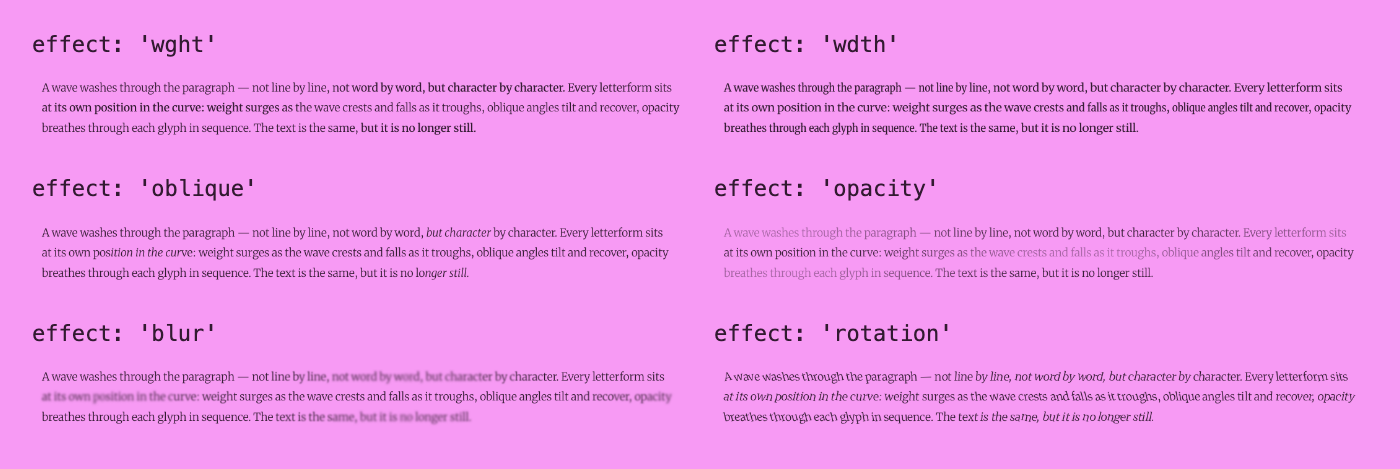
Each effect alone at its default amplitude, on the demo's Merriweather paragraph. Pass an array to layer them (the GIF above is ['wght', 'opacity']).
| Option | Default | Description |
|---|---|---|
effect |
'wght' |
'wght' | 'wdth' | 'oblique' | 'opacity' | 'rotation' | 'blur' | 'size'. Pass an array to layer multiple effects simultaneously. Note: oblique requires Chrome 87+, Firefox 88+, Safari 14.1+. size causes layout recalculation per frame — use low amplitude |
source |
'fixed' |
'fixed' — all characters share the same amplitude. 'sentiment' — per-word AFINN emotional valence scales amplitude; words with strong charge pulse at full amplitude, neutral function words pulse at minimum. Uses the sentiment package, an optional dependency npm installs with floodText; it is loaded only in this mode, as a separate chunk by your bundler. Scores arrive asynchronously: the hook re-runs by itself; in vanilla JS, await loadSentiment() before applyFloodText. Not available in the Webflow embed |
amplitude |
auto | Peak deviation. Used in single-effect mode. wght, wdth and oblique oscillate around the text's own weight, width and slant (bold stays bold; italic text keeps its italic), keeping any other axes you set. Defaults: wght 200, wdth 20, oblique 15°, opacity 0.3, rotation 15°, blur 2px, size 0.15em |
amplitudes |
— | Per-effect overrides when layering multiple effects, e.g. { wght: 300, blur: 3 } |
properties |
— | Custom CSS properties or variables to animate per character. Each entry: { property, base, amplitude, unit?, clamp? } where clamp is an optional [min, max] pair to cap the result (e.g. [0, 1] for opacity). E.g. [{ property: 'letter-spacing', base: 0, amplitude: 0.05, unit: 'em' }] or [{ property: '--my-axis', base: 100, amplitude: 20, clamp: [50, 150] }] |
period |
4 |
Seconds per full wave cycle. Minimum 0.5 (faster waves would flash more than twice a second) |
density |
2 |
Wave cycles visible across the paragraph at once. Higher = more bands |
direction |
'diagonal-down' |
'diagonal-down' ↘ | 'diagonal-up' ↗ | 'right' → | 'left' ←. All directions use 2D screen coordinates from getBoundingClientRect — read once before the animation loop starts |
waveShape |
'sine' |
'sine' | 'sawtooth' | 'triangle' |
pauseOffscreen |
true |
Pause the animation when the element scrolls out of view; resume when visible. Uses IntersectionObserver internally |
as |
'p' |
HTML element to render, e.g. 'h1', 'span'. (React component only) |
Every visible character (grapheme — emoji sequences, accents and Indic clusters stay whole) is wrapped in an inline <span>. Whitespace is left as bare text nodes, so the browser lays the text out exactly as before. The original elements are kept (links keep their listeners), and the text stays in the DOM, so screen readers read it as before. Styles, scripts, form fields and SVG are left alone. getCleanHTML() returns the original markup. Each frame, the wave function is evaluated at that character's normalised position in the paragraph. The density option controls how many wave cycles are visible at once.
For all directions, each character's 2D screen coordinates are read via getBoundingClientRect once before the loop starts. right/left use the horizontal x-coordinate so characters at the same column across lines are in phase; diagonal directions project onto a 2D axis. Positions are read again after the element is first shown and after fonts load. Speed is framerate-independent and doesn't jump after the tab was hidden. Every element shares one requestAnimationFrame loop; an element removed from the page stops by itself, and stopping puts every character back at its own style. Under prefers-reduced-motion: reduce (React, vanilla and Webflow) the element is left untouched, and a running wave stops if the setting turns on. The same happens on e-ink and other slow-refresh screens (the update: slow media query).
Line break safety: the wave changes character widths, so the browser's own line breaks are locked while it runs: a <br class="ft-br"> at each line end, and no wrapping on the element. Words never move between lines (a hyphen is added where the browser had hyphenated a word). Justified text and white-space: pre-line are not locked. Re-apply after the container's width changes (the hook and the Webflow embed do this). The size effect still changes line heights. Because lines can't rewrap, a line can run slightly past the column while the wave is at its boldest: up to 6.6 px on the demo's 1,024 px Merriweather column at wght ±200 (largest overrun across 6 s of frames, headless Chrome). Leave a little room or keep overflow visible.
Kerning and ligatures: a font effect gives neighbouring characters different fonts, so the browser stops kerning and joining them (Source Serif paragraphs grew about 10% wider). floodText measures each character's kerning and ligature spacing and keeps it while the wave runs; ligature glyphs themselves (fi, ffl) show as separate letters while animating.
Performance: the font-axis effects (wght, wdth, oblique, size) make the browser lay the text out again every frame. In Chrome, wght on about 1,600 characters ran at a 23 ms median frame; on 6,400 characters it dropped to about 4 fps. Measured again for this README (headless Chrome on an Apple M1 Max, Webflow bundle, Merriweather, wght at its default amplitude, median time between requestAnimationFrame callbacks over 4 s, measured with a scratch Playwright script, not committed): a 28-character headline at 64 px ran at 8.3 ms (p95 9.1 ms); 1,558 characters at 18 px ran at 38.5 ms (p95 52.7 ms), and the same 1,558 characters with opacity instead ran at 13.4 ms. Keep font-axis waves to headlines and short passages; opacity, blur and rotation cost little. With opacity, check the faintest point (0.4 at the defaults) still has enough contrast.
Give readers a pause button: an animation that starts by itself, runs longer than five seconds and sits next to other content needs a way to pause it (WCAG 2.2.2, Pause, Stop, Hide). Wire a button to pauseFloodText(el) and resumeFloodText(el), passing each element you animated (pausing a wrapper doesn't reach the elements inside it). The demo on floodtext.com has one.
Server rendering: the component and hook render your text on the server unchanged; the characters are wrapped and the wave starts in the browser after hydration (in a layout effect, before the first paint of the hydrated page).
npm install
npm run test:run       # vitest (75 tests in 1.1.0)
npm run build          # dist/ (ESM, CJS, types)
npm run build:webflow  # dist/floodtext.webflow.min.js
The demo site lives in site/ (cd site && npm install && npx next build && npx next start). README images are generated from a local build of it with npm run capture (see scripts/capture.mjs).
package.json at the repo root lists next as a devDependency. This is a Vercel detection workaround — not a real dependency of the npm package. Vercel's build system inspects the root package.json to detect the framework; without next present it falls back to a static build and skips the Next.js pipeline, breaking the /site subdirectory deploy.
The package itself has no required runtime dependencies (sentiment is optional). Do not remove this entry.
- Per-character easing — apply a custom easing curve to individual character offsets, not just the raw wave value
- More built-in effects —
hue(color hue rotation),shadow(text-shadow offset),skew(CSS skewX) - SSR-compatible static snapshot — render a stable mid-wave frame on the server so there is no FOUC before hydration