




Real DOM text on any 3D surface — sphere, cylinder, torus, plane, waving flag, stool, or a custom mesh.
wrapType uses Three.js's CSS3DRenderer to distribute HTML text elements across the geometry of a 3D surface. Each character is a real DOM element oriented along the surface normal, which means variable fonts, CSS animations, hover states, and every other Liiift tool compose naturally — no canvas, no textures.

Try it live and drop in your own
.glb/.gltf/.objmesh at wraptype.com.
npm install @overpunch/wraptype threeOnly three is required. The remaining peers are optional — install the ones you use:
| Peer dependency | Needed for |
|---|---|
three (required) |
Core geometry + CSS3DRenderer |
react, react-dom |
The WrapTypeScene component / useWrapType hook |
@react-three/fiber, troika-three-text |
The GPU/SDF renderer at @overpunch/wraptype/r3f |
# React + DOM renderer (most common):
npm install @overpunch/wraptype three react react-dom

# R3F / WebGL renderer:
npm install @overpunch/wraptype three @react-three/fiber troika-three-text
Vanilla JS users need only three: import from @overpunch/wraptype/core (the main entry also exports the React components, so it imports react). The React-free SDF factory is at @overpunch/wraptype/sdf (three + troika-three-text).
'use client' // Next.js App Router: WrapTypeScene renders in the browser only.

import { WrapTypeScene } from '@overpunch/wraptype'

<WrapTypeScene
  text="Typography is the art and technique of arranging type"
  shape="sphere"
  fill="cover"
  fontSize={13}
  color="rgba(220,210,255,0.85)"
  autoRotate
  style={{ width: '100%', height: '500px' }}
/>

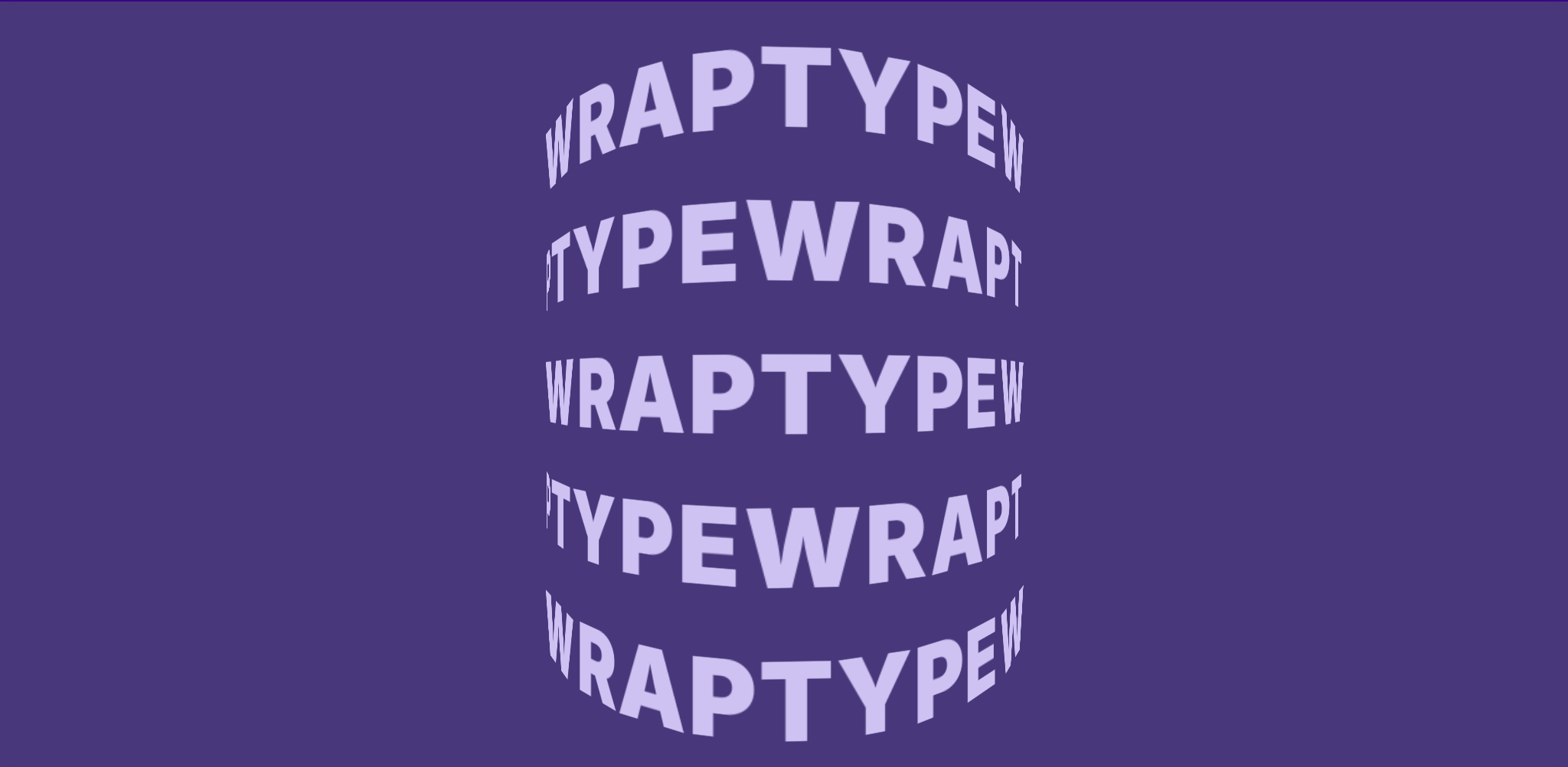

Every glyph above is a live <span> placed in 3D by CSS3DRenderer — styleable and animatable. Characters on the far side are hidden by default, so everything you see reads left to right. Screen readers get the text once (the 3D characters are hidden from them). Captured from a local build of the demo with npm run capture.
'use client'

import { useWrapType } from '@overpunch/wraptype'

export function Ring() {
  const { ref } = useWrapType({
    text: 'Typography is the art and technique of arranging type',
    shape: 'cylinder',
    fill: 'flow',
  })
  // The container needs a size: the scene fills it.
  return <div ref={ref} style={{ width: '100%', height: '500px' }} />
}The React components are browser-only, and the published bundle does not carry a 'use client' directive, so import them from a file marked 'use client' (as above) and render that from your Server Component page:
// app/page.tsx (a Server Component)
import { Ring } from './Ring' // the 'use client' file above

export default function Page() {
  return <Ring />
}import { getCharPositions, createWrapScene } from '@overpunch/wraptype/core'
// The container needs a size (e.g. width: 100%; height: 500px): the scene fills it.
const container = document.getElementById('scene')
// Pass null as the positions: the scene measures each character's width (proportional spacing) and lays
// the text out itself.
const scene = createWrapScene(container, null, {
text: 'Typography is the art and technique of arranging type',
shape: 'torus',
fill: 'cover',
autoRotate: true,
autoRotateSpeed: 0.6,
})
// Later, to clean up:
scene.destroy()
// Your own positions (e.g. from getCharPositions with a charWidthMap, or getCharPositionsFromMesh):
const newPositions = getCharPositions({ text: 'New text', shape: 'sphere' })
scene.rebuild(newPositions)The default renderer places real HTML in 3D (CSS3DRenderer). For text that needs to live inside a WebGL scene — receiving lights, shaders, and post-processing — import the SDF renderer from the @overpunch/wraptype/r3f entry point. It uses troika-three-text for GPU-antialiased glyphs curved onto the surface via troika's native curveRadius.
Requires @react-three/fiber and troika-three-text as peers.
import { Canvas } from '@react-three/fiber'
import { WrapTypeMesh } from '@overpunch/wraptype/r3f'

<Canvas>
  <WrapTypeMesh
    shape="sphere"
    radius={1}
    text="Typography on any surface"
    color="#ffffff"
    fontSize={0.1}
    autoRotate
  />
</Canvas>
WrapTypeMesh accepts shape ('sphere' | 'cylinder' | 'torus' | 'plane'; troika curves text around a vertical axis only, so sphere and torus render as a band of words around the equator, and flag and stool fall back to plane), radius, text, font, fontSize, letterSpacing, maxWidth, textAlign, color, curvatureTracking, curvatureTrackingFactor, plus standard transform props (position, rotation, scale, autoRotate, autoRotateSpeed).
import { createSDFText, updateSDFText } from '@overpunch/wraptype/sdf'

const { group, dispose } = createSDFText('cylinder', {
  text: 'Typography on any surface',
  fontSize: 0.1,
  color: '#ffffff',
}, /* radius */ 1)

scene.add(group)

// Rebuild in place — keeps the same group reference:
updateSDFText(group, 'torus', { text: 'New text', color: '#ffccaa' }, 1)

// Free GPU resources when done:
dispose()| When to use | Renderer | Import |
|---|---|---|
| Variable fonts, CSS animation, selectable text, compose with other Liiift tools | DOM (CSS3DRenderer) | @overpunch/wraptype |
| Text inside a WebGL scene — lighting, shaders, post-processing, large glyph counts | SDF (WebGL) | @overpunch/wraptype/r3f |
| Option | Type | Default | Description |
|---|---|---|---|
text |
string |
— | Text to distribute across the surface. Repeats to fill. |
shape |
'sphere' | 'cylinder' | 'torus' | 'plane' | 'stool' | 'flag' |
'sphere' |
Built-in 3D geometry to wrap text onto. |
mode |
'surface' |
'surface' |
Places characters on the geometry. ('silhouette' is reserved and not implemented yet; it falls back to 'surface' with a warning.) |
fill |
'cover' | 'flow' | 'full-width' | 'full-height' |
'cover' |
How to distribute characters across the surface. ('pattern' is reserved; it falls back to 'cover'.) |
fontSize |
number |
14 |
Character font size in px. |
fontFamily |
string |
undefined |
CSS font-family override applied to each character span. |
fontWeight |
string | number |
'normal' |
CSS font-weight applied to each character span. |
color |
string |
'white' |
CSS color applied to every character element. |
radius |
number |
300 |
Surface radius in scene units. |
height |
number |
radius * 2 |
Cylinder or plane height in scene units. |
autoRotate |
boolean |
false |
Continuously rotate the scene. |
autoRotateSpeed |
number |
1.0 |
Rotation speed multiplier. |
camera |
'orbit' | 'fixed' |
'orbit' |
'orbit' — drag to rotate, scroll to zoom. 'fixed' — static camera. |
zoom |
boolean |
true |
Wheel / pinch zoom on the orbit camera. Set false so the mouse wheel scrolls the page over the scene. |
showBackfaces |
boolean |
false |
Show characters on the far side, seen through the surface (mirrored). Hidden by default. |
cameraPosition |
[number, number, number] |
[0, 0, 700] |
Initial camera position in scene units. |
charAdvanceRatio |
number |
0.62 |
Fraction of fontSize used as a character's advance when it has no measured width (charWidthMap; the scene and the React components measure widths for you). |
charWidthMap |
Map<string, number> |
measured | Advance width per character, in px (see measureCharWidths). |
lineHeightRatio |
number |
1.4 |
Line height multiplier relative to fontSize. |
repeat |
boolean |
true |
When false, text is placed exactly once without tiling; text that doesn't fit is left out with a warning. |
characterCurve |
number |
0 |
Bend characters to follow surface curvature. 0 = flat, 1 = full bend. |
positions |
CharPosition[] |
— | Pre-computed positions (e.g. from getCharPositionsFromMesh); when given, they replace the built-in shape layout. (React only; in vanilla JS pass them to createWrapScene.) |
style |
CSSProperties |
— | Applied to the container div. (React only) |
cover— tiles the full surface in rows (latitude bands on the sphere); the text continues from row to rowflow— a single band around the equator / circumference; the text repeats to fill it (withrepeat: false, text longer than the band is cut)full-width— (sphere) the text once around the equator, scaled to fit it exactlyfull-height— (sphere) one character per line down the meridian facing the camera- Rows and rings are justified, so the text meets itself without a seam or overlap. On other shapes,
full-widthandfull-heightusecover.
Every character faces outward and reads left to right from outside the surface. Text is laid out by grapheme, so emoji sequences and accented letters stay whole; right-to-left scripts are laid out in logical order (left to right).
Returned by createWrapScene():
| Method | Description |
|---|---|
destroy() |
Removes the renderer and all event listeners. |
rebuild(positions) |
Replaces all character elements without rebuilding the renderer (custom positions also stop the flag's own animation). |
The render loop runs only while something moves (dragging, damping, auto-rotation, the flag's wave) and while the scene is on screen. prefers-reduced-motion stops auto-rotation and the flag's wave, including when the setting changes while the scene runs. Sizes are validated: zero, negative and non-numeric fontSize, radius and ratios fall back to their defaults, and a layout is capped at 20,000 characters (with a warning).
The 3D characters repeat the text, one letter per element, so they are hidden from screen readers (aria-hidden), and the text is exposed once in a visually hidden element inside the container: screen readers read it, and find-in-page finds it. Give WrapTypeScene an aria-label or role="img" if the scene needs a description; HTML attributes are forwarded to the container. The glyphs themselves are not selectable.
Returns CharPosition[] — one entry per character instance placed on the surface.
interface CharPosition {
  char: string
  position: [number, number, number]  // world position
  normal:   [number, number, number]  // outward surface normal
  right:    [number, number, number]  // tangent along text direction
  up:       [number, number, number]  // tangent perpendicular to right
}Like getCharPositions, but evaluates positions at a specific time parameter t — useful for animating the geometry.
Returns true if the given shape name requires time-stepped updates (e.g. 'flag').
Three.js's CSS3DRenderer maps HTML elements into 3D space using CSS perspective and matrix3d transforms. wrapType computes character positions analytically from the shape's surface equations — no UV unwrapping or texture atlases.
Each character element is oriented so its visible face points along the outward surface normal using a rotation matrix built from the surface's local right/up/normal frame.
OrbitControls are wired to a transparent overlay <div> so that pointer events reach the controls without selecting text.
| Shape | Notes |
|---|---|
| Sphere | Latitude bands from φ = 0.12π to 0.88π. Band character count scales with sin(φ). |
| Cylinder | Characters arc around the circumference, stacked in rows. |
| Torus | flow: characters follow the outer ring. cover: rings of text over the whole tube, parameterised by major and minor angle; seen from the front, the inside of the tube reads upside down. |
| Plane | Grid of characters on a flat surface facing the camera. |
| Stool | Cylinder with disc caps — top, side, and bottom surfaces sampled separately. |
| Flag | Animated surface — characters follow a sinusoidal wave that propagates along the flag. |
Drop any .glb, .gltf, or .obj file onto the demo. wrapType samples the surface with MeshSurfaceSampler, orients each character along the local normal, and auto-scales to fit the scene radius.
In code, load any Three.js Mesh and feed it to getCharPositionsFromMesh, then render the result through the same scene API (or pass positions to <WrapTypeScene> in React):
import { GLTFLoader } from 'three/addons/loaders/GLTFLoader.js'
import type { Mesh } from 'three'
import { getCharPositionsFromMesh, createWrapScene } from '@overpunch/wraptype/core'

new GLTFLoader().load('/model.glb', (gltf) => {
  // The first mesh in the file (merge multi-part models into one mesh before exporting).
  const mesh = gltf.scene.getObjectByProperty('isMesh', true) as Mesh | undefined
  if (!mesh) return

  const positions = getCharPositionsFromMesh(
    mesh,
    'Typography on any surface',
    { radius: 300 },
    250, // sample count
  )
  // text is required by the options type; with custom positions, the scene uses it for screen readers.
  createWrapScene(document.getElementById('scene')!, positions, { text: 'Typography on any surface', autoRotate: true })
})| Runtime | Modern evergreen browsers (CSS3DRenderer needs transform-style: preserve-3d + matrix3d). |
| Peer deps | three >= 0.160. Optional: react/react-dom >= 17, @react-three/fiber >= 8, troika-three-text >= 0.47. |
| Module formats | ESM + CJS, with bundled TypeScript declarations. |
| SSR | Browser-only. In Next.js App Router, mark the consuming component 'use client'. |
The DOM renderer creates one HTML element per character instance, so cost scales with the number of placed glyphs (which fill, repeat, and surface area all affect). It is built for striking display typography — wrap a headline, a logo, a hero — not for paragraphs of thousands of characters. In headless Chrome (software rendering), an auto-rotating sphere of about 2,000 characters ran at a ~45 ms median frame and the default sphere (about 6,000) at ~150 ms; real GPUs are much faster. A static scene does no work between interactions. For very high glyph counts, or to embed text inside a lit/shaded WebGL scene, use the SDF renderer instead.
- drei
<Text3D>/ extruded geometry — renders solid 3D letterforms in WebGL. wrapType's DOM mode instead keeps glyphs as flat, real HTML on the surface, styleable with CSS, with the text exposed once to screen readers. - Plain
troika-three-text— gives you GPU SDF text but not surface distribution. wrapType's/r3frenderer wraps troika with shape geometry and curvature; its DOM renderer needs no WebGL text at all. - CSS-only 3D transforms — can fake perspective on a block of text, but cannot distribute individual characters analytically across a curved surface with correct per-glyph normals. That is wrapType's core.
git clone https://github.com/over-punch/wrapType.git
cd wrapType
npm install

npm test        # vitest unit tests (happy-dom)
npm run typecheck
npm run build   # vite library build → dist/ (ESM + CJS + types)
The package source lives in src/ (core/ is framework-agnostic; react/ holds the hook + component; r3f/ is the SDF renderer). The landing page and interactive demo are a separate Next.js app in site/. README visuals are regenerated reproducibly with npm run capture: it drives a local build of the demo (cd site && npx next build && npx next start -p 5961) with Playwright and needs ffmpeg for the GIF; see scripts/capture.mjs.
Part of type-tools — a suite of typographic tools for techniques that are impossible or impractical in CSS alone.