
Ship Agent Plugins with Python packages.
Documentation · PyPI · Agent Plugins format




agent-plugins ships a Python library and its agent integrations in one package. An agent with Python execution can read its packaged instructions, then use the library in the same environment. Library code, skills, tool configuration, and resources share one release.
The Agent Plugins format defines the directory: a manifest, Agent Skills for instructions and resources, Model Context Protocol (MCP) server configuration for tools, and client extensions. This library packages that directory and makes it discoverable through Python metadata. Agent clients choose which components to activate.
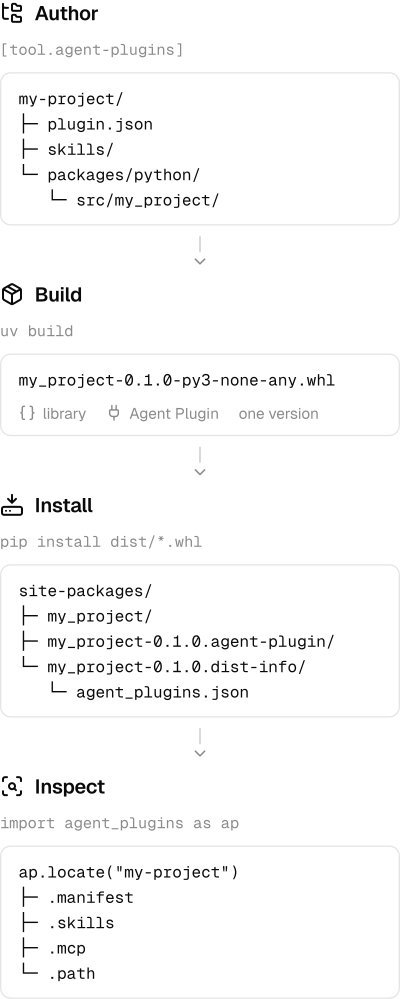
Keep plugin.json and skills/ beside your code. For a project using the uv build backend, configure pyproject.toml:
[build-system]
requires = ["agent-plugins", "uv_build"]
build-backend = "agent_plugins.build.uv_build"

[tool.agent-plugins]
root = "."
Build with the uv package manager:
uv buildThe quickstart creates a complete project, builds it, and locates the installed plugin. Use the Hatchling adapter for Hatchling projects, or attach a prebuilt wheel when another tool owns the build:
agent-plugins attach-wheel dist/my_project-0.1.0-py3-none-any.whl --project .Attachment updates the wheel in place. Pass --output-dir to preserve the input.
Install agent-plugins in the environment you want to inspect. The package includes its own Agent Skill:
pip install agent-pluginsimport agent_plugins as ap
plugin = ap.locate("agent-plugins")
skill = plugin.skill("agent-plugins")
print(skill.source)
print(skill.file("SKILL.md"))Pass your library's distribution name to locate() to inspect its plugin. Use Plugin.from_project() to inspect the selected source files before building.
- Get started: package, install, and locate a plugin.
- How packaging works: wheels, source distributions, and editable installs.
- Integrate: read skills, inspect files, and resolve MCP configuration.
- Python API · CLI · Configuration
Packaging lifecycle
See development_docs/ for setup, architecture, checks, and releases. Serve the documentation locally with pnpm --dir docs dev.