
Turn eye blinks into Morse code and text — live, in your browser.
Private by design. No video ever leaves your device.


EYEM turns eye blinks into Morse and text instantly in your browser, private and serverless. Auto-calibrates, supports 54 symbols, live two-way translation, Morse beep, voice-to-Morse, quick copy, collapsible table and C/M/F/R shortcuts with a dark purple accessible UI for inclusive assistive needs.
Just open the link — no install required:
- Press Start Camera (or
C) → allow camera permission - Keep eyes open 2–3s — purple vertical bar calibrates, then disappears
- Blink to type — translation appears instantly
- No camera? Type directly or press
Mto speak
Requires Chrome/Edge,
https://orlocalhost, and camera/mic permission.
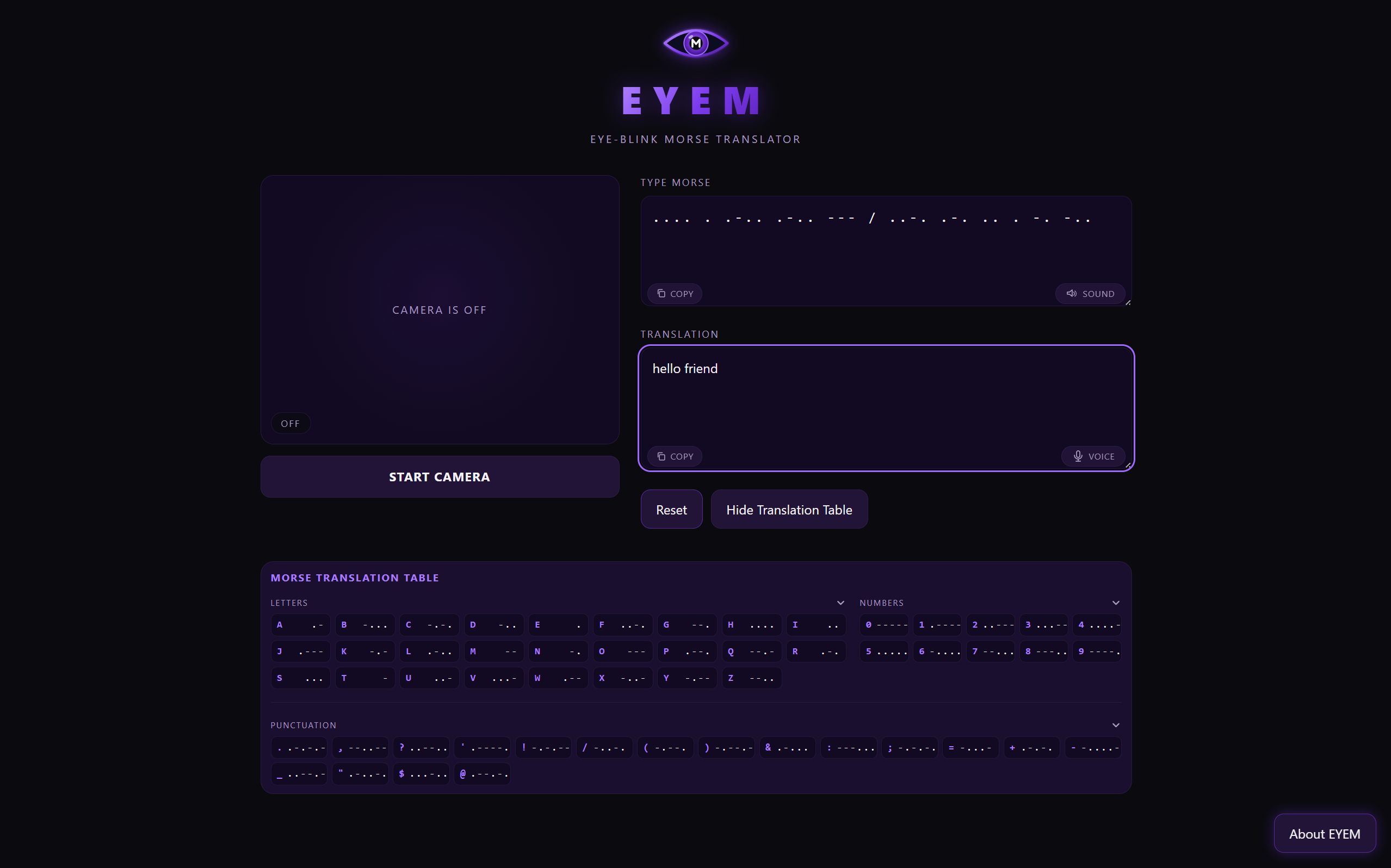
- Real-time blink → Morse → Text — adaptive auto-calibration (~2.8s, 45 EAR samples), 5-frame smoothing, hysteresis thresholds
- Bidirectional — type Morse to get English, type English to get Morse instantly
- 54 symbols — A–Z, 0–9 and punctuation
. , ? ' ! / ( ) & : ; = + - _ " $ @ - Single-line translation table — Letters / Numbers / Punctuation, each collapsible (
▼), every cell in one line likeA .- - Voice → Morse — mic button inside Translation box +
Mshortcut (Web Speech API) - Morse audio — dot 80ms / dash 240ms at 700Hz, mute toggle inside Morse box (persists via
localStorage, respectsprefers-reduced-motion) - Copy & Sound inside boxes — Copy bottom-left, Voice/Sound bottom-right, with light click pop (900→600Hz)
- Notifications — toasts + Quick Start slide from the right (
top:58px), 5s delay, auto-hide 20s, × on hover - Dark purple accessible UI —
var(--muted) #a99ac0, custom 8–10px scrollbar, eye-indicator (top-right), vertical calibration bar (#9f67ff → #5b21b6) - Keyboard shortcuts —
CCamera,MMic,Fdelete last symbol,Rreset (all ignored while typing) - 100% client-side — MediaPipe runs in-browser, no backend, no data upload
- Camera on → MediaPipe Face Landmarker (Tasks Vision 0.10.14, GPU→CPU fallback) tracks 478 landmarks locally via CDN
- EAR calculation → eye-aspect-ratio smoothed over 5 frames; thresholds
0.62× / 0.78×median with hysteresis - Timing →
<0.15signored (natural blink) ·0.15–0.70s= dot··0.70–2s= dash—·>2signored - Sequencing → Double blink (700ms gap) = new letter (space) · Triple blink = new word (
/) · Flush idle 750ms - Translation →
js/morse.jsdecodes live, updates both boxes andaria-liveregion
| Action | Result |
|---|---|
| Quick blink (~0.15–0.70s) | · dot |
| Hold ~1s (0.70–2s) | — dash |
| Double blink | New letter (space) |
| Triple blink | New word (/) |
F |
Delete last symbol (·/—/ / /) |
R (camera on, outside input) |
Clear all — Cleared — blink again to start. |
| In Morse box | Type . - · space = letter · // or double-space = word |
| In Translation box | Type English → Morse appears instantly |
C / M |
Toggle Camera / Mic (outside inputs only) |
Example: .... . .-.. .-.. --- / ..-. .-. .. . -. -.. → HELLO FRIEND
- Frontend — Vanilla HTML/CSS/JS, no build step, versioned cache-bust (
?v=52) - Vision —
@mediapipe/tasks-vision@0.10.14+ WASM (face_landmarker.taskfromstorage.googleapis.com) - Audio — Web Audio API (click + Morse beep), Web Speech API (
webkitSpeechRecognitionfallback) - Perf & A11y — 5-frame EAR average, GPU→CPU fallback,
aria-live="polite"Morse feed, focus trap + Esc in About modal,prefers-reduced-motionguard
Run locally (camera/mic need secure context):
# Python
python -m http.server 8000
# then open http://localhost:8000

# or Node
npx serve .Everything runs on-device. No video, audio, or keystrokes are sent to any server. MediaPipe and Speech Recognition run in your browser.
- People with limited mobility (ALS, spinal injuries) who can blink reliably
- Assistive-technology builders exploring camera-based input without special hardware
- Developers / students / researchers in CV, HCI, eye-tracking
- Morse learners and anyone curious to control software with eyes
Developed by Tareq khattab
- GitHub: @tk-2f
Built with care — accessibility first. If EYEM helped you, please ⭐ the repo.